1. Introduction
This manual provides essential information for the safe and efficient operation and maintenance of your Pulsar 9500W Tri Fuel Portable Inverter Generator, Model GS95TiSCO. Please read this manual thoroughly before operating the generator to ensure proper use and to prevent injury or damage.
The Pulsar GS95TiSCO is a versatile portable inverter generator designed to provide reliable power using gasoline, propane, or natural gas. It features a remote start, CO Sentry for safety, and is suitable for residential use, including home backup, powering tools, and outdoor activities.
2. Safety Information
WARNING: Operating this generator can expose you to chemicals including engine exhaust, carbon monoxide, phthalates, and lead, which are known to the State of California to cause cancer and birth defects or other reproductive harm. For more information go to www.P65Warnings.ca.gov.
- Carbon Monoxide Hazard: Generator exhaust contains carbon monoxide, a colorless, odorless, poisonous gas. Breathing carbon monoxide can cause nausea, fainting, or death. Operate the generator outdoors in a well-ventilated area, far from windows, doors, and vents. Never operate indoors, in a garage, or in partially enclosed spaces. This generator is equipped with a CO Sentry system for automatic shutdown if carbon monoxide levels become unsafe.
- Electrical Shock Hazard: Never operate the generator in wet conditions. Ensure all electrical connections are dry and properly insulated. Do not touch the generator with wet hands.
- Fire Hazard: Gasoline is highly flammable. Store fuel in approved containers in a well-ventilated area away from ignition sources. Do not refuel a hot or running engine. Ensure proper ventilation when using propane or natural gas.
- Hot Surfaces: The generator engine and muffler become very hot during operation and remain hot for a period after shutdown. Avoid touching hot surfaces to prevent burns.
- Moving Parts: Keep hands, feet, hair, and clothing away from moving parts to prevent injury.
- Children and Pets: Keep children and pets away from the generator at all times.
3. Setup and Initial Preparation
3.1 Unpacking and Assembly
Carefully remove the generator from its packaging. Inspect for any shipping damage. Assembly typically involves attaching the wheels and handles. Refer to the included assembly guide for detailed instructions.


3.2 Adding Engine Oil
The generator is shipped without engine oil. Before first use, add the recommended type and amount of oil. Refer to the oil fill cap or engine specifications for the correct oil type (e.g., 10W-30) and capacity.
- Place the generator on a level surface.
- Remove the oil fill cap/dipstick.
- Slowly pour the recommended oil into the oil fill opening until it reaches the upper limit mark on the dipstick. Do not overfill.
- Securely replace the oil fill cap/dipstick.
3.3 Fuel Connection
This generator operates on Gasoline, Propane (LPG), or Natural Gas (NG).
- Gasoline: Fill the fuel tank (capacity 1.18 Gallons) with fresh, unleaded gasoline. Do not overfill. Ensure the fuel cap is securely tightened.
- Propane (LPG): Connect a standard propane tank (not included) to the generator's LPG inlet using the provided hose. Ensure all connections are tight to prevent leaks.
- Natural Gas (NG): Connect the generator to a natural gas supply line using the appropriate hose and fittings. Ensure all connections are secure and leak-free.
IMPORTANT: Never mix fuel types in the gasoline tank. Always select the desired fuel type using the fuel selector switch before starting the generator.
4. Operation
4.1 Control Panel Overview

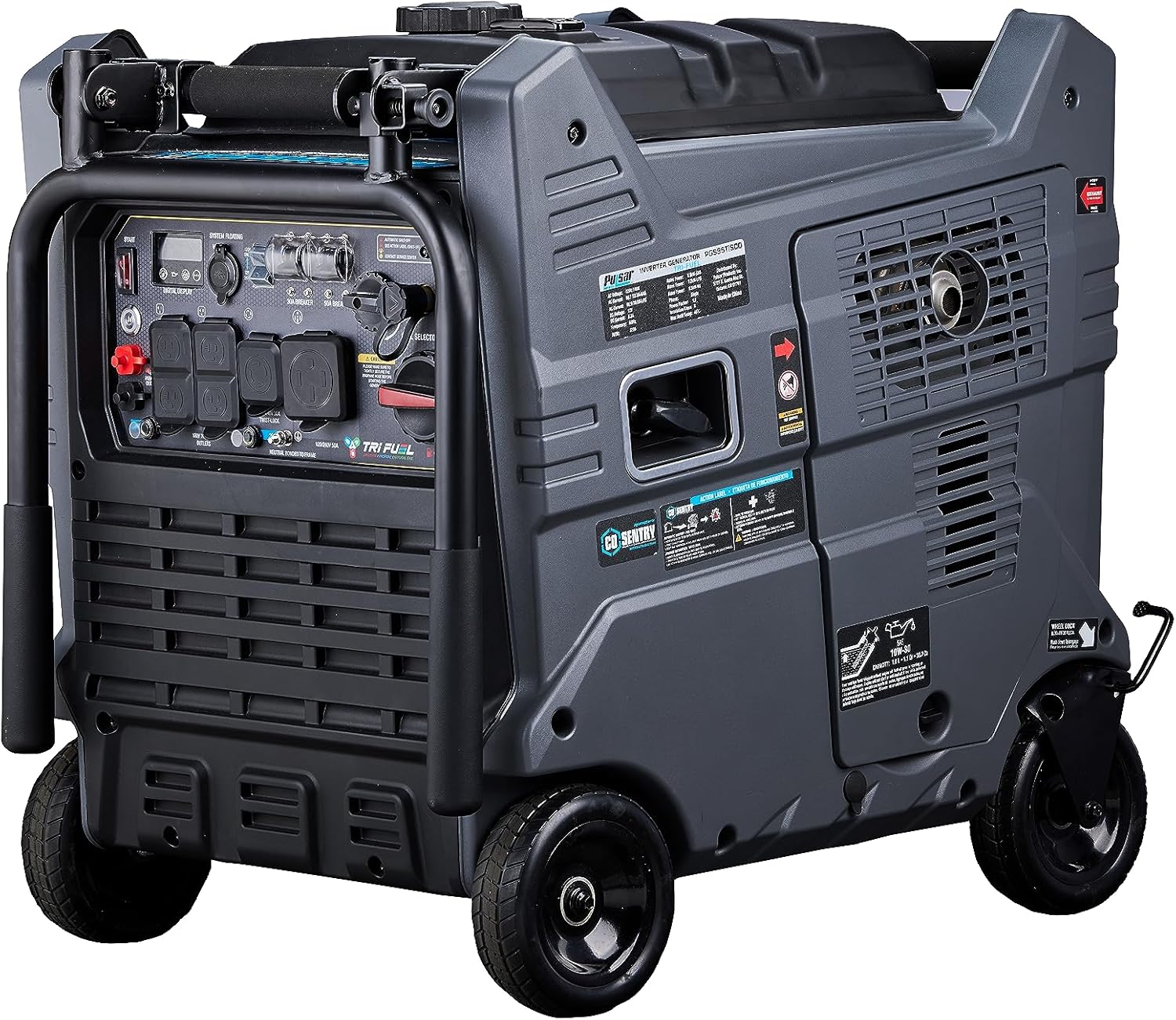
The control panel includes:
- Electric Start Button: For easy starting.
- Display Center: Shows operational data.
- USB A & USB C Ports: For charging small electronic devices.
- Voltage Selector: To switch between 120V and 240V output.
- Fuel Source Switch: To select Gasoline, LPG, or NG.
- AC Outlets: Multiple 20A, 30A, and 50A outlets for various power needs.
- CO Sentry Indicator: Alerts and automatically shuts down the generator if carbon monoxide levels are too high.
4.2 Starting the Generator
- Ensure the generator is on a level surface and all electrical loads are disconnected.
- Select the desired fuel type (Gasoline, LPG, or NG) using the Fuel Source Switch.
- If using gasoline, ensure the fuel valve is open. If using propane or natural gas, ensure the gas supply valve is open.
- Press and hold the Electric Start button until the engine starts. Alternatively, use the remote start key fob.
- Allow the engine to warm up for a few minutes before connecting electrical loads.

4.3 Connecting Electrical Loads
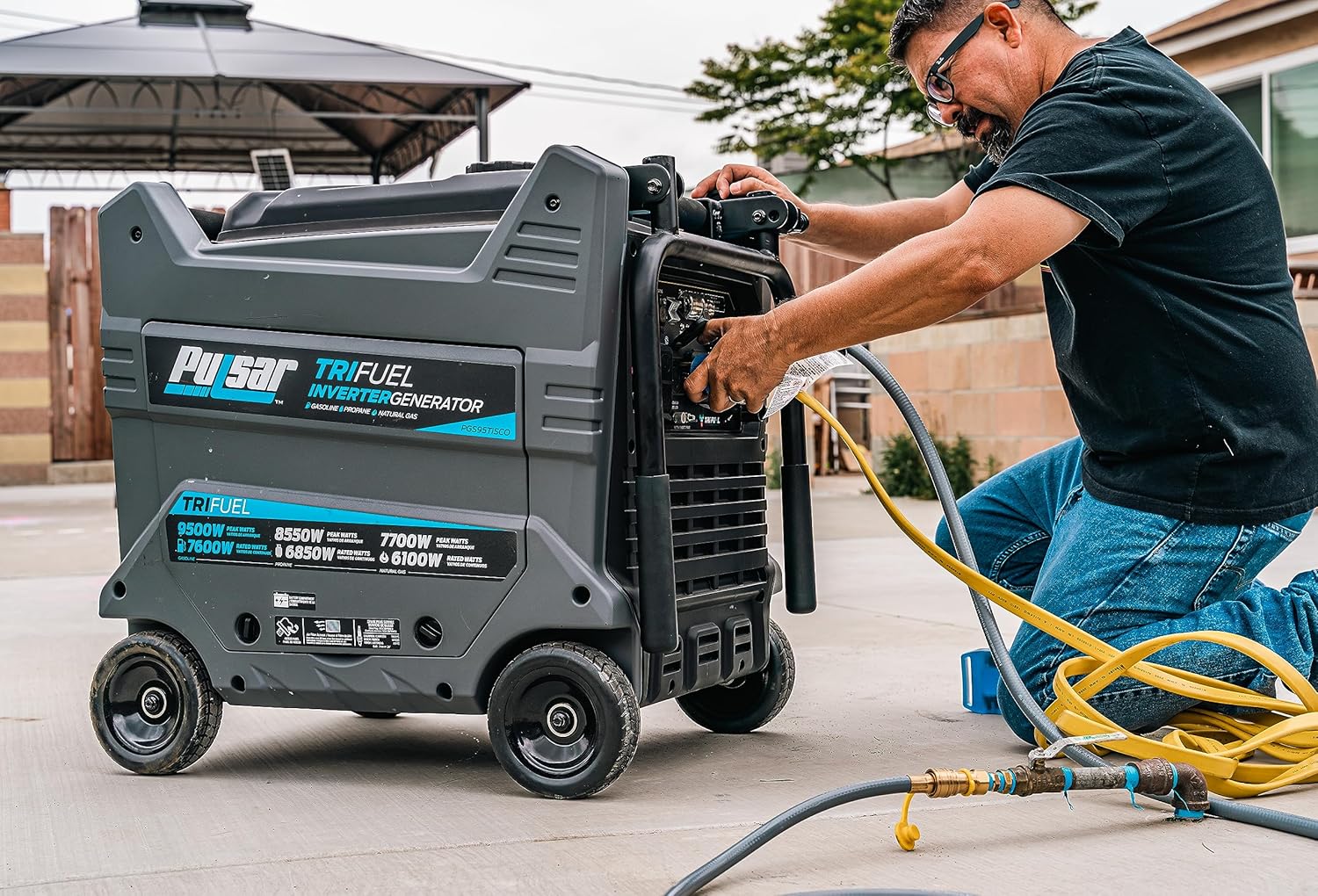
Once the generator is running smoothly, you can connect your electrical devices. Ensure the total wattage of connected devices does not exceed the generator's running wattage for the selected fuel type.
- Gasoline: 7600 Running Watts / 9500 Peak Watts
- Propane: 6850 Running Watts / 8550 Peak Watts
- Natural Gas: 6100 Running Watts / 7700 Peak Watts


4.4 Shutting Down the Generator
- Disconnect all electrical loads from the generator.
- Allow the generator to run for a few minutes without load to cool down.
- Turn the engine switch to the "OFF" position.
- If using propane or natural gas, close the fuel supply valve. If using gasoline, turn the fuel valve to the "OFF" position.
5. Maintenance
Regular maintenance is crucial for the longevity and safe operation of your generator. Always perform maintenance with the engine off and cool.
5.1 Engine Oil Change
Change the engine oil after the first 20 hours of operation, and then every 100 hours or annually, whichever comes first. Refer to the engine specifications for the correct oil type and capacity.
- Place a drain pan beneath the oil drain plug.
- Remove the oil drain plug and oil fill cap/dipstick to allow oil to drain completely.
- Reinstall the oil drain plug and tighten securely.
- Refill with the recommended amount of new engine oil.
- Securely replace the oil fill cap/dipstick.
5.2 Air Filter Cleaning/Replacement
Inspect the air filter every 50 hours or every 3 months. Clean or replace if dirty. A clogged air filter can reduce engine performance and increase fuel consumption.
5.3 Spark Plug Inspection
Inspect the spark plug every 100 hours or every 6 months. Clean or replace if fouled or damaged. Ensure the gap is set correctly according to specifications.
5.4 Storage
For extended storage (over 30 days):
- Drain the gasoline from the fuel tank and carburetor, or add a fuel stabilizer.
- Remove the spark plug and pour a small amount of engine oil into the cylinder. Crank the engine a few times to distribute the oil, then reinstall the spark plug.
- Clean the exterior of the generator.
- Store in a clean, dry, well-ventilated area.
6. Troubleshooting
This section provides solutions to common operational issues. For problems not listed here, contact customer support.
| Problem | Possible Cause | Solution |
|---|---|---|
| Engine will not start | No fuel, incorrect fuel type selected, low oil level, spark plug issue, battery dead (for electric start). | Check fuel level and type, add oil, inspect/replace spark plug, charge/replace battery. |
| No power output | Circuit breaker tripped, overload, faulty connection. | Reset circuit breakers, reduce load, check connections. |
| Engine runs rough | Stale fuel, clogged air filter, dirty spark plug. | Drain old fuel and add fresh, clean/replace air filter, clean/replace spark plug. |
| CO Sentry shutdown | High carbon monoxide levels detected. | Move generator to a more open, well-ventilated area. Allow area to clear before restarting. |
7. Specifications
| Feature | Detail |
|---|---|
| Model | GS95TiSCO |
| Brand | Pulsar |
| Power Source | Gasoline / Propane / Natural Gas |
| Starting Wattage (Gasoline) | 9500 Watts |
| Running Wattage (Gasoline) | 7600 Watts |
| Peak Wattage (Propane) | 8550 Watts |
| Running Wattage (Propane) | 6850 Watts |
| Peak Wattage (Natural Gas) | 7700 Watts |
| Running Wattage (Natural Gas) | 6100 Watts |
| Voltage | 240 Volts (selectable 120V/240V) |
| Engine Type | 4 Stroke |
| Engine Displacement | 458 Cubic Centimeters |
| Gasoline Tank Volume | 1.18 Gallons |
| Item Weight | 243 Pounds |
| Product Dimensions (L x W x H) | 22.8" x 29.4" x 31.4" |
| Special Features | Automatic Shut Down, Automatic Voltage Regulation, CO Sensor, Portable, Tri-Fuel, Remote Start |
| Total Power Outlets | 4 (various types) |


8. Warranty & Support
8.1 Manufacturer's Warranty
This Pulsar generator comes with a 2-year manufacturer's warranty. Please retain your proof of purchase for warranty claims. The warranty covers defects in materials and workmanship under normal use. It does not cover damage due to misuse, neglect, or unauthorized modifications.
For specific terms and conditions, refer to the warranty card included with your product or visit the official Pulsar website.
8.2 Customer Support
If you encounter any issues or have questions regarding your Pulsar generator, please contact Pulsar customer support. Contact information can typically be found on the manufacturer's website or in the product packaging.
When contacting support, please have your model number (GS95TiSCO) and serial number ready.


