
Introduction
Thank you for choosing the Seismic Audio Tremor_18-PW Powered PA 18-Inch Subwoofer. This manual provides essential information for the safe and efficient operation of your new subwoofer. Please read it thoroughly before use and retain it for future reference.
The Tremor_18-PW is a powerful 18-inch active subwoofer designed to deliver robust low-frequency sound reinforcement for various audio applications.
Safety Information
WARNING: To reduce the risk of electric shock, do not expose this appliance to rain or moisture. Do not remove the cover. No user-serviceable parts inside. Refer servicing to qualified personnel.
- Read all instructions before operating the product.
- Retain these instructions for future reference.
- Heed all warnings on the product and in the operating instructions.
- Follow all instructions.
- Do not use this apparatus near water.
- Clean only with a dry cloth.
- Do not block any ventilation openings. Install in accordance with the manufacturer's instructions.
- Do not install near any heat sources such as radiators, heat registers, stoves, or other apparatus (including amplifiers) that produce heat.
- Do not defeat the safety purpose of the polarized or grounding-type plug. A polarized plug has two blades with one wider than the other. A grounding-type plug has two blades and a third grounding prong. The wide blade or the third prong is provided for your safety. If the provided plug does not fit into your outlet, consult an electrician for replacement of the obsolete outlet.
- Protect the power cord from being walked on or pinched, particularly at plugs, convenience receptacles, and the point where they exit from the apparatus.
- Only use attachments/accessories specified by the manufacturer.
- Use only with the cart, stand, tripod, bracket, or table specified by the manufacturer, or sold with the apparatus. When a cart is used, use caution when moving the cart/apparatus combination to avoid injury from tip-over.
- Unplug this apparatus during lightning storms or when unused for long periods of time.
- Refer all servicing to qualified service personnel. Servicing is required when the apparatus has been damaged in any way, such as power-supply cord or plug is damaged, liquid has been spilled or objects have fallen into the apparatus, the apparatus has been exposed to rain or moisture, does not operate normally, or has been dropped.
Package Contents
Verify that your package contains the following items:
- 1 x Seismic Audio Tremor_18-PW Powered PA 18-Inch Subwoofer Cabinet
- 1 x Power Cable
- 1 x User Manual (this document)
Setup
Proper setup ensures optimal performance and safety. Follow these steps to set up your subwoofer:
Unpacking and Placement
- Carefully remove the subwoofer from its packaging.
- Inspect the unit for any signs of damage during transit. If damage is found, contact your dealer immediately.
- Place the subwoofer on a stable, flat surface. The unit is designed for floor standing placement.
- Ensure adequate ventilation around the unit. Do not block the rear panel fan or any vents.

Figure 1: Front view of the Tremor_18-PW subwoofer, showing the protective grille and Seismic Audio logo.

Figure 2: Angled view of the Tremor_18-PW subwoofer, highlighting the side carrying handle for portability.
Connecting the Subwoofer
The Tremor_18-PW features XLR connectivity for audio input and output. Refer to the rear panel diagram for connection points.

Figure 3: Overview of the Tremor_18-PW rear panel, displaying all input/output connections and control knobs.
- Power Connection: Connect the provided power cable to the AC INPUT on the rear panel and then to a suitable grounded electrical outlet. Ensure the voltage selector switch (if present) matches your local power supply (110V/230V).
- Audio Input: Connect your audio source (e.g., mixer, PA system) to the XLR INPUT jacks on the rear panel. The subwoofer supports balanced XLR connections.
- Audio Output (Daisy-chaining): If connecting additional speakers or subwoofers, use the XLR OUTPUT jacks. These outputs typically pass through the input signal, allowing for daisy-chaining.
- Satellite Output: The unit includes XLR Satellite Output connections, allowing you to send a high-pass filtered signal to full-range satellite speakers.
Operating Instructions
Familiarize yourself with the controls on the rear panel for optimal sound adjustment.
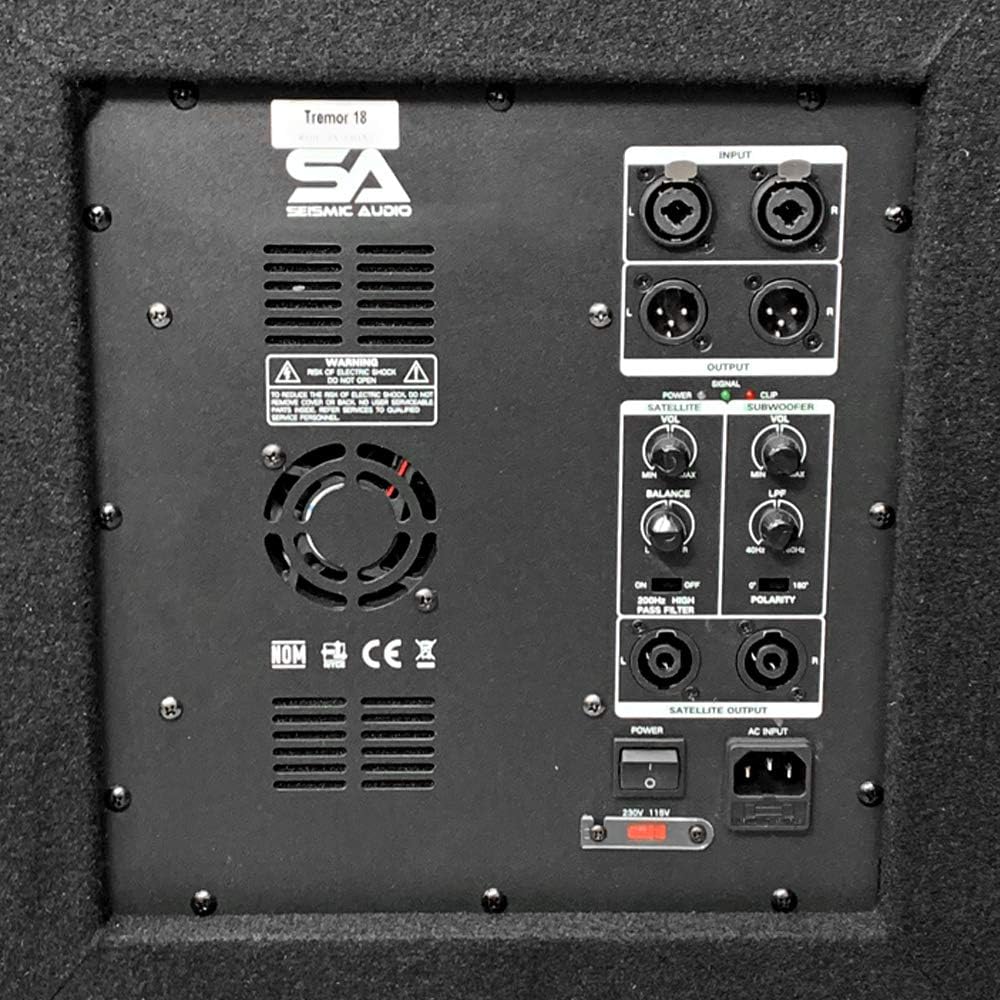
Figure 4: Detailed view of the Tremor_18-PW control panel, including input/output sections, volume controls, Low Pass Filter (LPF), and polarity switch.
- Power Switch: Located near the AC input. Flip to the 'ON' position to power on the subwoofer. Always turn on the subwoofer last in your audio chain and turn it off first.
- Volume Control (Subwoofer): Adjusts the overall output level of the subwoofer. Start with this control at its minimum setting and gradually increase to the desired level.
- Volume Control (Satellite): Adjusts the output level for the satellite speakers connected to the Satellite Output.
- Low Pass Filter (LPF): This knob controls the upper frequency limit of the subwoofer. Adjust it to blend smoothly with your main speakers. Common settings range from 80Hz to 120Hz.
- Polarity Switch: This switch (0°/180°) helps to align the phase of the subwoofer with your main speakers. Experiment with both settings to find the one that produces the most impactful and coherent bass response.
- Signal/Clip Indicators:
- SIGNAL: Illuminates when an audio signal is present.
- CLIP: Illuminates when the input signal is too high, causing distortion. Reduce the input level from your source or the subwoofer's volume control if this indicator lights up frequently.
- 60Hz High Pass Filter (Satellite Output): This switch, when engaged, applies a 60Hz high-pass filter to the signal sent to the satellite outputs, preventing low frequencies from reaching your full-range speakers.
Initial Power-Up:
- Ensure all connections are secure and the subwoofer volume is at minimum.
- Power on your mixer and main speakers first.
- Flip the power switch on the Tremor_18-PW to 'ON'.
- Gradually increase the subwoofer volume to a comfortable listening level, then adjust the LPF and Polarity for optimal sound.
- If using satellite speakers, adjust their volume and the Satellite Output volume on the subwoofer for balance.
Maintenance
Regular maintenance helps prolong the life of your subwoofer.
- Cleaning: Disconnect the power before cleaning. Use a soft, dry cloth to wipe down the exterior. Do not use abrasive cleaners, solvents, or waxes.
- Ventilation: Ensure that the ventilation openings and the rear panel fan remain clear of dust and debris. Periodically clean the fan area with compressed air if necessary.
- Storage: If storing the subwoofer for an extended period, keep it in a dry, cool environment, preferably in its original packaging or a protective cover.
- Inspection: Periodically check all cables and connections for wear or damage.
Troubleshooting
If you encounter issues with your Tremor_18-PW subwoofer, refer to the following common problems and solutions:
| Problem | Possible Cause | Solution |
|---|---|---|
| No sound from subwoofer |
|
|
| Distorted sound |
|
|
| Humming or buzzing noise |
|
|
| Bass response is weak or unclear |
|
|
Specifications
The following are the technical specifications for the Seismic Audio Tremor_18-PW Powered PA 18-Inch Subwoofer:

Figure 5: Dimensions of the Tremor_18-PW subwoofer, indicating 26 inches in depth, width, and height.
| Feature | Detail |
|---|---|
| Model Number | Tremor_18-PW |
| Speaker Type | Powered 18-inch Subwoofer |
| Woofer Diameter | 18 Inches |
| Woofer Magnet | 90 oz. |
| Voice Coil | 3 inch |
| RMS Power | 500 Watts |
| Peak Power | 1000 Watts |
| Impedance | 8 Ohms |
| Signal-to-Noise Ratio | 98 dB |
| Connectivity Technology | XLR (Wired) |
| Audio Output Mode | Mono |
| Mounting Type | Floor Standing |
| Enclosure Material | Carpet, Metal, Plastic |
| Additional Features | Daisy-chaining, 60Hz High Pass Filter for Satellite Output |
| Power Source | Corded Electric |
| Item Dimensions (D x W x H) | 26"D x 26"W x 26"H |
| Item Weight | 70 Pounds |
| Color | Black |
| Manufacturer | Seismic Audio Speakers, Inc. |
| UPC | 847861017576 |
Warranty and Support
Warranty: The Seismic Audio Tremor_18-PW subwoofer comes with a one-year manufacturer defect and labor warranty. This warranty covers defects in materials and workmanship under normal use. It does not cover damage caused by misuse, abuse, accidents, unauthorized modifications, or improper installation.
For warranty claims or technical support, please contact Seismic Audio customer service. Keep your proof of purchase for warranty validation.
Manufacturer: Seismic Audio Speakers, Inc.