
1. Introduction
This manual provides detailed instructions for the Earth People Technology UnoProLogic Altera MAX V CPLD Development Board. The UnoProLogic system offers a flexible platform for learning and developing with Complex Programmable Logic Devices (CPLDs). It integrates a powerful CPLD with a USB to Serial Interface, facilitating the development and debugging of programmable logic code. This board is designed for seamless interaction with Altera's Quartus Prime Lite software, providing a user-friendly workflow for programming and communication.
2. Key Features
- Integrated Altera 5M570 CPLD with 440 MacroCells and on-chip Flash memory.
- On-board USB to Serial Interface for JTAG programming and bidirectional communication with a host PC.
- 24 Input/Output pins, compatible with 5 Volt logic levels.
- I/O pins protected by 74LVCH4245 8-Bit Bus transceivers.
- Four integrated green LEDs for status indication.
- Two push-button switches for user input.
- 4-Channel Analog-to-Digital Converter (ADC) with a 300KS/s sample rate.
- USB Interface supporting 480 Mbps data transfers.
- Built-in programmer hardware, requiring only a standard USB-C cable for programming.
- Open-source software and API for highly configurable communication.
3. Setup Guide
3.1 Software Installation
- Altera Quartus Prime Lite Software: Download and install the free Altera Quartus Prime Lite software from the official Intel (formerly Altera) website. This environment is used for developing and compiling programmable logic code.
- FTDI Drivers: The UnoProLogic board utilizes an FT2232H chip for USB-to-JTAG programming and serial communication. Ensure the appropriate FTDI drivers are installed on your Windows PC. These drivers are typically included with Quartus or can be downloaded from the FTDI website. Refer to the Earth People Technology website for specific driver versions and installation instructions.
- ActiveHost API: For advanced communication between the CPLD and your host PC, install the ActiveHost API. This API connects transparently with the Active Transfer Library running within the CPLD code.
3.2 Hardware Connection
Connect the UnoProLogic board to your Windows PC using a standard USB-C cable. The board will draw power and establish a data connection through this single cable. No external programmer is required as the JTAG programmer is integrated.

Figure 3.2.1: UnoProLogic board connected to a computer via USB-C cable. This image illustrates the physical connection of the UnoProLogic development board to a personal computer using a USB-C cable, highlighting the simplicity of its setup.
4. Operating Instructions
4.1 Programming Workflow
- Code Development: Develop your programmable logic code (e.g., VHDL or Verilog) within the Altera Quartus Prime Lite software environment on your Windows PC.
- Compilation: Compile your code in Quartus Prime Lite to generate the programming file for the Altera 5M570 CPLD.
- Device Programming: Use the Quartus Programmer software to load the compiled programming file into the CPLD. Ensure the UnoProLogic board is connected via USB-C. The integrated JTAG programmer will handle the transfer. The 5M570 CPLD can be reprogrammed thousands of times, making it suitable for iterative development.
4.2 I/O and ADC Usage
The UnoProLogic board provides 24 input/output pins that are 5 Volt tolerant, protected by 74LVCH4245 8-Bit Bus transceivers. These pins can be configured for various digital logic applications. Additionally, the board features a 4-channel ADC with a 300KS/s sample rate, allowing for analog signal acquisition.
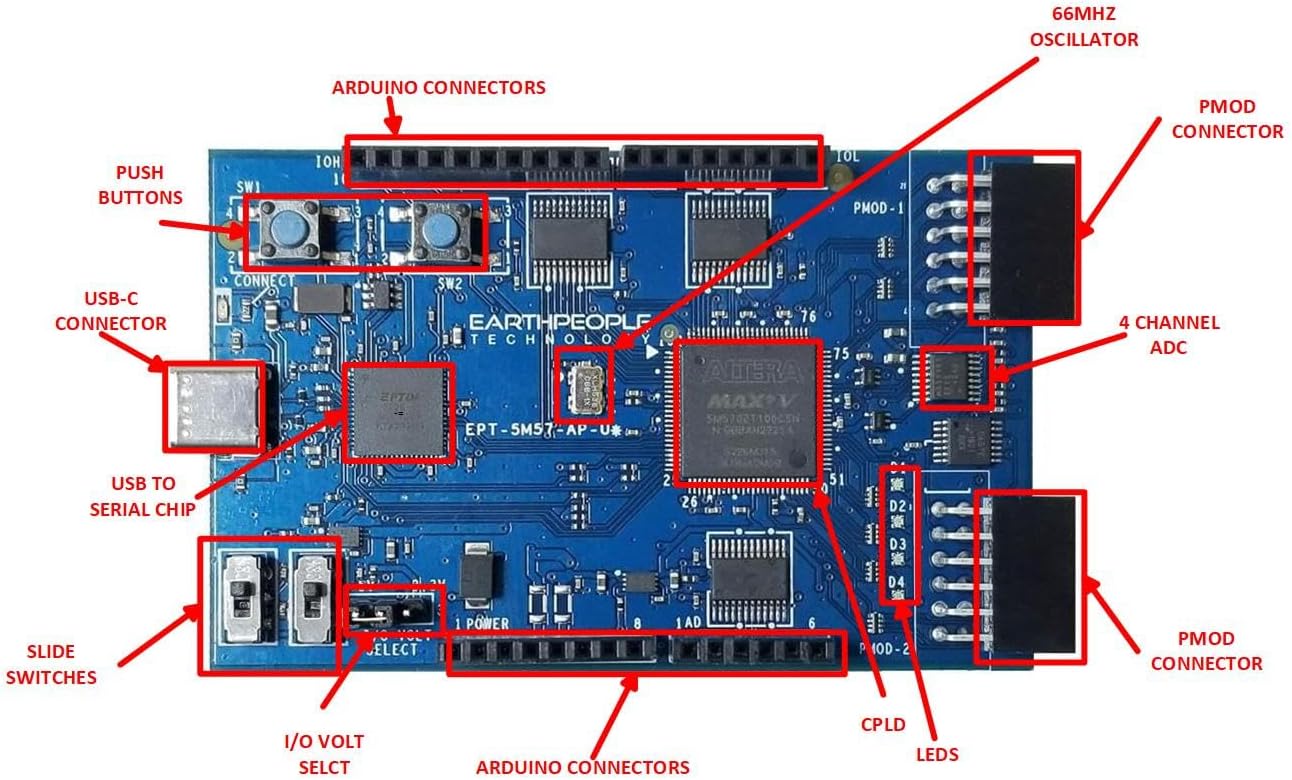
Figure 4.2.1: Top-down view of the UnoProLogic board with key components labeled. This image provides a clear overview of the board's layout, indicating the locations of the CPLD, USB-C connector, push buttons, LEDs, ADC, and various connectors.

Figure 4.2.2: Top-down view of the UnoProLogic board. This image shows the overall component placement on the board from a direct overhead perspective, useful for identifying various chips and connectors.
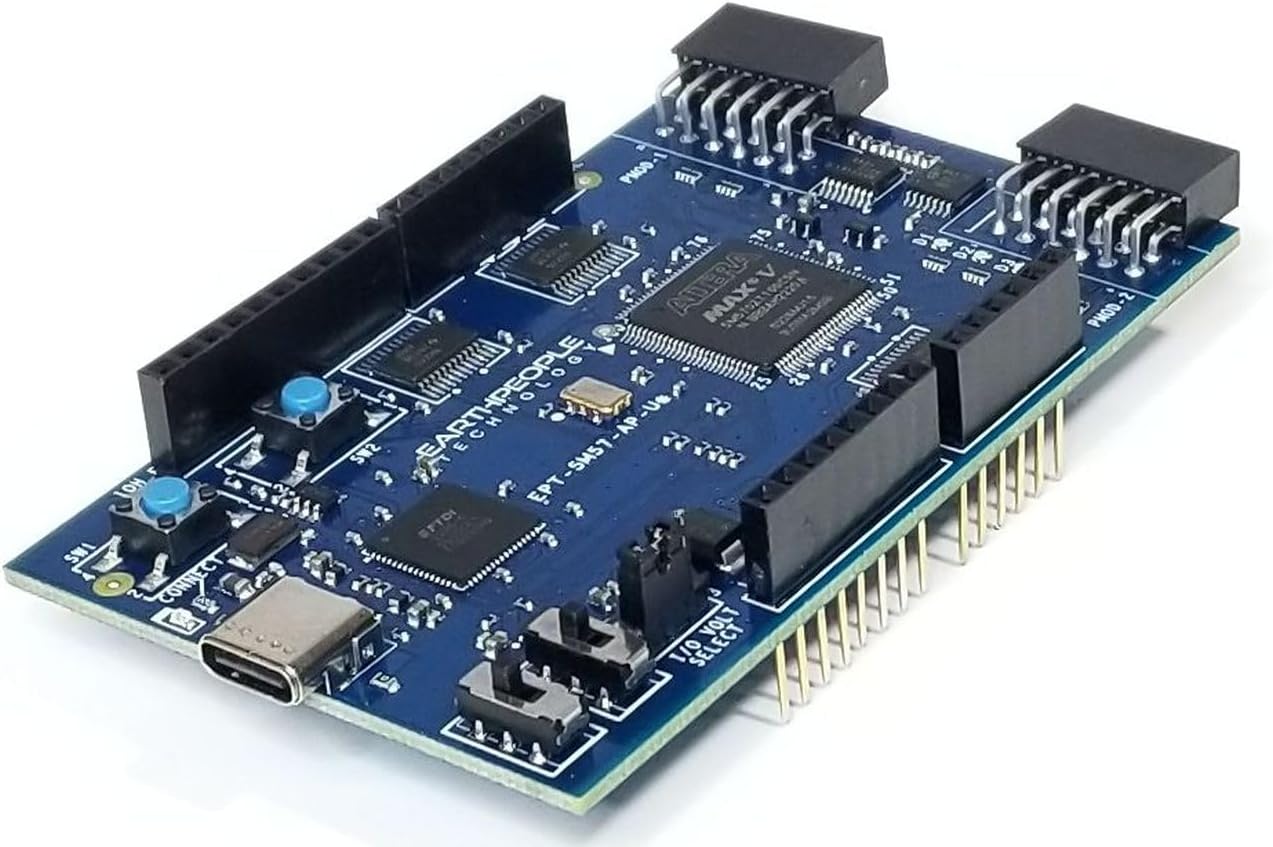
Figure 4.2.3: Angled view of the UnoProLogic board. This perspective highlights the 3D layout of the board, including the headers and the USB-C port, providing a comprehensive visual of the product.
5. Block Diagram
The following block diagram illustrates the internal architecture and connectivity of the UnoProLogic development board, detailing the signal flow between its main components.

Figure 5.1.1: UnoProLogic Block Diagram. This diagram provides a high-level overview of the board's functional blocks, including the USB interface, power supplies, CPLD, level translators, ADC, and various I/O connections.
6. Maintenance
The UnoProLogic board requires minimal maintenance. Keep the board clean and free from dust and moisture. Ensure proper ventilation during operation. Regularly check the Earth People Technology website for software updates, including new versions of the ActiveHost API or updated driver recommendations, to ensure optimal performance and compatibility with the latest operating systems and Quartus Prime Lite versions.
7. Troubleshooting
- Driver Issues: If the board is not recognized by your PC or Quartus software, verify that the correct FTDI drivers are installed. Outdated or unsigned drivers can cause connectivity problems, especially on newer Windows operating systems. Refer to the Earth People Technology support page for the latest driver information.
- Programming Errors: Ensure your USB-C cable is securely connected and that the Quartus Programmer is configured for the correct device (Altera 5M570). Check for any error messages in the Quartus software.
- Power Issues: The board is powered via the USB-C connection. If the board does not power on (e.g., no LEDs illuminate), try a different USB port or cable.
- Software Compatibility: While the board is designed for Quartus Prime Lite, ensure your version of Quartus is compatible with the Altera 5M570 CPLD.
- I/O Pin Functionality: When using I/O pins, be aware of the 5V tolerance and the directionality of the level translators. Consult the detailed schematics available on the manufacturer's website for specific pin configurations and limitations.
8. Technical Specifications
| Feature | Specification |
|---|---|
| CPLD | Altera 5M570 |
| MacroCells | 440 |
| Inputs/Outputs | 24 (5 Volt tolerant) |
| I/O Protection | 74LVCH4245 8-Bit Bus transceivers |
| LEDs | 4 Green LEDs |
| Switches | 2 Push-button switches |
| ADC Channels | 4 |
| ADC Sample Rate | 300 KS/s |
| USB Interface | USB-C, 480 Mbps data transfers |
| JTAG Programmer | Integrated (FT2232H Chip) |
| Operating System Compatibility | Windows |
| Dimensions (LxWxH) | 2 x 2 x 0.63 inches |
| Item Weight | 5 ounces |
| Model Number | EPT-5M57-AP-U2 |
9. Support and Resources
For additional support, including detailed schematics, the complete user manual, data sheets, and project files, please visit the official Earth People Technology website. The UnoProLogic product page provides comprehensive resources to assist with your development projects.
Website: www.earthpeopletechnology.com