
1. Introduction
Thank you for choosing the TONE Swivel Ratchet Handle RH3VHW. This manual provides essential information for the safe and effective use, maintenance, and troubleshooting of your new tool. Please read this manual thoroughly before operation and retain it for future reference.
2. Safety Information
Always observe the following safety precautions to prevent injury or damage to the tool.
- Wear appropriate personal protective equipment, such as safety glasses, when using the tool.
- Ensure the correct size socket is used for the fastener to prevent stripping or damage.
- Do not use the ratchet handle if it is damaged or appears to be malfunctioning.
- Avoid applying excessive force beyond the tool's design limits.
- Keep hands and fingers clear of moving parts during operation.
- Store the tool in a dry, clean place away from children.
3. Product Overview
The TONE Swivel Ratchet Handle RH3VHW is a versatile 3/8-inch drive tool designed for efficient fastening and loosening tasks. Its key features include a 180-degree swivel head with a locking mechanism, a lightweight hollow grip, and a fine 2.5-degree feed angle for precise operation in confined spaces.

Figure 3.1: An angled view of the TONE Swivel Ratchet Handle RH3VHW, showcasing its overall design and the swivel head mechanism.

Figure 3.2: A direct side view of the TONE Swivel Ratchet Handle RH3VHW, highlighting its slender profile and ergonomic handle.

Figure 3.3: A detailed image of the ratchet's handle, emphasizing its hollow construction which contributes to the tool's lightweight design (271g).
4. Setup
4.1 Attaching a Socket
- Select the appropriate 3/8-inch drive socket for your fastener.
- Align the square drive of the socket with the square drive on the ratchet head.
- Press the socket firmly onto the ratchet drive. The socket hold mechanism will secure it in place.

Figure 4.1: A visual guide demonstrating how to attach and detach sockets using the socket hold mechanism, ensuring secure connection.
4.2 Detaching a Socket
- To remove the socket, firmly grasp the socket and pull it off the ratchet drive. The socket hold mechanism will release.
5. Operating Instructions
5.1 Ratchet Direction
The ratchet direction can be changed by rotating the lever on the ratchet head. Move the lever to the left for loosening (counter-clockwise) and to the right for tightening (clockwise).
5.2 Swivel Head Operation
The ratchet head can swivel 180 degrees to access fasteners in various angles. It features a locking mechanism to secure the head in desired positions.

Figure 5.1: A sequence of images demonstrating the 180-degree swivel capability of the ratchet head and its locking mechanism for secure positioning. Slide the lever to 'FREE' to adjust the angle, then to 'LOCK' to secure it.

Figure 5.2: Top view of the ratchet head, indicating the 'FREE' position for the swivel mechanism, allowing 180-degree rotation.

Figure 5.3: Bottom view of the ratchet head, indicating the 'LOCK' position for the swivel mechanism, securing the head in place.
5.3 Using the Bolster for Additional Leverage
The ratchet handle is designed with a bolster on the shaft, allowing for the application of a wrench to gain additional leverage when needed for stubborn fasteners.

Figure 5.4: A close-up view of the ratchet's shaft, highlighting the bolster design that allows for additional leverage using a wrench.
6. Maintenance
6.1 Cleaning
After each use, wipe the ratchet handle clean with a dry cloth to remove dirt, grease, and debris. For stubborn grime, a mild solvent or degreaser can be used, followed by thorough drying.
6.2 Lubrication
Periodically, apply a small amount of light machine oil to the ratchet mechanism to ensure smooth operation and prevent corrosion. Avoid over-lubrication, which can attract dirt.
6.3 Storage
Store the ratchet handle in a clean, dry environment. Protect it from extreme temperatures and humidity to prolong its lifespan.
7. Troubleshooting
7.1 Ratchet Mechanism Sticking
- Cause: Dirt or lack of lubrication.
- Solution: Clean the ratchet head thoroughly and apply a small amount of light machine oil.
7.2 Swivel Head Not Locking Securely
- Cause: Debris in the locking mechanism or wear.
- Solution: Inspect the locking mechanism for obstructions. Clean if necessary. If wear is evident, contact customer support.
7.3 Socket Not Attaching/Detaching Easily
- Cause: Dirt in the drive square or socket, or a damaged socket.
- Solution: Ensure both the ratchet drive and socket are clean. Try a different socket to rule out socket damage.
8. Specifications
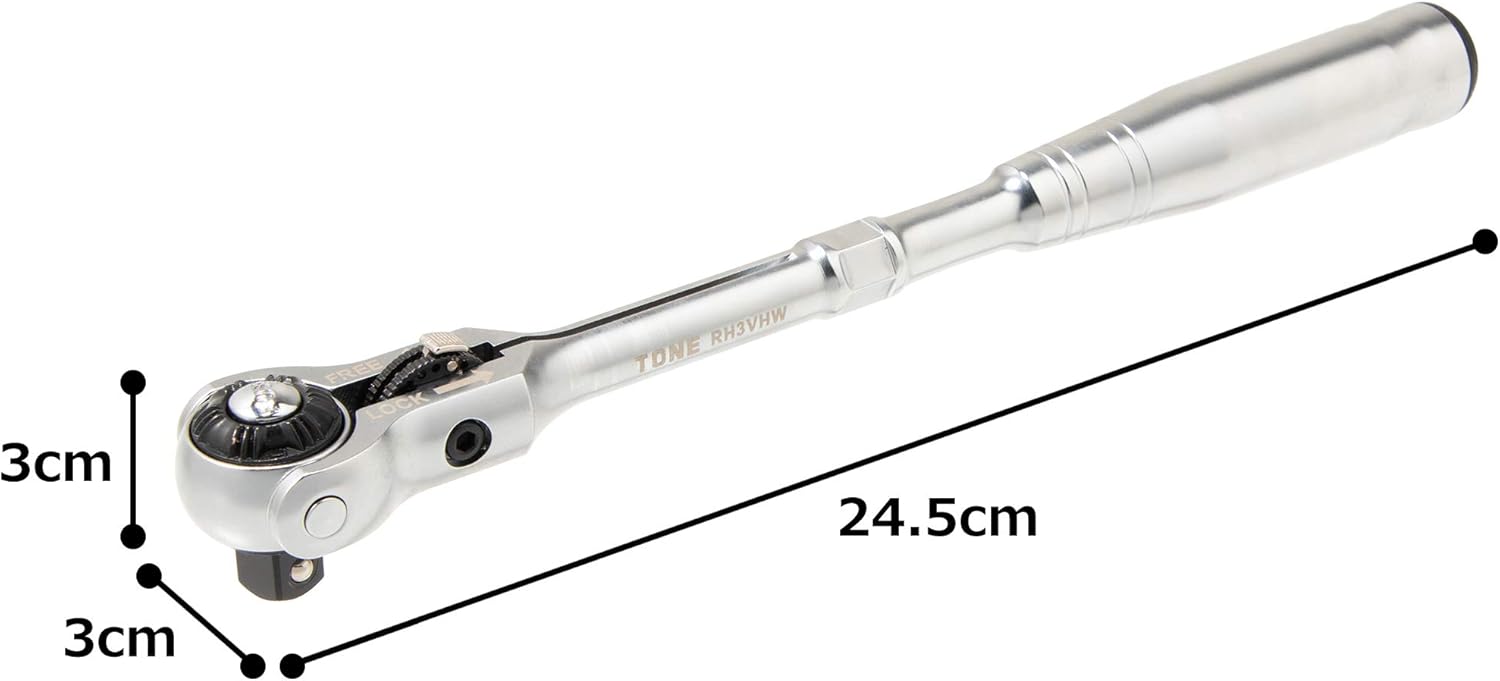
Figure 8.1: The ratchet handle shown with its total length (24.5 cm) and head height (3 cm) clearly marked for reference.

Figure 8.2: A technical diagram illustrating the key dimensions of the TONE Swivel Ratchet Handle RH3VHW, including total length and head width.

Figure 8.3: An infographic highlighting the ratchet's fine 2.5-degree feed angle, achieved by 144 equivalent teeth, and its thin, lightweight, and compact design.
| Feature | Specification |
|---|---|
| Drive Size | 3/8 inch (9.5 mm) |
| Model Number | RH3VHW |
| Total Length | 9.6 inches (245 mm) |
| Head Width | 1.3 inches (33.4 mm) |
| Head Thickness | 1.2 inches (31.6 mm) |
| Weight | 9.7 oz (271 g) |
| Number of Teeth | 72 x 2 (equivalent to 144) |
| Ratchet Feed Angle | 2.5° |
| Head Style | Fixed Square (Swivel with Lock) |
| Material | Metal |
| Finish Type | Powder Coated |
| Color | Silver |
| Operation Mode | Mechanical |
| Measurement System | Inch, Metric |
| Batteries Required | No |
9. Warranty and Support
TONE products are manufactured to high-quality standards. For warranty information, repair services, or technical support, please refer to the official TONE website or contact your authorized TONE dealer. Keep your purchase receipt as proof of purchase.