1. Introduction
This user manual provides detailed instructions for the safe and efficient operation of your Pioneer VSX-923K A/V Receiver. Please read this manual thoroughly before using the product and retain it for future reference.
The Pioneer VSX-923K is a 7.2 channel A/V receiver designed to amplify your audio and video experience, offering advanced features such as 4K Ultra HD video upscaling, high-resolution audio playback, and extensive connectivity options.
2. Important Safety Instructions
Always follow basic safety precautions when using this product to reduce the risk of fire, electric shock, and injury to persons.
- Read these instructions.
- Keep these instructions.
- Heed all warnings.
- Follow all instructions.
- Do not use this apparatus near water.
- Clean only with dry cloth.
- Do not block any ventilation openings. Install in accordance with the manufacturer's instructions.
- Do not install near any heat sources such as radiators, heat registers, stoves, or other apparatus (including amplifiers) that produce heat.
- Protect the power cord from being walked on or pinched particularly at plugs, convenience receptacles, and the point where they exit from the apparatus.
- Only use attachments/accessories specified by the manufacturer.
- Unplug this apparatus during lightning storms or when unused for long periods of time.
3. Product Overview
The Pioneer VSX-923K A/V Receiver is designed to be the central hub of your home entertainment system. It features multiple inputs and outputs to connect various audio and video sources.
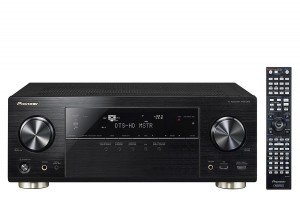
Figure 3.1: Front view of the Pioneer VSX-923K A/V Receiver alongside its remote control. The receiver features a black finish with a central display, input selectors, and volume knob. The remote control is slim and black with numerous buttons.
3.1 Key Features
- 7.2 Channel A/V Receiver with dual sub-woofer preouts.
- 4K Ultra HD video upscaling and pass-through.
- High-Resolution Audio playback (WAV, FLAC, AIFF, Apple Lossless up to 192kHz/24-bit).
- Network streaming via DLNA or Apple AirPlay.
- Smartphone connectivity for iPod, iPhone, iPad, or Android.
- Built-in ECO Mode for energy saving.
- Multi-room audio with powered Zone 2 output.
4. Setup
4.1 Unpacking and Placement
Carefully remove the receiver from its packaging. Ensure all accessories are present (remote control, batteries, setup microphone, FM antenna, AM loop antenna, power cord).
Place the receiver on a stable, level surface with adequate ventilation. Avoid placing it in direct sunlight or near heat sources. Allow at least 10 cm (4 inches) of clear space around the top and sides for proper airflow.
4.2 Speaker Connection
The VSX-923K supports a 7.2 channel speaker configuration. Connect your speakers to the corresponding terminals on the rear panel. Ensure correct polarity (+ to + and - to -) for all speakers.
- Front Speakers (L/R): Connect to FRONT L/R terminals.
- Center Speaker: Connect to CENTER terminal.
- Surround Speakers (L/R): Connect to SURROUND L/R terminals.
- Surround Back/Height Speakers (L/R): Connect to SURROUND BACK/HEIGHT L/R terminals.
- Subwoofers: Connect to SUBWOOFER 1 and SUBWOOFER 2 pre-out jacks using RCA cables.
4.3 Connecting Audio/Video Components
Use appropriate cables (HDMI, optical, coaxial, RCA) to connect your source devices (Blu-ray player, game console, cable box, etc.) to the receiver's input jacks.
- HDMI: For high-definition audio and video. Connect HDMI OUT to your TV/projector and HDMI IN to your source devices. The VSX-923K has 8 HDMI inputs.
- Optical/Coaxial Digital: For digital audio from devices without HDMI.
- Analog Audio: For analog audio devices (e.g., CD player, turntable with pre-amp).
- USB: For connecting USB storage devices for music playback.
- LAN: Connect an Ethernet cable for network features (Internet Radio, DLNA, AirPlay).
4.4 Initial Setup and MCACC Calibration
After connecting all components, power on the receiver. Pioneer's Multi-Channel Acoustic Calibration System (MCACC) will guide you through the initial speaker setup and room calibration process. Use the supplied setup microphone for accurate measurements.
- Connect the MCACC setup microphone to the front panel jack.
- Place the microphone at your primary listening position.
- Follow the on-screen instructions on your TV to start the MCACC calibration.
- The system will emit test tones to measure speaker size, level, distance, and equalization.
5. Operating Instructions
5.1 Basic Operation
- Power On/Off: Press the POWER button on the front panel or remote control.
- Input Selection: Use the INPUT SELECTOR buttons on the front panel or remote to choose your desired source (e.g., BD/DVD, GAME, TV/SAT).
- Volume Control: Adjust the MASTER VOLUME knob on the front panel or VOL +/- buttons on the remote.
- Sound Modes: Press the SURROUND, STEREO, or ADVANCED SURROUND buttons on the remote to select different audio processing modes.
5.2 Network Features
Connect the receiver to your home network via an Ethernet cable or an optional wireless LAN adapter to access the following features:
- Internet Radio: Access thousands of internet radio stations worldwide.
- DLNA: Stream music files from compatible devices on your home network (e.g., PC, NAS).
- Apple AirPlay: Stream music wirelessly from your Apple devices.
- Firmware Updates: Keep your receiver's software up-to-date via network connection.
5.3 Smartphone/Tablet Control
Download the free Pioneer iControlAV2013 app for your iOS or Android device to control the receiver remotely. The app provides an intuitive interface for input selection, volume control, sound mode adjustments, and more.
5.4 ECO Mode
Activate ECO Mode to reduce power consumption without significantly compromising sound and video performance. This feature can be enabled or disabled through the receiver's on-screen menu.
6. Maintenance
6.1 Cleaning
To maintain the appearance of your receiver, wipe the cabinet and front panel with a soft, dry cloth. Do not use abrasive cleaners, waxes, or solvents as they may damage the finish.
For stubborn stains, slightly dampen the cloth with water and a mild detergent, then wipe dry immediately.
6.2 Ventilation
Ensure that the ventilation openings on the top and sides of the receiver are not blocked. Proper ventilation is crucial to prevent overheating and ensure long-term reliability.
6.3 Firmware Updates
Periodically check for firmware updates via the network connection. Updates can improve performance, add new features, and resolve potential issues. Refer to the on-screen menu for checking and performing updates.
7. Troubleshooting
If you experience problems with your receiver, refer to the following common issues and solutions before contacting customer support.
| Problem | Possible Cause | Solution |
|---|---|---|
| No power | Power cord not connected securely. | Check power cord connection to the receiver and wall outlet. |
| No sound | Incorrect input selected; speakers not connected properly; volume too low; Mute is on. | Select correct input; check speaker wire connections; increase volume; press MUTE button on remote. |
| No video | Incorrect input selected; HDMI cable not connected properly; TV input not set to receiver. | Select correct input; check HDMI cable connections; ensure TV is on the correct HDMI input. |
| Remote control not working | Batteries are dead or inserted incorrectly; obstacle between remote and receiver. | Replace batteries; ensure correct polarity; remove obstacles; point remote directly at receiver. |
| Network features not working | Network cable disconnected; router/modem issue; incorrect network settings. | Check LAN cable connection; restart router/modem; verify network settings in receiver menu. |
8. Specifications
The following are key technical specifications for the Pioneer VSX-923K A/V Receiver:
| Feature | Detail |
|---|---|
| Model | VSX-923-K |
| Channels | 7.2 Channel |
| Audio Wattage | 190 Watts (per channel, 6 ohms, 1 kHz, 1% THD, 1 ch driven) |
| Video Upscaling | 4K Ultra HD |
| HDMI Inputs | 8 |
| HDMI Outputs | 1 |
| Audio Formats | MP3, WMA, AAC, FLAC, WAV, AIFF, Apple Lossless |
| Connectivity | USB, HDMI, Ethernet (LAN), Bluetooth (Built-In), FM Tuner |
| Special Features | Built-In Bluetooth, Subwoofer Pre-outs (x2), FM Tuner, Internet Radio, DLNA, AirPlay, ECO Mode, Zone 2 Audio Output |
| Dimensions (approx.) | 43.5 x 36.25 x 16.8 cm (W x D x H) |
| Weight (approx.) | 11.5 kg |
9. Warranty and Support
For warranty information, please refer to the warranty card included with your product or visit the official Pioneer website. Keep your proof of purchase for warranty claims.
For technical support, service, or inquiries, please contact Pioneer customer service. Contact details can typically be found on the Pioneer website or in the product packaging.
Pioneer Official Website: www.pioneer-india.in