
Introduction
This manual provides essential instructions for the safe and efficient use of your Kenwood MO740 Electric Convention Oven. Designed for versatility, this 25-liter oven features rotisserie, grill, baking, and toasting functions, making it suitable for a wide range of culinary tasks. Please read this manual thoroughly before first use and retain it for future reference.
Important Safety Instructions
When using electrical appliances, basic safety precautions should always be followed to reduce the risk of fire, electric shock, and injury to persons, including the following:
- Read all instructions before operating the oven.
- Do not touch hot surfaces. Use handles or knobs.
- To protect against electric shock, do not immerse cord, plugs, or the appliance in water or other liquid.
- Close supervision is necessary when any appliance is used by or near children.
- Unplug from outlet when not in use and before cleaning. Allow to cool before putting on or taking off parts.
- Do not operate any appliance with a damaged cord or plug, or after the appliance malfunctions or has been damaged in any manner.
- The use of accessory attachments not recommended by the appliance manufacturer may cause hazards or injury.
- Do not use outdoors.
- Do not let cord hang over edge of table or counter, or touch hot surfaces.
- Do not place on or near a hot gas or electric burner, or in a heated oven.
- Extreme caution must be used when moving an appliance containing hot oil or other hot liquids.
- Always attach plug to appliance first, then plug cord into the wall outlet. To disconnect, turn any control to "off", then remove plug from wall outlet.
- Do not use appliance for other than intended use.
- Oversize foods or metal utensils must not be inserted in a toaster oven as they may create a fire or risk of electric shock.
- A fire may occur if the oven is covered or touching flammable material, including curtains, draperies, walls, and the like, when in operation.
- Do not place any materials other than manufacturer's recommended accessories in this oven when not in use.
- Do not place any of the following materials in the oven: paper, cardboard, plastic, and the like.
- Do not cover crumb tray or any part of the oven with metal foil. This will cause overheating of the oven.
Product Components and Accessories
Familiarize yourself with the parts of your Kenwood MO740 oven and its included accessories.

Figure 1: Front View of Kenwood MO740 Oven. This image displays the overall design of the oven, including the control knobs on the right side and the transparent glass door with a handle.

Figure 2: Oven Interior with Door Open. This view shows the oven's interior, including the heating elements, the removable grill rack, and the baking tray, with the door fully open.
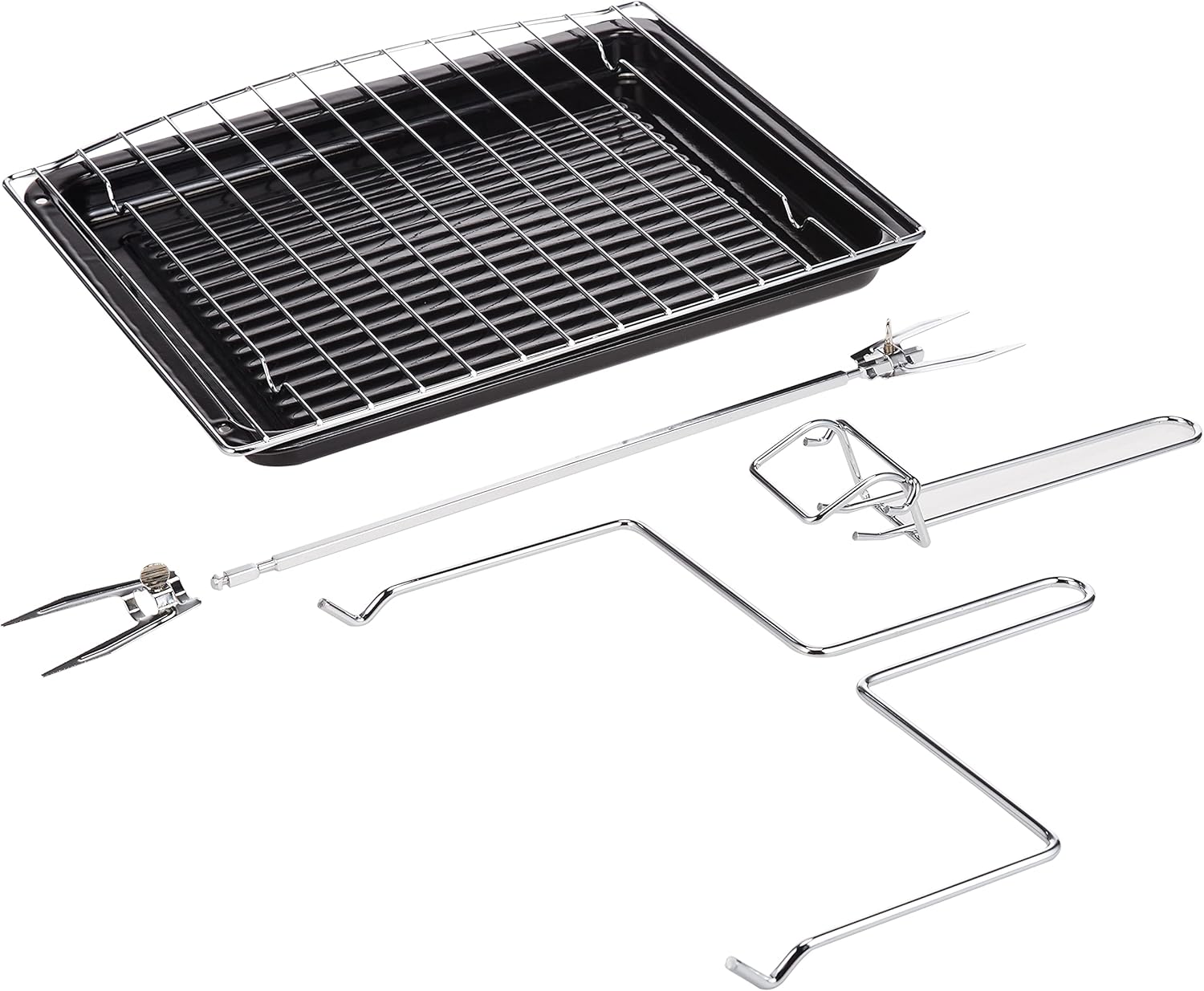
Figure 3: Included Accessories. This image illustrates the various accessories that come with the oven, such as the grill rack, baking tray, rotisserie spit, rotisserie forks, and tray handle.
Main Parts:
- Temperature Control Knob: Adjusts oven temperature (0-250°C).
- Function Selector Knob: Selects cooking mode (e.g., Bake, Grill, Rotisserie).
- Timer Knob: Sets cooking time (up to 60 minutes) with auto cut-off.
- Power Indicator Light: Illuminates when the oven is operating.
- Glass Door: Transparent door for viewing cooking progress.
- Handle: For opening and closing the oven door.
Accessories:
- Grill Rack: For grilling and toasting.
- Baking Tray: For baking and collecting drips.
- Rotisserie Spit: For roasting poultry and meat.
- Rotisserie Forks: Secure food onto the rotisserie spit.
- Tray Handle: For safely removing hot trays and racks.
- Crumb Tray: Located at the bottom, slides out for easy cleaning.
Setup and First Use
Unpacking:
- Carefully remove the oven and all accessories from the packaging.
- Remove any packing materials, stickers, or labels from the oven.
- Wipe the exterior of the oven with a damp cloth. Wash the grill rack, baking tray, rotisserie spit, and tray handle in warm, soapy water. Rinse and dry thoroughly.
Placement:
- Place the oven on a stable, level, heat-resistant surface.
- Ensure there is adequate ventilation around the oven (at least 10-15 cm clearance on all sides and top).
- Do not place the oven near flammable materials such as curtains or walls.
- Ensure the power cord is not touching any hot surfaces.
Before First Use:
It is recommended to run the oven empty for approximately 15 minutes to burn off any manufacturing residues. This may produce a slight odor and some smoke, which is normal.
- Ensure the oven is empty.
- Set the Temperature Control Knob to 250°C.
- Set the Function Selector Knob to the "Bake" or "Convection Bake" setting (usually indicated by top and bottom heating elements with a fan symbol).
- Set the Timer Knob to 15 minutes. The power indicator light will illuminate.
- After 15 minutes, the oven will switch off automatically. Allow the oven to cool completely before use.
Operating Instructions
The Kenwood MO740 oven features three control knobs for temperature, function, and timer.
General Operation:
- Prepare Food: Place food on the appropriate accessory (baking tray, grill rack, or rotisserie spit).
- Insert Accessory: Carefully slide the accessory into the desired rack position inside the oven.
- Set Temperature: Turn the Temperature Control Knob to the desired cooking temperature.
- Select Function: Turn the Function Selector Knob to the desired cooking mode:
- Bake/Roast: Typically uses both top and bottom heating elements, often with convection fan for even cooking.
- Grill/Broil: Uses the top heating element for browning and crisping.
- Rotisserie: Activates the rotisserie motor and heating elements for rotating food.
- Toast: Often uses both top and bottom elements for even toasting.
- Set Timer: Turn the Timer Knob to the desired cooking time (up to 60 minutes). The oven will start operating, and the power indicator light will illuminate. For continuous operation, turn the timer past the 60-minute mark to the "Stay On" position (if available, otherwise reset timer as needed).
- Monitor Cooking: Observe food through the glass door.
- Completion: When the timer reaches zero, the oven will automatically switch off and a bell may sound. If cooking is not complete, reset the timer.
- Remove Food: Using oven mitts and the tray handle, carefully remove the cooked food from the oven.
Using the Rotisserie Function:
The rotisserie function is ideal for roasting whole chickens or other cuts of meat, ensuring even cooking and browning.
- Prepare the meat: Truss poultry or secure meat tightly to ensure it rotates evenly.
- Insert the rotisserie spit through the center of the meat. Secure the meat with the rotisserie forks, tightening the screws.
- Place the pointed end of the rotisserie spit into the rotisserie drive socket on the right side of the oven interior.
- Rest the notched end of the spit onto the rotisserie support on the left side.
- Place the baking tray on the bottom rack to catch any drips.
- Close the oven door.
- Set the Temperature Control Knob to the desired roasting temperature.
- Turn the Function Selector Knob to the "Rotisserie" setting (usually indicated by a rotating spit symbol).
- Set the Timer Knob for the required cooking duration.
- Once cooking is complete, use the tray handle to carefully lift and remove the rotisserie spit from the oven.
Care and Maintenance
Regular cleaning and proper maintenance will ensure the longevity and optimal performance of your Kenwood MO740 oven.
Cleaning:
- Always unplug the oven from the power outlet and allow it to cool completely before cleaning.
- Crumb Tray: Slide out the crumb tray from the bottom of the oven. Discard crumbs and wash the tray in warm, soapy water. Rinse and dry thoroughly before replacing.
- Accessories: Wash the grill rack, baking tray, rotisserie spit, and forks in warm, soapy water. For stubborn food residue, soak them before cleaning. Rinse and dry thoroughly.
- Interior: The oven features non-stick sides for easier cleaning. Wipe the interior surfaces with a damp cloth and a mild detergent. Avoid abrasive cleaners or scouring pads that could damage the non-stick coating.
- Exterior: Wipe the exterior surfaces with a damp cloth. Do not use abrasive cleaners or immerse the oven in water.
- Glass Door: Clean the glass door with a soft cloth and a glass cleaner or mild soapy water.
Note: Never immerse the main oven unit, cord, or plug in water or any other liquid.
Storage:
Ensure the oven is clean and completely dry before storing. Store the oven and its accessories in a cool, dry place.
Troubleshooting
If you encounter issues with your Kenwood MO740 oven, refer to the following common problems and solutions:
| Problem | Possible Cause | Solution |
|---|---|---|
| Oven does not turn on. |
|
|
| Food is not cooking evenly. |
|
|
| Rotisserie spit is not rotating. |
|
|
| Smoke or unusual odor during first use. | Manufacturing residues burning off. | This is normal during the initial burn-in period. Ensure good ventilation. If it persists after initial use, contact customer support. |
If the problem persists after attempting these solutions, please contact Kenwood customer support for assistance.
Technical Specifications
| Brand | Kenwood |
| Model | MO740 |
| Capacity | 25 Liters |
| Power (Wattage) | 1900 Watts |
| Product Dimensions (L x W x H) | 50 x 38 x 28 cm |
| Item Weight | 8.85 kg (19.51 Pounds) |
| Control Type | Knob |
| Special Features | Non-Stick Coating, Temperature Control, 60-Minute Timer, Rotisserie Function |
| Included Components | Rotisserie spit, Grill, Tray Handle, Baking Tray, Crumb Tray |

Figure 4: Kenwood MO740 Oven Dimensions. This diagram illustrates the length (50cm), width (28cm), and height (38cm) of the oven.
Warranty and Support
For information regarding warranty coverage, please refer to the warranty card included with your product or contact Kenwood customer support. Keep your proof of purchase for warranty claims.
For technical assistance, spare parts, or service inquiries, please visit the official Kenwood website or contact their authorized service centers.