
Introduction
Thank you for choosing the Pigeon Rapido Anti-Skid 2100-Watt Induction Cooktop. This appliance is designed for efficient and convenient cooking, featuring a sleek design, feather touch controls, and multiple preset cooking options. Please read this manual carefully before operating the cooktop to ensure safe and optimal performance. Keep this manual for future reference.
Key features include:
- 2100 Watts of power for rapid heating.
- Feather touch control panel for easy operation.
- 8 Indian preset menus for diverse cooking needs.
- Anti-skid ring to prevent cookware from slipping.
- Child lock feature for enhanced safety.
- Automatic shut-off for electrical overload protection.
- Dual heat sensor for precise temperature control.
Important Safety Instructions
When using electrical appliances, basic safety precautions should always be followed, including the following:
- Read all instructions before using the appliance.
- Do not touch hot surfaces. Use handles or knobs.
- To protect against electrical shock, do not immerse cord, plugs, or the appliance in water or other liquid.
- Close supervision is necessary when any appliance is used by or near children. Utilize the child lock feature.
- Unplug from outlet when not in use and before cleaning. Allow to cool before putting on or taking off parts.
- Do not operate any appliance with a damaged cord or plug or after the appliance malfunctions or has been damaged in any manner.
- The use of accessory attachments not recommended by the appliance manufacturer may cause injuries.
- Do not use outdoors.
- Do not let cord hang over edge of table or counter, or touch hot surfaces.
- Do not place on or near a hot gas or electric burner, or in a heated oven.
- Extreme caution must be used when moving an appliance containing hot oil or other hot liquids.
- Always attach plug to appliance first, then plug cord into the wall outlet. To disconnect, turn any control to "off", then remove plug from wall outlet.
- Do not use appliance for other than intended use.
- Ensure proper ventilation around the cooktop during operation.
- Only use induction-compatible cookware.
Product Overview
Familiarize yourself with the components of your Pigeon Rapido Induction Cooktop.
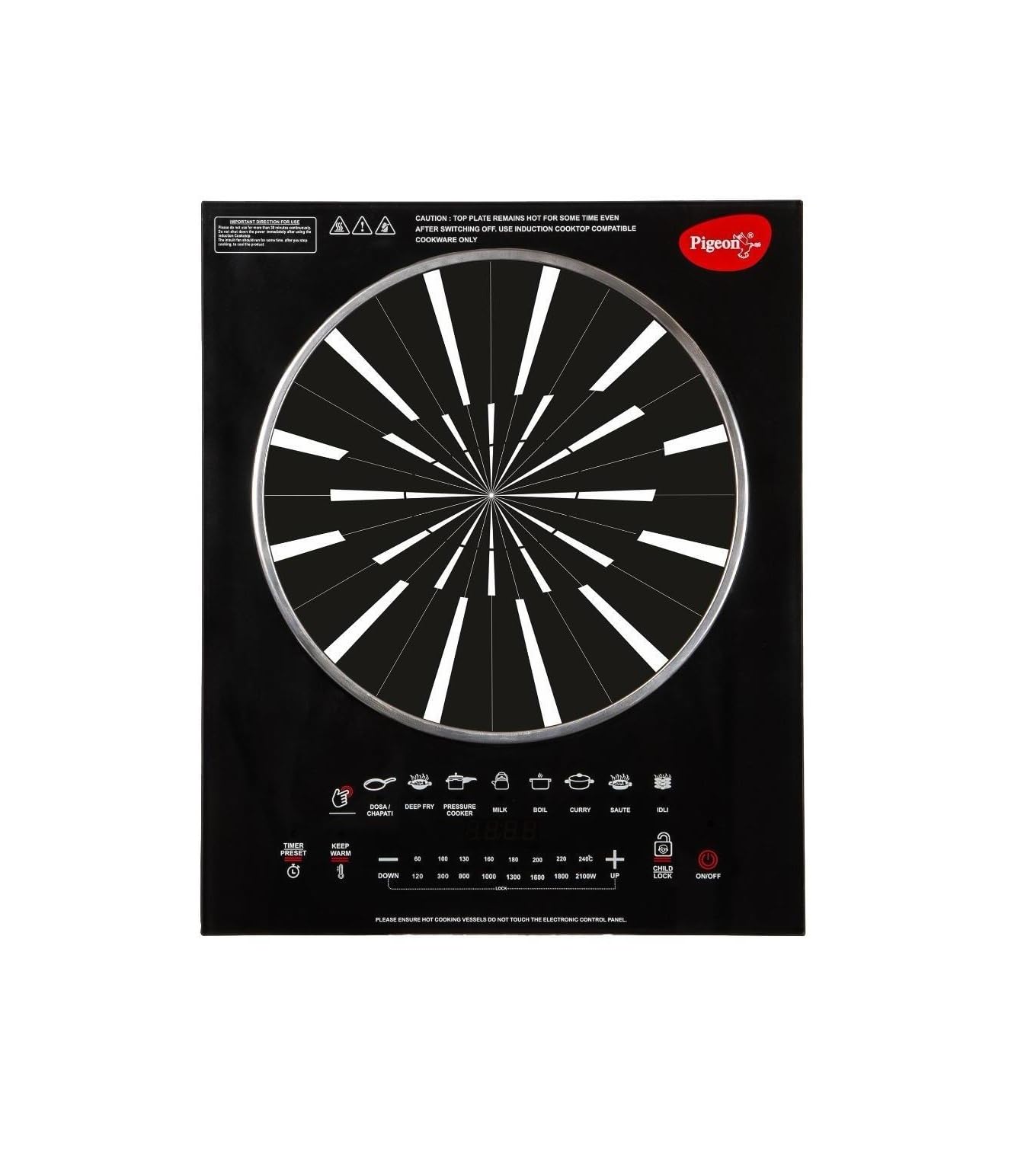
Figure 1: Pigeon Rapido Anti-Skid 2100-Watt Induction Cooktop. This image shows the black crystal cooking surface, the central induction coil area, and the touch control panel located at the bottom front. The control panel includes buttons for various preset cooking modes, power adjustment, timer, keep warm, child lock, and on/off.
Key Components:
- Crystal Cooking Surface: The smooth, durable surface where cookware is placed.
- Induction Coil Area: The central marked area on the cooking surface where induction-compatible cookware should be placed.
- Control Panel: Feather touch buttons for power, temperature/wattage adjustment, timer, and preset functions.
- LED Display: Shows power level, temperature, or timer settings.
- Anti-Skid Ring: Located on the cooking surface to help stabilize cookware.
- Ventilation Openings: Located on the sides and bottom for cooling. Ensure these are not blocked.
Setup
- Unpacking: Carefully remove the induction cooktop from its packaging. Retain the packaging for future storage or transport.
- Placement: Place the cooktop on a flat, stable, and heat-resistant surface. Ensure there is adequate space (at least 10-15 cm) around the cooktop for proper ventilation. Do not place it near water sources or flammable materials.
- Power Connection: Plug the power cord into a standard 220V AC electrical outlet. Ensure the outlet is properly grounded and can support the 2100W power requirement of the cooktop.
- Initial Cleaning: Before first use, wipe the crystal cooking surface with a soft, damp cloth. Ensure it is completely dry before plugging in.
Operating Instructions
- Power On: Place induction-compatible cookware (e.g., cast iron, enameled iron, or stainless steel with a magnetic base) filled with food or liquid onto the center of the cooking surface. Press the ON/OFF button to turn on the cooktop. The LED display will illuminate.
- Select Cooking Mode:
- Manual Mode: After powering on, the cooktop may default to a certain power level. Use the UP (+) and DOWN (-) buttons to adjust the power (wattage) or temperature as desired. The display will show the current setting.
- Preset Menus: The cooktop features 8 Indian preset menus. Press the corresponding button for dishes like Dosa/Chapati, Deep Fry, Pressure Cooker, Milk, Boil, Curry, Saute, or Idli. The cooktop will automatically adjust to the optimal power and temperature for the selected dish.
- Keep Warm Function: Press the KEEP WARM button to maintain food at a warm temperature after cooking.
- Timer Function: Press the TIMER/PRESET button to set a cooking duration. Use the UP (+) and DOWN (-) buttons to adjust the time. The cooktop will automatically switch off once the timer expires.
- Child Lock: To activate the child lock, press and hold the CHILD LOCK button for a few seconds. This will disable the control panel to prevent accidental operation. To deactivate, press and hold the CHILD LOCK button again.
- Power Off: After cooking, press the ON/OFF button to turn off the cooktop. The fan may continue to run for a short period to cool down internal components. Unplug the appliance from the power outlet when not in use.
Cookware Compatibility: Only use cookware made of magnetic materials such as cast iron, enameled iron, or stainless steel with a magnetic base. Cookware with a flat bottom and a diameter between 12 cm and 26 cm is recommended. Non-magnetic materials like glass, ceramic, aluminum, or copper will not work on an induction cooktop.
Maintenance and Cleaning
Regular cleaning and maintenance will ensure the longevity and optimal performance of your induction cooktop.
- Before Cleaning: Always unplug the cooktop from the power outlet and allow it to cool completely before cleaning.
- Cleaning the Surface: Wipe the crystal cooking surface with a soft, damp cloth and a mild detergent. For stubborn stains, use a non-abrasive cleaner specifically designed for glass or ceramic cooktops. Avoid abrasive pads, scouring powders, or harsh chemicals that can scratch the surface.
- Cleaning the Control Panel: Wipe the control panel with a soft, damp cloth. Ensure no liquid enters the control buttons.
- Cleaning the Exterior: Wipe the exterior body with a soft, damp cloth.
- Ventilation Openings: Ensure the ventilation openings are free from dust and debris. Use a soft brush or vacuum cleaner to gently clear any blockages.
- Storage: If storing the cooktop for an extended period, ensure it is clean and dry. Store it in its original packaging in a cool, dry place.
Do NOT immerse the cooktop in water or any other liquid.
Troubleshooting
If you encounter any issues with your induction cooktop, refer to the following common problems and their solutions. If the problem persists, contact customer support.
| Error Code | Description | Possible Solution |
|---|---|---|
| E0 | No pot/pan detected or unsuitable pot. | Ensure an induction-compatible pot is placed centrally on the cooking zone. Check if the pot's base is flat and within the recommended size. |
| E1 | Low Cut Off (90±10V). | The input voltage is too low. Check your power supply. If other appliances are working normally, contact an electrician. |
| E2 | High Cut Off (280±10V). | The input voltage is too high. Unplug the cooktop immediately. Check your power supply. If other appliances are working normally, contact an electrician. |
| E3 | Center Thermistor Open and Short CKT. | Internal sensor error. Unplug the cooktop and wait a few minutes before plugging it back in. If the error persists, contact customer service. |
| E4 | IGBT Thermistor Open and Short CKT. | Internal sensor error related to the IGBT component. Unplug the cooktop and wait a few minutes before plugging it back in. If the error persists, contact customer service. |
| E5 | No error shown on Display but starts switching when overheated. | The cooktop is overheating. Turn off the cooktop, remove the cookware, and allow it to cool down. Ensure ventilation openings are not blocked. |
| E6 | Fan Open, Short Ckt & IGBT Over Heat. | Fan malfunction or IGBT overheating. Turn off and unplug the cooktop. Check if the fan is obstructed. If the error persists, contact customer service. |
For issues not listed above, or if troubleshooting steps do not resolve the problem, please contact Pigeon customer support.
Specifications
| Brand | Pigeon |
| Model Number | Rapido Anti SKid 2100 Watts (8906026976751) |
| Power | 2100 Watts |
| Voltage | 220 Volts |
| Heating Elements | 1 |
| Color | Black |
| Power Source | AC/DC (Electric) |
| Special Features | Anti-skid, Child Lock, Extra Wide Surface, Pre-set Cooking Menus, Smart Timer |
| Burner Type | Induction |
| Control Type | Touch |
| Installation Type | Countertop |
| Item Dimensions (D x W x H) | 37D x 33W x 11H Centimeters |
| Item Weight | 3.44 kg |
| Heater Surface Material Type | Crystal |
| Included Components | Induction Cooktop, User Manual |
Warranty and Customer Support
Warranty: The Pigeon Rapido Anti-Skid 2100-Watt Induction Cooktop comes with a 1-year warranty from the date of purchase. This warranty covers manufacturing defects under normal use. Please retain your purchase receipt as proof of purchase for warranty claims.
What the Warranty Does Not Cover:
- Damage caused by improper use, negligence, or accident.
- Damage from unauthorized repairs or modifications.
- Normal wear and tear.
- Commercial use.
Customer Support: For any queries, service requests, or warranty claims, please contact the manufacturer directly:
Manufacturer: Stovekraft India
Address: 81/1, Harohalli Industrial Area, Kanakpura, Bangalore - 562112, India
Phone: (080) 28016222
Please have your product model number (Rapido Anti SKid 2100 Watts) and date of purchase ready when contacting support.