
Introduction
This manual provides essential information regarding the Samsung OM75P-21-ESGN Microwave Magnetron, a genuine replacement component designed to restore the heating functionality of compatible Samsung microwave ovens. The magnetron is a critical part responsible for generating the microwave energy that cooks food. This document covers safety precautions, installation guidelines, functional overview, maintenance advice, troubleshooting common issues, and product specifications.
Due to the high voltage involved, installation and repair should only be performed by qualified service professionals. Attempting repairs without proper knowledge and safety precautions can result in serious injury or death.
Important Safety Information
WARNING: MICROWAVE OVENS CONTAIN HIGH VOLTAGE CAPACITORS THAT CAN RETAIN A LETHAL ELECTRICAL CHARGE EVEN AFTER THE APPLIANCE IS UNPLUGGED. EXTREME CAUTION IS REQUIRED.
- Professional Installation Recommended: It is strongly recommended that this part be installed by a certified appliance repair technician.
- Disconnect Power: Always unplug the microwave oven from the power outlet and wait several minutes before attempting any service.
- Discharge Capacitor: Before touching any components, the high-voltage capacitor must be safely discharged. This requires specialized tools and knowledge.
- Handle with Care: Magnetrons contain sensitive components. Avoid dropping or subjecting the part to physical shock.
- Proper Grounding: Ensure all components are properly grounded after installation.
- Personal Protective Equipment: Wear appropriate safety gear, including insulated gloves and eye protection, if you are a qualified technician performing this repair.
Product Overview
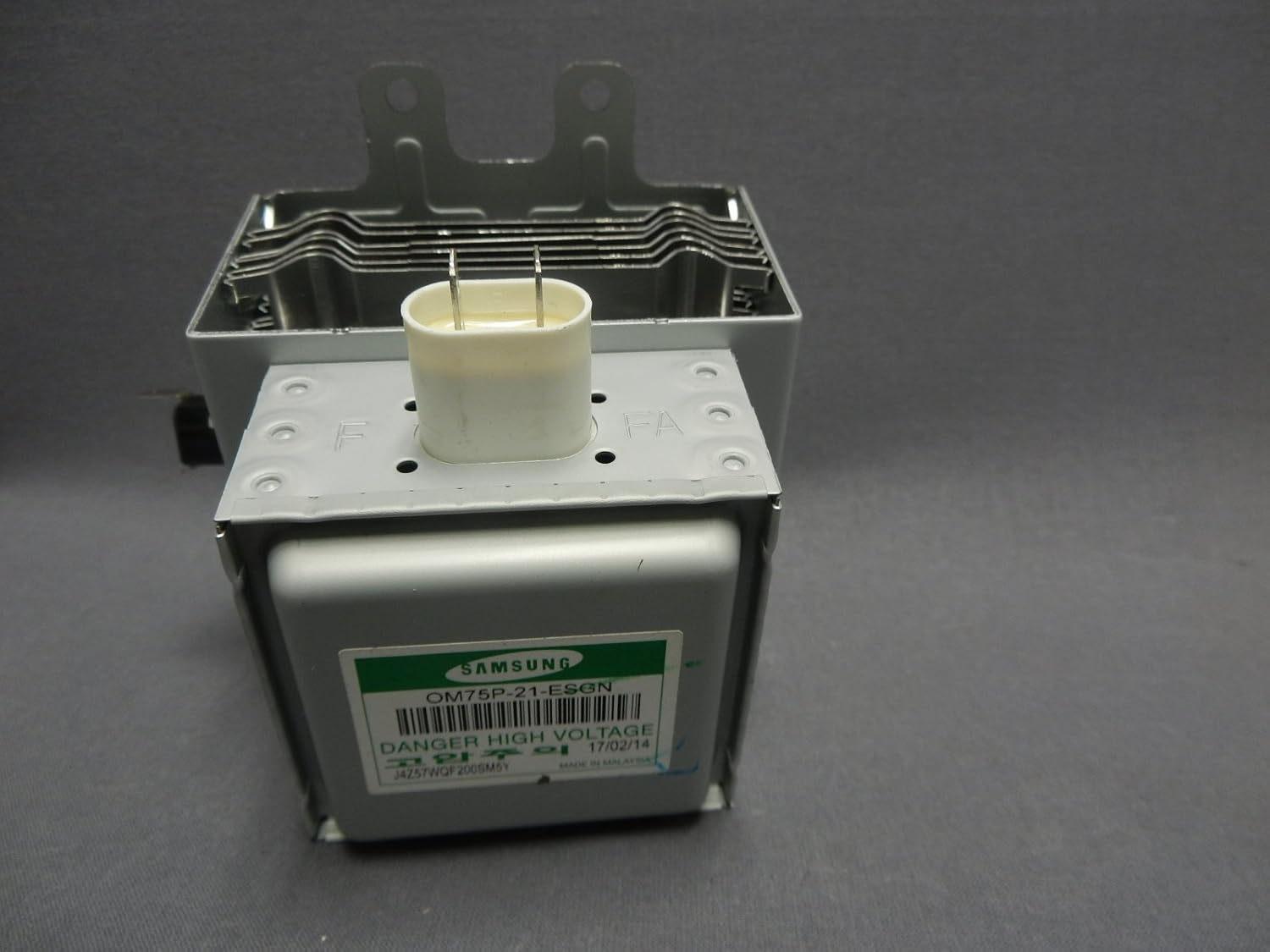
Image: The Samsung OM75P-21-ESGN Microwave Magnetron. This image displays the magnetron unit, highlighting its metal casing, cooling fins, and the ceramic antenna cap with two electrical terminals. A green label on the side clearly shows the Samsung brand, model number OM75P-21-ESGN, and a "DANGER HIGH VOLTAGE" warning. The manufacturing date "17/02/14" and a serial number "J4Z57WQF200SM6Y" are also visible on the label, indicating it was "MADE IN MALAYSIA".
The Samsung OM75P-21-ESGN is a genuine Samsung Magnetron, rated at 1000 Watts. It is designed to fit various Samsung microwave models, including those in the ME16, ME17, ME18, ME20, ME21, SMH16, SMH17, SMH18, SMH19, SMH21, and SMH91 series, as well as Kenmore 401 series microwaves. This component is crucial for the microwave's heating function.
The part number, OM75P-21-ESGN, is clearly visible on the product label, ensuring authenticity and compatibility.
Installation Guide
Installation of a microwave magnetron involves high voltage and should only be performed by a qualified service technician. The following steps are for informational purposes for trained professionals only.
- Preparation: Unplug the microwave oven from the wall outlet. Wait at least 5-10 minutes for the high-voltage capacitor to discharge.
- Access: Carefully remove the microwave's outer casing to gain access to the internal components, including the magnetron. Refer to your specific microwave model's service manual for exact instructions on casing removal.
- Capacitor Discharge: Using a high-voltage probe or a properly insulated screwdriver with a jumper wire, safely discharge the high-voltage capacitor. Confirm discharge with a multimeter. This step is critical for safety.
- Disconnect Wiring: Disconnect the electrical wires connected to the old magnetron. Note their positions for correct re-connection.
- Remove Old Magnetron: Unscrew and carefully remove the old magnetron from its mounting bracket. Be mindful of the waveguide connection.
- Install New Magnetron: Position the new Samsung OM75P-21-ESGN magnetron into the mounting bracket. Ensure it seats correctly and securely.
- Connect Wiring: Reconnect the electrical wires to the new magnetron, ensuring all connections are secure and correctly polarized.
- Reassemble: Carefully reattach the microwave's outer casing, ensuring all screws are tightened and no wires are pinched.
- Test: Plug the microwave back into the power outlet and perform a test run with a cup of water to verify heating functionality. Observe for any unusual noises or smells.
Operation (Component Function)
The OM75P-21-ESGN magnetron is an electromagnetic vacuum tube that converts electrical energy into microwave radiation. This radiation is then directed through a waveguide into the microwave oven's cooking cavity, where it interacts with food molecules, causing them to vibrate and generate heat, thus cooking the food.
As an internal component, the magnetron does not have user-operable controls. Its function is entirely dependent on the microwave oven's control board and power supply. Proper operation is indicated by the microwave's ability to heat food efficiently and without unusual noise or arcing.
Maintenance
The magnetron itself is a sealed unit and is not user-serviceable. Regular maintenance of the microwave oven can help prolong the life of its components, including the magnetron:
- Keep Clean: Regularly clean the interior of the microwave oven to prevent food splatters and grease buildup, which can interfere with microwave distribution and potentially damage components.
- Avoid Running Empty: Do not operate the microwave oven when it is empty. This can cause the magnetron to overheat and shorten its lifespan. Always place food or a cup of water inside when operating.
- Proper Ventilation: Ensure the microwave's ventilation openings are not blocked, allowing for proper airflow and cooling of internal components.
- Inspect Door Seals: Periodically check the microwave door seals for any signs of damage or wear. Damaged seals can lead to microwave leakage and reduced efficiency.
Troubleshooting
If your microwave oven is experiencing issues related to heating, the magnetron may be a contributing factor. Below are common symptoms associated with a failing magnetron:
| Symptom | Possible Cause (Magnetron Related) | Resolution (Professional Service Required) |
|---|---|---|
| Microwave runs but does not heat food. | Failed magnetron, or related high-voltage components (diode, capacitor, transformer). | Diagnosis and replacement of the magnetron or other faulty high-voltage components by a qualified technician. |
| Loud buzzing or humming noise during operation. | Internal short in the magnetron, or issues with the high-voltage transformer or capacitor. | Professional inspection to identify the source of the noise and replace the defective part. |
| Circuit breaker trips when microwave is used. | Short circuit within the magnetron, high-voltage transformer, or high-voltage diode. | Immediate professional diagnosis and repair to prevent electrical hazards. |
| Burning smell or smoke from the microwave. | Overheated or arcing magnetron, or other electrical component failure. | Immediately unplug the microwave. Do not use. Seek professional repair. |
Always unplug the microwave immediately if you observe any of these symptoms and contact a qualified service professional for diagnosis and repair.
Specifications
- Brand: Samsung
- Model Info: OM75P-21-ESGN
- Part Number: OM75P-21-ESGN
- Wattage: 1000 Watts
- Item Weight: Approximately 2.2 pounds (1 kg)
- Product Dimensions: Approximately 6.4 x 6.25 x 5.55 inches (16.26 x 15.88 x 14.1 cm)
- Oven Cooking Mode: Microwave Radiation
- Included Components: Single Samsung OM75P-21-ESGN Microwave Magnetron - 1000 Watts
- Compatibility: Fits Kenmore 401 series and Samsung ME16, ME17, ME18, ME20, ME21, SMH16, SMH17, SMH18, SMH19, SMH21, SMH91 series microwaves.
Warranty and Support
For specific warranty information regarding your Samsung appliance or the replacement part, it is recommended to refer to your appliance's original service manual or contact Samsung customer support directly. Warranty terms for replacement parts may vary.
If you require technical assistance, professional repair services, or have questions about the compatibility or installation of this magnetron, please contact Samsung's official customer support or a certified appliance repair technician.
You can typically find contact information for Samsung support on their official website or within your appliance's user manual.