
UNICO L-TTR200
UNICO L-TTR200 Rock-IT Tube Rocker Instruction Manual
Model: L-TTR200
Introduction
This manual provides essential information for the safe and efficient operation of your UNICO L-TTR200 Rock-IT Tube Rocker. Please read these instructions carefully before use and retain for future reference.
The UNICO L-TTR200 is designed for gentle, thorough mixing of samples in blood collection tubes and other laboratory vials. Its rocking motion ensures homogeneous suspension without causing cell damage.
Safety Precautions
- Always operate the unit on a stable, level surface.
- Ensure the power supply matches the unit's requirements (110V).
- Do not operate the unit if it appears damaged.
- Avoid spilling liquids onto the unit. In case of spillage, disconnect power immediately and clean thoroughly.
- Do not attempt to service the unit yourself. Refer all servicing to qualified personnel.
- Keep hands clear of moving parts during operation.
Setup
Follow these steps to set up your UNICO L-TTR200 Tube Rocker:
- Unpacking: Carefully remove the tube rocker from its packaging. Inspect the unit for any signs of shipping damage. Report any damage to your supplier immediately.
- Placement: Place the rocker on a clean, stable, and level laboratory benchtop. Ensure there is adequate space around the unit for ventilation and operation.
- Power Connection: Connect the power cord to the rocker and then to a grounded 110V AC power outlet.
- Initial Inspection: Before first use, ensure the rocking platform is securely in place and moves freely by gently rocking it manually.
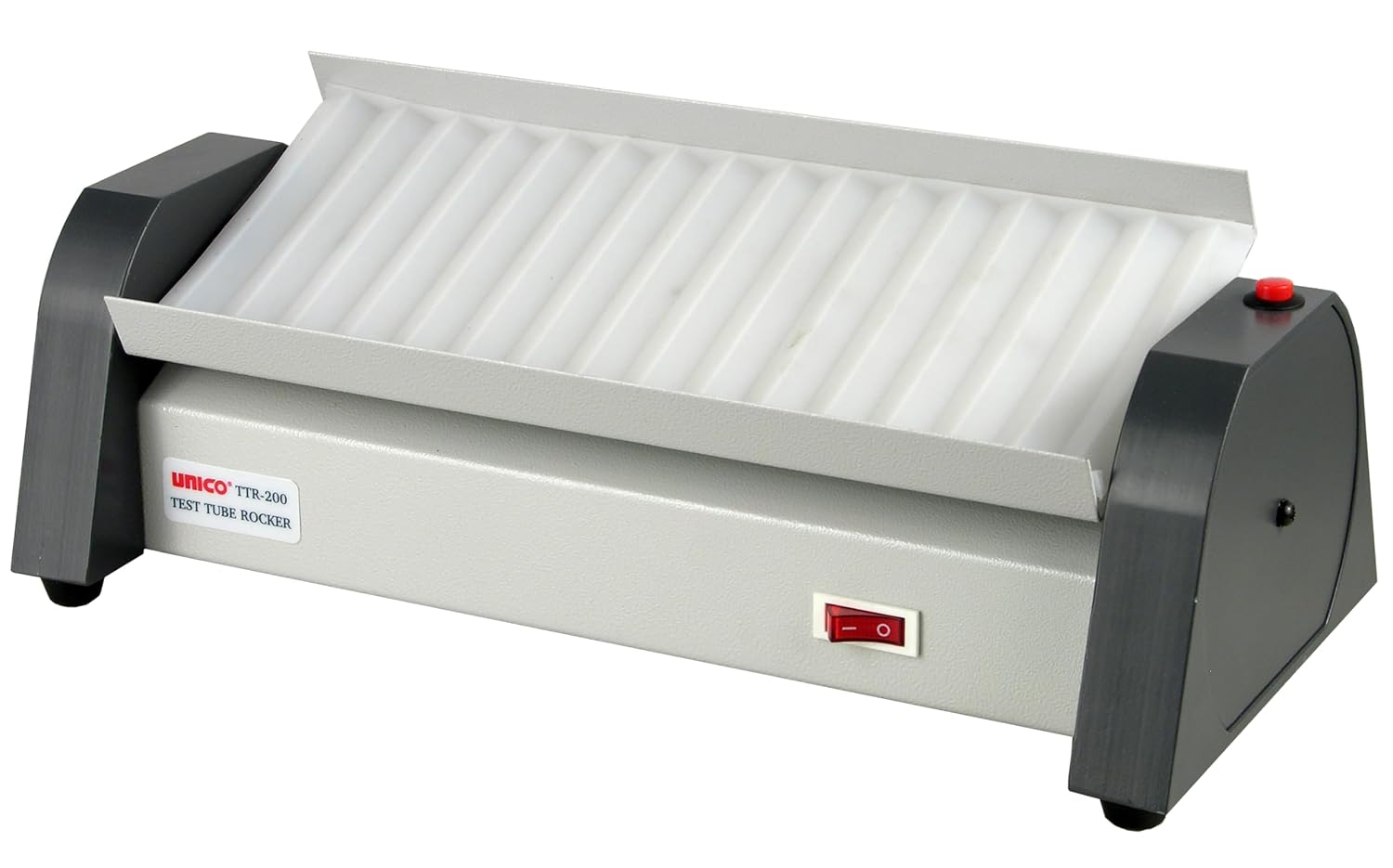
Figure 1: Front view of the UNICO L-TTR200 Rock-IT Tube Rocker. This image shows the main power switch and the overall design of the unit.
Operating Instructions
- Loading Tubes: Place up to 15 tubes or vials onto the rocking platform. Ensure tubes are securely seated in the grooves to prevent dislodgement during operation. The platform is designed to accommodate various tube sizes.
- Power On: Flip the main power switch (typically located on the front or side of the unit) to the 'ON' position. The rocker will immediately begin its gentle rocking motion at 25 cycles per minute (CPM).
- Using the Pause Button: The unit features a red top-mounted pause button. Press this button to temporarily stop the rocking motion. This allows for safe addition or removal of tubes without stopping the main power. Press the button again to resume rocking.
- Monitoring: Observe the mixing process to ensure proper sample agitation. The gentle rocking motion is designed for homogeneous suspension.
- Power Off: When mixing is complete, remove the tubes and flip the main power switch to the 'OFF' position.
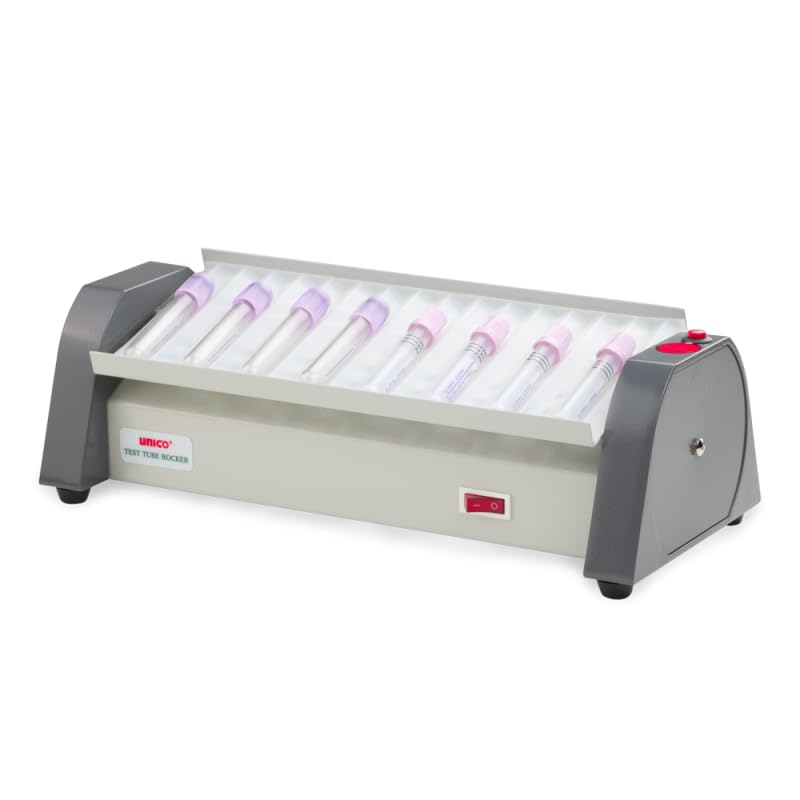
Figure 2: The UNICO L-TTR200 Rock-IT Tube Rocker with various laboratory tubes loaded onto the platform. This demonstrates the unit's capacity and how tubes are placed.

Figure 3: A hand demonstrating the use of the red pause button located on the side of the UNICO L-TTR200 Rock-IT Tube Rocker. This button temporarily halts the rocking motion.
Video 1: This video demonstrates the UNICO L-TTR200 Rock-IT Tube Rocker in operation, showing the gentle rocking motion and how tubes are mixed.
Maintenance
Proper maintenance ensures the longevity and optimal performance of your tube rocker.
- Cleaning: Disconnect the unit from power before cleaning. Wipe down the exterior surfaces with a damp cloth and a mild detergent. Do not use abrasive cleaners or solvents.
- Platform Pad: The rocking platform features a reversible and autoclavable pad. This pad can be removed for sterilization if necessary. Ensure the pad is dry before reattaching.
- Inspection: Regularly inspect the power cord for any damage. Check the rocking mechanism for any unusual noises or resistance.
- Storage: When not in use for extended periods, store the unit in a clean, dry environment away from direct sunlight and extreme temperatures.
Troubleshooting
| Problem | Possible Cause | Solution |
|---|---|---|
| Unit does not power on. | No power supply; Power cord disconnected; Faulty power outlet. | Check power cord connection; Ensure power switch is ON; Test outlet with another device; Check circuit breaker. |
| Rocking motion is erratic or noisy. | Unit not on a level surface; Obstruction in mechanism; Overloaded platform. | Ensure unit is on a level surface; Inspect for obstructions; Reduce number of tubes to within 15-tube capacity. |
| Pause button not responding. | Internal mechanism issue. | If the main power is on and the unit is rocking, but the pause button does not respond, contact customer support. |
If troubleshooting steps do not resolve the issue, please contact UNICO customer support.
Specifications
| Model Number | L-TTR200 |
| Capacity | 15 Tubes/Vials |
| Rocking Cycles Per Minute (CPM) | 25 |
| Power Supply | 110V |
| Product Dimensions (L x W x H) | 17 x 9 x 8 inches |
| Item Weight | 4.8 pounds |
| Manufacturer | UNICO |
| Special Features | Pause Button, Reversible and Autoclavable Pad, Heavy Duty and Silent Mixer |
Warranty and Support
For warranty information or technical support, please contact UNICO customer service. Refer to your purchase documentation for specific warranty terms and contact details.
Manufacturer: UNICO
Model: L-TTR200
Related Documents - L-TTR200
 |
Vacmaster VQ1030SIWDC-110 1000W 30L Wet & Dry Vacuum Cleaner Manual Comprehensive user manual for the Vacmaster VQ1030SIWDC-110 1000W 30L Wet & Dry Vacuum Cleaner. Includes safety information, assembly instructions, operation guides, maintenance tips, troubleshooting, and technical specifications. Suitable for commercial use. |
 |
Columbus McKinnon Lodestar Hoist Wiring Diagrams A collection of detailed wiring diagrams for Columbus McKinnon Lodestar electric hoists, covering various models, single-phase, and three-phase voltage configurations. This document serves as a critical reference for installation, maintenance, and troubleshooting. |
 |
Phenom Noir User Guide - Peopoly 3D Printer Instructions and Software Setup Comprehensive user guide for the Peopoly Phenom Noir 3D printer, detailing specifications, installation procedures for the vat and build plate, printing process, and step-by-step software setup and operation with Chitubox. |
 |
Keystone SolarFlex Quickstart Guide: Setting Up Your RV Solar System A quickstart guide for Keystone RV's SolarFlex system, detailing setup for models like Protect 220, Discover 440i, Outlast 660i-L, and Outlast Extreme 1320i-L. Includes instructions for connecting Victron components and configuring batteries. |
 |
Official Radio Service Manual Supplement No. 3: Radio Model Index and Schematics Comprehensive index and schematics from the Official Radio Service Manual Supplement No. 3, covering 1931 and 1932 radio models from various manufacturers like All-American Mohawk Corp. Essential technical data for radio service professionals. |
 |
Modern Chef Vegetable Processor MGHLC-300 | METALGAS, S.R.L. Discover the Modern Chef MGHLC-300 vegetable processor, a professional kitchen appliance from METALGAS, S.R.L. featuring 550W motor power, 110V 60Hz operation, and 25.5kg weight for efficient food preparation. |
Ask a question about this manual
Ask about setup, troubleshooting, compatibility, parts, safety, or missing instructions. Manuals+ will review the question and use this page’s manual context to help answer it.