
1. Introduction
This manual provides essential instructions for the safe operation and maintenance of your RCA RAS1609BLE Music LED Color Lightwall Sound Bar Speaker. Please read this manual thoroughly before using the product and retain it for future reference.
The RCA RAS1609BLE is a versatile sound bar speaker featuring Bluetooth wireless technology, a digital FM radio, a USB charging port, and an integrated LED lightwall with multiple display options. It is designed to enhance your audio experience with both sound and visual effects.
2. Safety Information
- Do not expose the unit to rain or moisture to prevent fire or electric shock.
- Do not block any ventilation openings. Ensure adequate space around the unit for proper airflow.
- Use only attachments/accessories specified by the manufacturer.
- Unplug the unit during lightning storms or when unused for long periods.
- Refer all servicing to qualified service personnel.
- Do not open the casing; there are no user-serviceable parts inside.
- Keep the unit away from direct sunlight, heat sources, and strong magnetic fields.
3. Package Contents
Verify that all items listed below are included in your package:
- RCA RAS1609BLE Sound Bar Speaker
- Remote Control
- Power Adapter (DC 9V)
- RCA eMusic Trial Card (for up to 20 music downloads)

Figure 3.1: Package contents including the sound bar, remote, power adapter, and eMusic card.
4. Product Overview
4.1 Front View
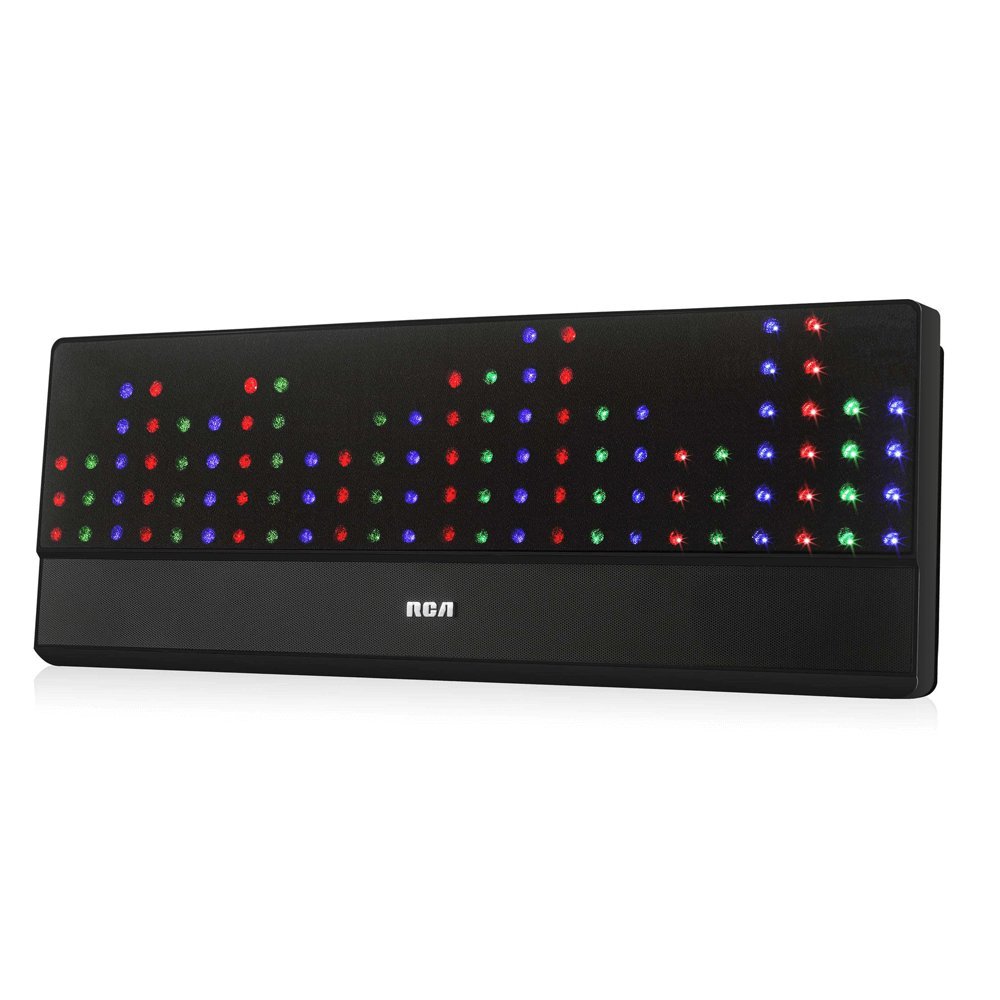
Figure 4.1: Front view of the sound bar speaker, showing the speaker grille and RCA logo.
4.2 Side Panel Controls

Figure 4.2: Side panel with control buttons. From top to bottom: Power, Volume Up, Volume Down, Track Forward, Track Backward, Mode, Pair.
- Power Button: Turns the unit on or off.
- Volume Up/Down: Adjusts the audio volume.
- Track Forward/Backward: Skips tracks in Bluetooth or USB mode, or tunes FM radio stations.
- Mode Button: Switches between input sources (Bluetooth, FM, AUX).
- Pair Button: Initiates Bluetooth pairing mode.
4.3 Rear Panel Connections

Figure 4.3: Rear panel with connection ports. From left to right: USB, DC IN 9V, LINE IN, FM ANT.
- USB Port: For charging external devices (e.g., smartphones, tablets). Not for audio playback.
- DC IN 9V: Connect the provided power adapter here.
- LINE IN (3.5mm AUX): Connect external audio devices using a 3.5mm audio cable (not included).
- FM ANT: Connect the included FM antenna for improved radio reception.
4.4 Remote Control

Figure 4.4: Remote control for convenient operation of the sound bar.
The remote control provides access to all major functions, including power, input selection, volume, track control, light mode, sound mode, and light brightness.
5. Setup
- Placement: Position the sound bar on a stable, flat surface or mount it on a wall (mounting hardware not included). Ensure it is near a power outlet and within range of your Bluetooth devices.
- Connect FM Antenna: Insert the FM antenna wire into the 'FM ANT' jack on the rear panel. Extend the antenna for optimal reception.
- Connect Power: Plug the provided power adapter into the 'DC IN 9V' port on the rear of the sound bar, then plug the adapter into a wall outlet.
- Power On: Press the Power button on the side panel or the remote control to turn on the sound bar.
6. Operating Instructions
6.1 Bluetooth Connection
- Turn on the sound bar.
- Press the Mode button on the unit or remote until 'BT' or 'Bluetooth' is displayed (if applicable, or indicated by an LED). The unit will enter pairing mode, indicated by a flashing light or sound.
- On your smartphone, tablet, or other Bluetooth-enabled device, enable Bluetooth and search for available devices.
- Select "RCA RAS1609BLE" (or similar name) from the list of devices.
- Once paired, the sound bar will indicate a successful connection, and you can begin streaming audio.
6.2 FM Radio Operation
- Press the Mode button to select FM radio mode.
- Use the Track Forward or Track Backward buttons on the unit or remote to scan for available FM stations.
- Adjust the volume using the Volume Up/Down buttons.
6.3 AUX Input
- Connect one end of a 3.5mm audio cable (not included) to the LINE IN port on the rear of the sound bar.
- Connect the other end of the cable to the headphone jack or audio output of your external device (e.g., MP3 player, TV).
- Press the Mode button to select AUX input.
- Play audio from your external device and adjust volume on both the device and the sound bar.
6.4 USB Charging
The USB port on the rear panel is for charging external devices only. Connect your device's USB charging cable to this port to charge it while the sound bar is powered on.
Note: This USB port does not support audio playback from USB drives.
6.5 LED Lightwall Functions
The sound bar features an integrated LED lightwall with 8 different lightshow options. Use the Light Mode button on the remote control to cycle through the available patterns.

Figure 6.1: Visual representation of the 8 distinct LED lightshow patterns: Wave, Fountain, Disco, EQ, Rain, Music, Shutter, and Mood.
You can also adjust the brightness of the LED lights using the Brightness buttons on the remote control.
7. Troubleshooting
| Problem | Possible Cause | Solution |
|---|---|---|
| No power | Power adapter not connected or outlet not active. | Ensure the power adapter is securely connected to the sound bar and a working power outlet. |
| No sound | Volume too low; incorrect input source; audio cable not connected properly. | Increase volume. Select the correct input source (Bluetooth, FM, AUX). Check audio cable connections. |
| Bluetooth device cannot pair | Sound bar not in pairing mode; device too far; Bluetooth disabled on device. | Ensure sound bar is in Bluetooth pairing mode. Move device closer. Enable Bluetooth on your device. |
| Poor FM reception | FM antenna not extended or positioned poorly. | Fully extend and adjust the position of the FM antenna. |
8. Specifications
- Brand: RCA
- Model Name: RAS1609BL
- Speaker Type: Soundbar
- Maximum Speaker Power Output: 5 Watts
- Audio Output Mode: Stereo
- Connectivity Technology: Bluetooth, RCA (Line In), USB (Charging Only)
- Wireless Technology: Bluetooth
- Mounting Type: Bar Mount, Plug Mount
- Material: Plastic
- Item Weight: 2.2 Pounds
- Compatible Devices: Smartphone, Tablet
- Power Source: Corded Electric (DC 9V)
- Impedance: 4 Ohms
- Manufacturer: Alco Electronics Ltd.
- UPC: 062118416098
9. Maintenance
- Cleaning: Use a soft, dry cloth to clean the exterior of the sound bar. Do not use liquid cleaners or abrasive materials.
- Storage: If storing the unit for an extended period, unplug it from the power outlet and store it in a cool, dry place.
- Ventilation: Ensure that the ventilation openings are not blocked by dust or debris.
10. Warranty and Support
This product comes with a Limited Warranty. For specific warranty terms and conditions, please refer to the documentation included with your purchase or contact RCA customer support.
For technical assistance or customer service inquiries, please visit the official RCA website or contact their support channels. Please have your model number (RAS1609BL) and proof of purchase ready when seeking support.


