
1. Overview
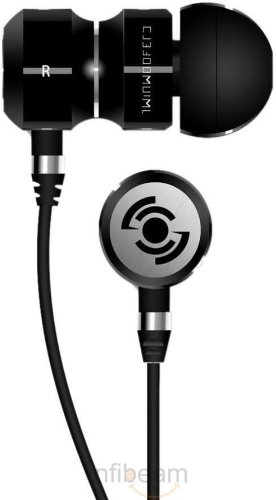
The Tekfusion Twinwoofers TTB01 In-Ear Headphones are designed to provide a high-quality audio experience. These in-ear headphones offer effective noise isolation, allowing for focused listening. They feature wired connectivity and are compatible with a variety of mobile phones, music players, and other devices equipped with a 3.5mm audio jack.

Video 1: An overview of the Tekfusion Twinwoofers In-Ear Headphones, highlighting key features and design elements.
2. Product Features
- High Definition Sound: Equipped with HD dynamic speaker systems for clear audio reproduction.
- Powerful Bass: Delivers enhanced bass response for a rich listening experience.
- Snug Fit: Ergonomically designed with various eartip sizes to ensure a comfortable and secure fit, enhancing sound isolation.
- Durable Construction: Features an all-metal chassis for increased rigidity and longevity.
- Lightweight Design: Ultra-lightweight construction allows for extended periods of use without discomfort.
- Black Chrome Edition: Stylish design with a partial matte and partial gloss finish.
3. What's in the Box
The Tekfusion Twinwoofers TTB01 package includes the following items:
- Tekfusion Twinwoofers TTB01 In-Ear Headphones
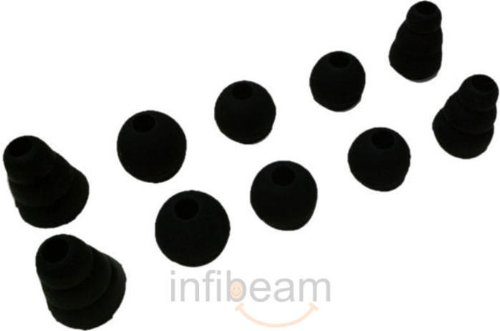
- Multiple sizes of Ear Cushions (Small, Medium, Large)
- Carry Pouch
- Cable Clip
4. Setup
4.1 Selecting Ear Tips
For optimal sound quality and comfort, it is important to select the correct size of ear tips. The package includes small, medium, and large silicon ear tips. Experiment with different sizes to find the pair that provides a snug fit in your ear canal and creates an effective seal for noise isolation.

4.2 Connecting to a Device
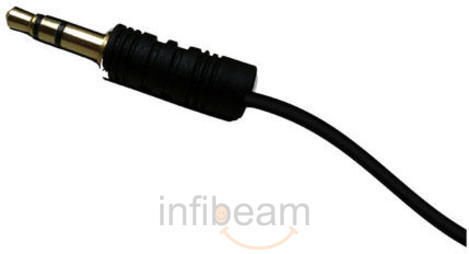
The Twinwoofers TTB01 headphones connect via a standard 3.5mm audio jack. Insert the jack firmly into the audio port of your compatible device (e.g., smartphone, tablet, laptop, MP3 player). Ensure the connection is secure to prevent audio interruptions.
4.3 Wearing the Headphones
Gently insert the earbud into your ear canal. The ergonomic hourglass shape is designed to rest comfortably, with the far edge of the housing fitting against your ear's antitragus. Use the included cable clip to secure the cable to your clothing, which helps reduce cable noise and keeps the weight off the headphone housing for enhanced comfort during movement.
5. Operating Instructions
Once connected to your audio device, begin playback of your desired audio content. Adjust the volume directly from your connected device to your preferred listening level. The in-ear design provides passive noise isolation, reducing ambient sounds for a more immersive experience.
6. Maintenance
6.1 Cleaning
- Regularly remove the ear tips and clean them with a soft, damp cloth. Allow them to dry completely before reattaching.
- Gently clean the dust caps on the earbuds using a dry cotton swab to prevent debris buildup, which can affect sound quality.
6.2 Storage and Cable Care
- When not in use, store the headphones in the provided carry pouch to protect them from dust, scratches, and tangles.
- Avoid sharply bending or pulling the cable, especially near the 3.5mm jack and earbud connections, to prevent internal wire damage.
7. Troubleshooting
7.1 No Sound or Low Volume
- Ensure the 3.5mm jack is fully inserted into your device's audio port.
- Check the volume level on your connected device.
- Test the headphones with another audio device to determine if the issue is with the headphones or the original device.
- Verify that the ear tips are correctly attached and not obstructed.
7.2 Poor Sound Quality
- Ensure the ear tips provide a proper seal in your ear canal. An improper fit can lead to reduced bass and overall sound quality.
- Clean the ear tips and dust caps as described in the Maintenance section to remove any blockages.
- Some audio devices may benefit from a 'burn-in' period, where the headphone drivers are used for several hours to reach their optimal sound performance.
8. Specifications
| Feature | Specification |
|---|---|
| Brand | Tekfusion |
| Model Number | TTB01 |
| Color | Black, Metallics |
| Ear Placement | In Ear |
| Form Factor | In Ear |
| Noise Control | Sound Isolation |
| Audio Driver Type | Dynamic Driver |
| Frequency Range | 20 Hz - 20,000 Hz |
| Enclosure Material | Metal |
| Compatible Devices | Cellphones, Laptops, Desktops, Tablets, Telephones |
| Cable Features | Tangle Free |
| Headphone Jack | 3.5 mm Jack |
| Network Connectivity | Wired |
9. Warranty and Support
For warranty information and customer support, please refer to the documentation provided with your purchase or visit the official Tekfusion website. Keep your proof of purchase for any warranty claims.