
1. Introduction
This manual provides essential information for the safe and effective installation, operation, and maintenance of the CUTLER HAMMER BR2100 2 Pole, 100 Amp, 1 Phase, 120/240 V Thermal Magnetic Circuit Breaker. This device is designed to protect electrical circuits from overcurrents and short circuits, ensuring the safety of electrical systems and equipment. Please read this manual thoroughly before proceeding with any installation or operation.
2. Safety Information
Electrical work can be hazardous. Improper installation or maintenance can result in serious injury or death. Always adhere to local electrical codes and safety regulations.
- Qualified Personnel Only: Installation and servicing of this circuit breaker must be performed by qualified, licensed electricians.
- Disconnect Power: Always ensure that all power to the electrical panel is disconnected at the main service disconnect before installing, removing, or servicing the circuit breaker. Verify with a voltage tester.
- Proper Rating: Ensure the circuit breaker's voltage and current ratings match the requirements of the electrical system it is protecting.
- Tight Connections: All electrical connections must be tight to prevent overheating and potential fire hazards.
- Personal Protective Equipment (PPE): Wear appropriate PPE, including insulated gloves and safety glasses, when working with electrical systems.
3. Setup and Installation
3.1 Pre-Installation Checks
- Confirm the BR2100 circuit breaker's specifications (100 Amp, 2 Pole, 120/240 V) are suitable for the application.
- Ensure the electrical panel is de-energized.
- Inspect the circuit breaker for any physical damage. Do not install damaged units.
3.2 Installation Steps
- De-energize Panel: Turn off the main power supply to the electrical panel at the service entrance.
- Remove Panel Cover: Carefully remove the cover of the electrical panel.
- Locate Slot: Identify an available slot on the bus bar for a 2-pole breaker.
- Install Breaker: Position the BR2100 circuit breaker onto the bus bar, ensuring it snaps securely into place.
- Connect Wires: Connect the load wires to the appropriate terminals on the circuit breaker. For a 2-pole breaker, connect one hot wire to each terminal. Refer to the wiring diagram provided with your electrical panel.
- Tighten Terminals: Use a screwdriver to tighten the terminal screws to the torque specifications indicated on the breaker or in the panel documentation. Over-tightening or under-tightening can cause issues.
- Replace Panel Cover: Once all connections are secure and verified, replace the electrical panel cover.
- Restore Power: Re-energize the main power supply to the electrical panel.
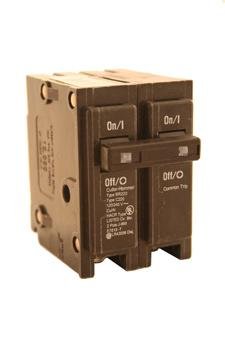
Image showing the Cutler Hammer BR2100 2 Pole, 100 Amp circuit breaker, highlighting its compact design and terminal connections. This image illustrates the general appearance of the breaker for installation reference.
4. Operation
4.1 Normal Operation
The CUTLER HAMMER BR2100 circuit breaker is designed to operate automatically. Under normal conditions, the breaker will remain in the 'ON' position, allowing electrical current to flow through the circuit. If an overcurrent or short circuit condition occurs, the thermal-magnetic mechanism within the breaker will trip, moving the handle to the 'TRIPPED' (center) position and interrupting the power to the protected circuit.
4.2 Resetting a Tripped Breaker
If the circuit breaker trips, follow these steps to reset it:
- Identify Cause: Determine and correct the cause of the trip (e.g., overloaded circuit, faulty appliance).
- Turn OFF: Move the breaker handle firmly to the 'OFF' position. You may feel a slight resistance as it moves past the tripped position.
- Turn ON: Firmly move the breaker handle to the 'ON' position.
- Monitor: If the breaker trips again immediately, do not attempt to reset it repeatedly. Consult a qualified electrician.
5. Maintenance
The CUTLER HAMMER BR2100 circuit breaker requires minimal maintenance. Regular inspections are recommended to ensure continued safe operation.
- Annual Visual Inspection: With power disconnected, visually inspect the breaker and its connections for any signs of overheating (discoloration), loose wires, or physical damage.
- Cleanliness: Ensure the area around the circuit breaker within the panel is free from dust, debris, and moisture.
- Testing: Periodic testing by a qualified electrician may be recommended, especially in commercial or industrial settings, to verify the trip mechanism's functionality.
Do not attempt to repair a damaged or malfunctioning circuit breaker. Replace it with an identical unit.
6. Troubleshooting
This section addresses common issues you might encounter with your circuit breaker.
| Problem | Possible Cause | Solution |
|---|---|---|
| Breaker trips frequently | Overloaded circuit, short circuit, faulty appliance | Reduce load on circuit, unplug appliances, inspect wiring for damage. If problem persists, consult an electrician. |
| Breaker does not reset | Persistent fault (short circuit), internal breaker damage | Ensure the fault is cleared. If it still won't reset, the breaker may be damaged and needs replacement by a qualified electrician. |
| Breaker feels hot | Loose connection, overloaded circuit, internal damage | Immediately disconnect power and have an electrician inspect connections and the breaker. |
| No power to circuit, breaker is ON | Loose wire, open circuit elsewhere, faulty breaker | Check all connections. If wiring is intact, the breaker may be faulty and require replacement. Consult an electrician. |
7. Specifications
Key technical specifications for the CUTLER HAMMER BR2100 Circuit Breaker:
- Brand: CUTLER HAMMER
- Model: BR2100
- Current Rating: 100 Amps
- Number of Poles: 2
- Voltage: 120/240 V AC
- Circuit Breaker Type: Standard Thermal Magnetic
- Mounting Type: Panel Mount
- Interrupting Rating: 10 kA (Kiloampere)
- Wire Size: 4 to 1/0 AWG (Aluminum/Copper)
- Approval: UL 489
- UPC: 653166152771
- Item Weight: Approximately 0.01 Ounces (Note: This weight may be a placeholder or incorrect, actual weight may vary)
8. Warranty Information
CUTLER HAMMER products are manufactured to high-quality standards. This product is covered by the manufacturer's standard limited warranty against defects in materials and workmanship. The specific terms and duration of the warranty may vary. Please refer to the official CUTLER HAMMER website or contact customer support for detailed warranty information. Keep your proof of purchase for warranty claims.
9. Customer Support
For technical assistance, troubleshooting beyond this manual, or warranty inquiries, please contact CUTLER HAMMER customer support. You can typically find contact information, including phone numbers and email addresses, on the official Eaton (parent company of Cutler Hammer) website.
Online Resources: Visit the official Eaton website for product documentation, FAQs, and support resources. www.eaton.com