
Introduction
Thank you for choosing the iKKEGOL HC520 Digital Indoor/Outdoor Thermometer and Hygrometer. This device is designed to provide accurate and reliable measurements of indoor and outdoor temperatures, as well as indoor humidity. Its large LCD display ensures easy readability, and the wired external probe allows for versatile placement. Please read this manual carefully to ensure proper setup, operation, and maintenance of your device.
Product Overview
The iKKEGOL HC520 features a compact design with a clear LCD screen. It includes an integrated flip-out stand for desktop use and a hanging hole for wall mounting. The external probe extends the temperature measurement capabilities to outdoor environments or specific areas like refrigerators.

Figure 1: Front view of the iKKEGOL HC520 device showing the LCD display and wired probe.
Setup
1. Battery Installation
- Locate the battery compartment on the back of the device.
- Slide open the battery cover.
- Insert one (1) AAA battery, ensuring correct polarity (+/-).
- Close the battery cover securely.

Figure 2: Back view of the device with the battery compartment open, showing where to insert the AAA battery.
2. Connecting the External Probe
- Identify the sensor wire plug.
- Insert the sensor wire plug into the designated socket located under the battery cover.
- Place the external sensor (probe) in the desired outdoor location or specific area for measurement (e.g., refrigerator, freezer). The probe cable is approximately 2 meters (6.6 feet) long.
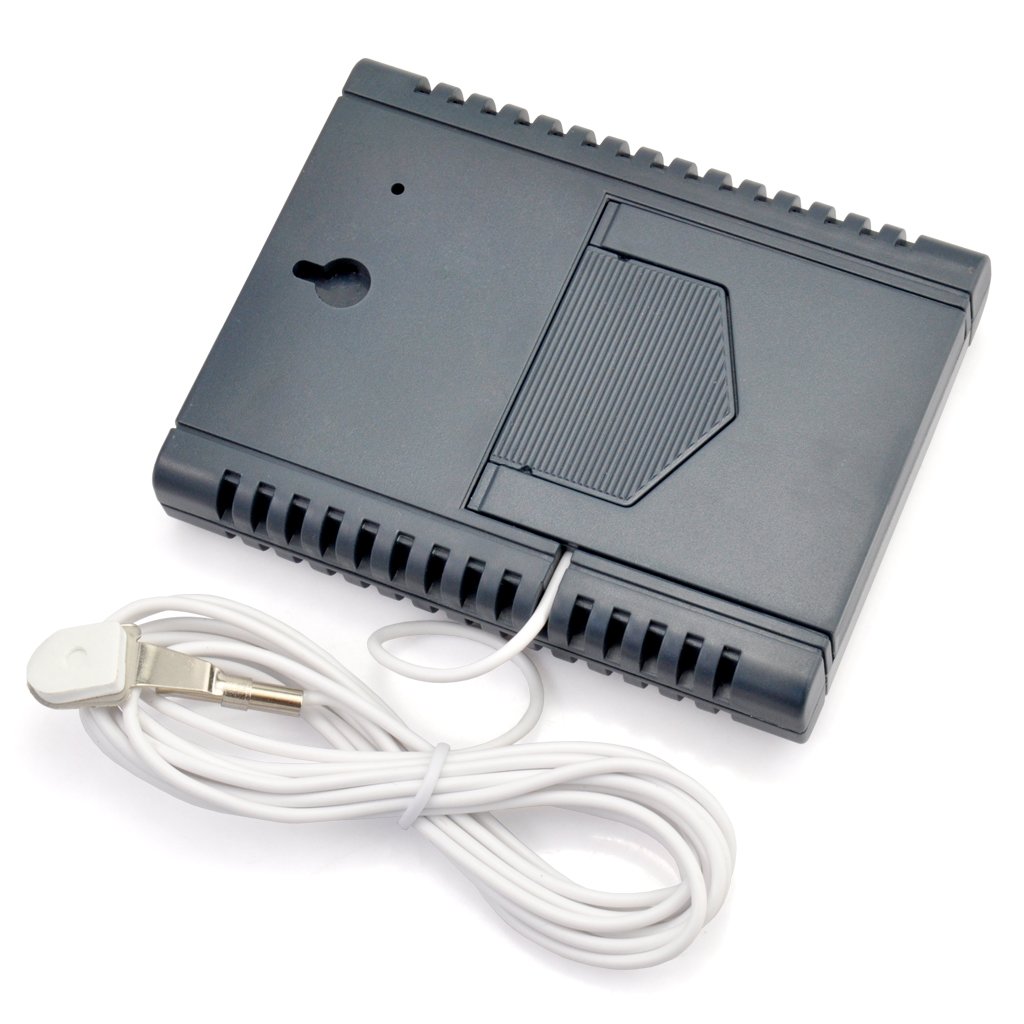
Figure 3: Back view of the device showing the external probe connected to its socket.
3. Mounting Options
The iKKEGOL HC520 offers two convenient mounting options:
- Desktop Stand: Utilize the integrated flip-out stand on the back of the device for placement on any flat surface.
- Wall Mount: Use the hanging hole on the back to mount the device on a wall.
Video 1: This video demonstrates the battery installation and basic display functions of a similar digital thermometer. Note that the exact model shown may differ from the iKKEGOL HC520.
Video 2: This video illustrates the connection of an external probe and the use of the °C/°F switch on a comparable indoor/outdoor thermometer. It also shows magnetic mounting, which is a feature on some similar devices.
Operating Instructions
The iKKEGOL HC520 features a user-friendly interface with four control buttons:
- IN-OUT Button: Press this button to switch the temperature display between INSIDE (IN) and OUTSIDE (OUT) readings. The active mode (IN or OUT) will be indicated on the LCD screen next to the temperature value. If the external sensor is not installed, only the INSIDE temperature will be displayed.
- MAX-MIN Button: Use this button to view the recorded MAXIMUM and MINIMUM temperature and humidity values. The display will show 'MAX' or 'MIN' to indicate which value is currently being shown.
- °C/°F Button: Press this button to toggle the temperature display unit between Celsius (°C) and Fahrenheit (°F).
- RESET Button: Press this button to clear all recorded MAX/MIN values and restore all settings to their original default values.
Temperature and Humidity Measurement
- The device simultaneously displays the current indoor temperature and indoor humidity.
- When the external probe is connected, the device can also display the outdoor temperature. Use the 'IN-OUT' button to switch between indoor and outdoor temperature readings.
- The humidity measurement is exclusively for indoor (IN) conditions. The '%' symbol will always appear above the humidity unit.
- A comfort level symbol (e.g., a smiley face) may be displayed to indicate the general comfort level based on the indoor humidity.
Video 3: This video demonstrates the use of an extended probe with a mini thermometer, showing how it can be used to measure temperatures in different environments.
Features
- Low power consumption for extended battery life.
- High stability and accuracy in measurements.
- Memory function to recall last measured values.
- Simultaneous display of temperature and humidity.
- Records and displays MIN and MAX temperature and humidity values.
- Comfort degree symbol for quick indoor condition assessment.
- Selectable temperature units: Celsius (°C) or Fahrenheit (°F).
- Versatile placement with integrated desktop stand and wall hanging option.
- Includes a 2-meter (6.6 ft) external probe for outdoor or remote temperature sensing.
- External sensor is easily attachable and detachable.
- Powered by one (1) AAA battery (not included).
- Large, clear, and easy-to-read LCD screen.
Specifications
| Specification | Value |
|---|---|
| Model Number | HC520 |
| Indoor Temperature Range | -10°C to +50°C (+14°F to +122°F) |
| Outdoor Temperature Range | -50°C to +70°C (-58°F to +158°F) |
| Indoor Humidity Range | Measures indoor humidity only |
| Product Dimensions | 78 x 98 x 17 mm (3.1" x 3.9" x 0.7") |
| Product Weight | 95g (3.4 oz) |
| Power Source | 1 x AAA Battery (not included) |
| External Probe Cable Length | 2 meters (6.6 ft) |

Figure 4: Diagram showing the dimensions of the iKKEGOL HC520 device.
Maintenance
- Cleaning: Wipe the device with a soft, dry cloth. Do not use abrasive cleaners or immerse the device in water.
- Battery Replacement: Replace the AAA battery when the display becomes dim or the device stops functioning. Ensure correct polarity during installation.
- Storage: If storing the device for an extended period, remove the battery to prevent leakage and damage. Store in a cool, dry place.
- Probe Care: Handle the external probe and cable with care to avoid damage. Ensure the probe is not exposed to extreme physical stress.
Troubleshooting
- No Display/Dim Display: Check if the battery is installed correctly and has sufficient charge. Replace the battery if necessary.
- Inaccurate Readings: Ensure the device and probe are placed in appropriate locations, away from direct sunlight, heat sources, or strong drafts that could affect readings. Allow a few minutes for readings to stabilize after placement or changes in environment.
- Outdoor Temperature Not Displaying: Verify that the external probe is securely plugged into the device. If the probe is damaged, it may need replacement.
- Readings Not Changing: Press the 'RESET' button to clear previous data and re-initialize the device.
Warranty and Support
For warranty information or technical support regarding your iKKEGOL HC520 Digital Indoor/Outdoor Thermometer and Hygrometer, please refer to the product packaging or contact iKKEGOL customer service directly. You may also visit the official iKKEGOL Store on Amazon for additional resources and contact options: iKKEGOL Store.