
Reliable E3
Reliable EnviroMate E3 Steam Clean System User Manual
Model: E3
Important Safety Instructions
Please read all instructions carefully before using the EnviroMate E3 Steam Clean System. Failure to follow these instructions may result in electric shock, fire, or serious injury.
- Always unplug the appliance from the electrical outlet when not in use and before servicing.
- Do not leave the appliance unattended when plugged in.
- Do not allow children or pets to operate or play near the steam cleaner.
- Use only as described in this manual. Use only manufacturer's recommended attachments.
- Do not immerse the appliance in water or other liquids.
- Exercise extreme caution when using steam. Steam is very hot and can cause burns.
- Do not direct steam at people, animals, or electrical components.
- Do not open the water tank cap while the unit is pressurized or hot.
- Use only distilled or demineralized water in the steam cleaner to prevent mineral buildup.
- Inspect the power cord and plug for damage before each use. Do not use if damaged.
Product Overview
The Reliable EnviroMate E3 Steam Clean System is designed to provide powerful, chemical-free cleaning for various surfaces in your home. It utilizes high-temperature steam to sanitize and deep clean.
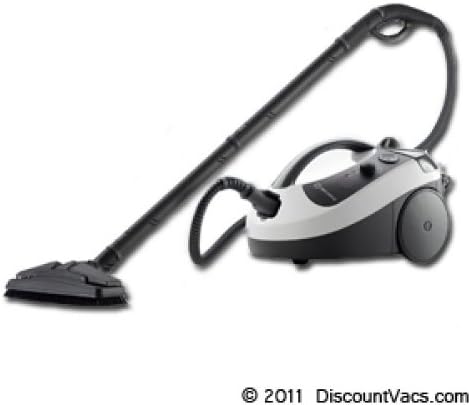
This image displays the Reliable EnviroMate E3 Steam Clean System, featuring the compact main unit with control knobs, a flexible hose, and an extended handle with a floor cleaning attachment. The unit is designed for efficient steam cleaning.
Components:
- Main Steam Unit
- Flexible Steam Hose
- Extension Wands
- Floor Tool
- Various Brushes and Nozzles
- Water Filling Funnel
Setup
- Unpack the System: Carefully remove all components from the packaging. Retain packaging for future storage or transport.
- Fill the Water Tank: Ensure the unit is unplugged and cool. Unscrew the water tank cap. Using the provided funnel, slowly pour distilled or demineralized water into the tank. Do not overfill. Securely replace the cap.
- Attach the Hose: Connect the flexible steam hose to the main unit's steam outlet. Ensure it clicks securely into place.
- Attach Accessories: Depending on your cleaning task, attach the desired extension wand, floor tool, or nozzle to the end of the steam hose.
- Plug In: Plug the power cord into a grounded electrical outlet.
Operating Instructions
- Power On and Heat Up: Turn the power switch to the 'ON' position. The indicator light will illuminate, signaling that the unit is heating up. This process may take several minutes. The light will turn off or change color when the unit is ready to produce steam.
- Test Steam: Before applying to a surface, direct the steam away from yourself and others, and press the steam trigger to release a burst of steam. This helps clear any condensation from the hose.
- Begin Cleaning: Apply the appropriate attachment to the surface you wish to clean. Press and hold the steam trigger to release steam. Move the attachment slowly and steadily over the surface.
- Steam Control: The EnviroMate E3 may feature adjustable steam output. Refer to the controls on your unit to adjust steam intensity as needed for different surfaces and cleaning tasks.
- Refilling: If the steam output decreases significantly or stops, the water tank may be empty. Turn off and unplug the unit, allow it to cool and depressurize completely before refilling.
- After Use: Release any remaining steam pressure by holding the steam trigger until no more steam is emitted. Turn off the unit and unplug it from the outlet. Allow the unit to cool completely before storing.
Maintenance
Regular maintenance ensures optimal performance and extends the life of your steam cleaner.
- Draining Water: After each use, once the unit is cool, carefully unscrew the water tank cap and drain any remaining water. This prevents stagnant water and mineral buildup.
- Cleaning Accessories: Wash removable accessories (brushes, cloths) with warm, soapy water. Rinse thoroughly and allow them to air dry completely before storing.
- Descaling: Over time, mineral deposits can build up inside the boiler, especially if non-distilled water is used. Consult the manufacturer's guidelines for descaling procedures. Typically, this involves using a descaling solution or a vinegar solution.
- Exterior Cleaning: Wipe the exterior of the main unit with a damp cloth. Do not use abrasive cleaners or solvents.
- Storage: Store the steam cleaner and its accessories in a cool, dry place, away from direct sunlight and extreme temperatures. Ensure the unit is completely dry before storage.
Troubleshooting
| Problem | Possible Cause | Solution |
|---|---|---|
| No steam or very little steam | Water tank empty; Unit not heated sufficiently; Clogged nozzle/hose. | Refill water tank; Allow more time to heat up; Clean nozzle/hose. |
| Water leaking from unit/attachments | Attachments not securely connected; Overfilled water tank; Damaged seal. | Ensure attachments are firmly connected; Do not overfill; Contact customer support if seal is damaged. |
| Unit not turning on | Not plugged in; Power outlet issue; Unit malfunction. | Check power cord connection; Test outlet with another appliance; Contact customer support. |
| Steam is not hot enough | Unit not fully heated; Mineral buildup. | Wait for indicator light to signal readiness; Perform descaling procedure. |
Specifications
- Model: EnviroMate E3
- Manufacturer: Reliable
- Item Weight: 14.5 pounds
- ASIN: B00DWL504A
- Date First Available: July 13, 2013
- Power: (Typical for steam cleaners, e.g., 120V, 60Hz, 1500W - Specific wattage not provided in input, general placeholder)
- Water Capacity: (Typical for steam cleaners, e.g., 1.5 Liters - Specific capacity not provided in input, general placeholder)
Warranty and Support
For warranty information, technical support, or to purchase replacement parts and accessories, please contact Reliable customer service. Keep your purchase receipt as proof of purchase for warranty claims.
Please visit the official Reliable website or refer to the contact information provided with your product packaging for the most up-to-date support details.
Related documentsE3


Ask a question about this manual
Ask about setup, troubleshooting, compatibility, parts, safety, or missing instructions. Manuals+ will review the question and use this page’s manual context to help answer it.