
1. Introduction
This manual provides detailed instructions for the proper use and maintenance of your Konica FT-1 Motor 35mm SLR film camera. The Konica FT-1 is equipped with a built-in motor for automatic film winding and supports custom shutter, ISO, and aperture settings, offering a versatile photographic experience. Please read this manual thoroughly before operating your camera to ensure optimal performance and longevity.
2. Product Overview
The Konica FT-1 Motor is a 35mm Single-Lens Reflex (SLR) camera featuring a built-in motor for automatic film advance. It is designed for use with 35mm film and offers a range of manual controls for creative photography.
- Camera Type: 35mm SLR Film Camera
- Lens: Includes Hexanon AR 50mm F1.8 Lens
- Film Winding: Built-in motor for automatic film advance
- Exposure Control: Custom Shutter, ISO, and Aperture settings
- Shutter Speeds: From 2 seconds to 1/1000 second
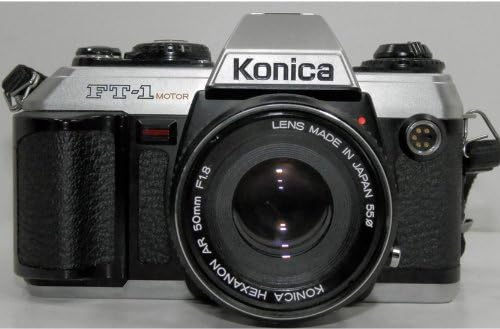
Front view of the Konica FT-1 Motor film camera, showcasing its silver and black body, the Konica branding, FT-1 Motor designation, and the attached Hexanon AR 50mm F1.8 lens.
3. Setup
3.1. Battery Installation
The Konica FT-1 Motor requires four (4) AA batteries for operation. Ensure the batteries are inserted with the correct polarity as indicated inside the battery compartment.
- Locate the battery compartment, typically on the bottom or side of the camera body.
- Open the battery compartment cover.
- Insert four fresh AA batteries, matching the positive (+) and negative (-) terminals with the markings.
- Close the battery compartment cover securely.
Note: Always use fresh batteries and remove them if the camera will not be used for an extended period to prevent leakage.
3.2. Lens Attachment
If the lens is not already attached, follow these steps:
- Remove the rear lens cap and the camera body cap.
- Align the red dot on the lens barrel with the red dot on the camera's lens mount.
- Gently insert the lens into the mount and rotate it clockwise until it clicks into place.
- To remove the lens, press the lens release button on the camera body and rotate the lens counter-clockwise.
3.3. Film Loading
The Konica FT-1 Motor uses 35mm film. Ensure you are in a shaded area or indoors when loading film to prevent light exposure.
- Open the camera back by pulling up the film rewind knob.
- Place the film cartridge into the film chamber on the left side.
- Pull the film leader across to the take-up spool on the right, ensuring it engages with the teeth.
- Close the camera back firmly until it latches.
- The built-in motor will automatically advance the film to the first frame. Check the frame counter to confirm.
4. Operating Instructions
4.1. Setting Film Speed (ISO)
Set the ISO dial on the camera to match the ISO speed of the film you are using. This is crucial for accurate exposure readings.
4.2. Setting Aperture (F-stop)
Rotate the aperture ring on the lens to select your desired F-stop. A smaller F-number (e.g., F1.8) indicates a wider aperture, allowing more light and creating a shallower depth of field. A larger F-number (e.g., F16) indicates a smaller aperture, allowing less light and creating a greater depth of field.
4.3. Setting Shutter Speed
Rotate the shutter speed dial on the camera body to select your desired shutter speed. Faster speeds (e.g., 1/1000 sec) freeze motion, while slower speeds (e.g., 1/30 sec) can create motion blur or require a tripod to prevent camera shake.
4.4. Focusing
Look through the viewfinder and rotate the focusing ring on the lens until your subject appears sharp. The FT-1 typically features a split-image or microprism focusing aid in the center of the viewfinder to assist with precise focusing.
4.5. Taking a Picture
- Ensure the camera is powered on and film is loaded.
- Set your desired ISO, aperture, and shutter speed.
- Focus on your subject.
- Press the shutter release button gently to take the photograph.
- The built-in motor will automatically advance the film to the next frame after the shutter is released.
4.6. Film Rewinding
Once all frames on the film roll have been exposed, the film needs to be rewound back into its cartridge before opening the camera back. Consult your camera's specific rewind mechanism (usually a button on the bottom and a crank on top) to initiate rewinding. The FT-1 Motor may have an automatic rewind feature or a manual crank after disengaging the motor.
5. Maintenance
5.1. Cleaning the Camera and Lens
- Use a soft, lint-free cloth to wipe the camera body.
- For the lens, use a lens brush to remove dust, followed by a lens cleaning solution and a microfiber cloth. Avoid touching the lens surface with your fingers.
- Never use harsh chemicals or abrasive materials on any part of the camera.
5.2. Battery Care
- Remove batteries when the camera is not in use for extended periods to prevent corrosion.
- Check battery contacts periodically for cleanliness and corrosion. Clean with a dry cloth if necessary.
5.3. Film Door Seal
Over time, the foam light seals around the film door can degrade, leading to light leaks on your film. Inspect these seals periodically. If they appear sticky, crumbly, or missing, they may need to be replaced by a qualified technician to ensure proper light sealing.
6. Troubleshooting
| Problem | Possible Cause | Solution |
|---|---|---|
| Camera does not power on. | Dead or incorrectly inserted batteries. | Replace batteries with fresh AA batteries, ensuring correct polarity. |
| Film does not advance. | Batteries are low or dead; film not properly loaded; motor malfunction. | Check/replace batteries. Re-load film, ensuring leader engages with take-up spool. If problem persists, seek professional service. |
| Light leaks on film. | Degraded film door light seals. | Inspect film door seals. If damaged, consider professional replacement. |
| Shutter does not fire. | Low batteries; camera in self-timer mode; film not advanced. | Check/replace batteries. Ensure self-timer is off. Confirm film is advanced to the next frame. |
7. Specifications
| Feature | Detail |
|---|---|
| Model Name | FT-1 |
| Brand | Konica |
| Film Format Type | 35mm |
| Included Components | Lens (Hexanon AR 50mm F1.8) |
| Special Feature | Built-in Motor for auto winding |
| Shutter Type | Focal Plane Shutter |
| Shutter Speeds | 2 seconds to 1/1000 second |
| Batteries Required | 4 AA batteries |
| Item Weight | 5.25 pounds |
| Package Dimensions | 12.1 x 9 x 5.2 inches |
| Date First Available | July 6, 2013 |
8. Warranty and Support
For information regarding warranty coverage, technical support, or service, please contact the original seller or Konica customer service directly. Specific warranty terms may vary based on the purchase date and region.
Note: As this is a vintage camera model, direct manufacturer support may be limited. Independent camera repair specialists are often available for service and parts.


