
Introduction
Thank you for choosing the ZEALOT N85 Multifunction Digital Headset. This headset is designed to provide a high-fidelity audio experience with versatile features including a built-in FM radio, an MP3 player with SD card support, and a comfortable over-ear design. This manual provides detailed instructions for setup, operation, and maintenance to ensure optimal performance and longevity of your device.
Safety Information
- Hearing Protection: Avoid listening at high volume levels for extended periods to prevent hearing damage.
- Environmental Conditions: Do not expose the headset to extreme temperatures, humidity, or water. Keep it away from direct sunlight and heat sources.
- Cleaning: Use a soft, dry cloth for cleaning. Do not use liquid cleaners or aerosols.
- Disassembly: Do not attempt to disassemble or modify the headset. This may void the warranty and cause damage.
- Disposal: Dispose of the device and its components responsibly according to local regulations.
Package Contents

Figure 1: ZEALOT N85 Headset with its retail packaging and included accessories.
Please check the package contents upon opening. The standard package should include:
- ZEALOT N85 Digital Headset
- USB Charging Cable
- User Manual (this document)
- (Optional: 3.5mm Audio Cable, depending on specific model variant)
Product Overview
Familiarize yourself with the components and controls of your ZEALOT N85 headset.

Figure 2: Overall view of the ZEALOT N85 Headset, highlighting the control panel on the right earcup.
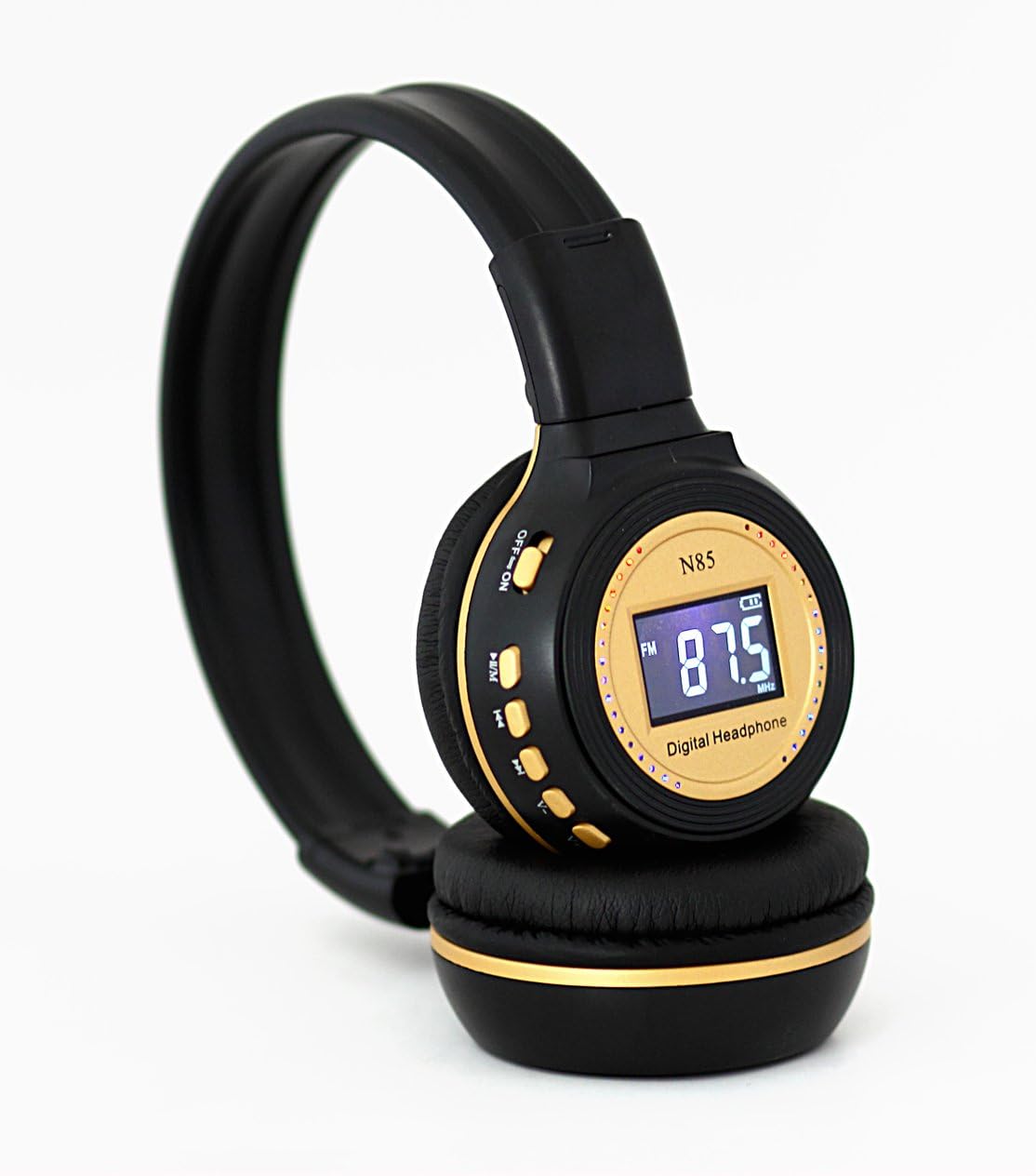
Figure 3: Detailed view of the control buttons and LCD display on the right earcup.
Key Components:
- LCD Display: Shows current mode (FM/MP3), frequency, track number, and battery status.
- ON/OFF Switch: Power switch for the headset.
- Play/Pause / M (Mode) Button: Controls playback (play/pause) and switches between FM radio and MP3 player modes.
- Previous Track / V- (Volume Down) Button: Skips to the previous track in MP3 mode or decreases volume.
- Next Track / V+ (Volume Up) Button: Skips to the next track in MP3 mode or increases volume.
- SD Card Slot: For inserting a MicroSD (TF) card with MP3 music files.
- USB Charging Port: For connecting the USB charging cable.
- 3.5mm Audio Jack: (If present) For wired connection to audio sources.
- Adjustable Headband: Allows for comfortable fit.
- Foldable Design: Earcups can be folded inward for compact storage.

Figure 4: The headset's foldable design for easy portability and storage.
Setup
1. Charging the Headset
Before first use, fully charge the headset. Connect the supplied USB charging cable to the headset's USB port and the other end to a USB power adapter (not included) or a computer's USB port. The charging indicator light will illuminate during charging and turn off when fully charged.
2. Inserting an SD Card (for MP3 Playback)
If you wish to use the MP3 player function, load your MP3 music files onto a MicroSD (TF) card. Carefully insert the SD card into the designated SD card slot on the headset until it clicks into place. Ensure the card is inserted in the correct orientation.
Operating Instructions
Power On/Off
Slide the ON/OFF switch to the "ON" position to power on the headset. Slide it to "OFF" to power off.
Mode Selection (FM Radio / MP3 Player)
Press the Play/Pause / M button to switch between FM Radio mode and MP3 Player mode. The LCD display will indicate the current mode.
FM Radio Operation

Figure 5: The LCD screen showing FM radio frequency.
- Automatic Channel Search: In FM mode, press and hold the Play/Pause / M button for a few seconds. The headset will automatically scan and store available FM radio stations.
- Changing Channels: Briefly press the Previous Track / V- button or the Next Track / V+ button to navigate through the stored FM channels.
MP3 Player Operation
Ensure an SD card with MP3 files is inserted.
- Play/Pause: Briefly press the Play/Pause / M button to play or pause the current track.
- Next Track: Briefly press the Next Track / V+ button to skip to the next song.
- Previous Track: Briefly press the Previous Track / V- button to go back to the beginning of the current song or to the previous song.
Volume Control
Press and hold the Next Track / V+ button to increase the volume. Press and hold the Previous Track / V- button to decrease the volume.
Maintenance
- Cleaning: Wipe the headset with a soft, dry, lint-free cloth. Do not use abrasive cleaners, alcohol, or chemical solvents.
- Storage: When not in use, store the headset in a cool, dry place, away from direct sunlight and extreme temperatures. The foldable design allows for compact storage.
- Battery Care: To prolong battery life, avoid fully discharging the battery frequently. Charge the headset regularly, even if not in use for extended periods.
Troubleshooting
| Problem | Possible Cause | Solution |
|---|---|---|
| Headset does not power on. | Battery is depleted. | Charge the headset fully. |
| No sound from headset. | Volume is too low. Incorrect mode selected. SD card issue (if in MP3 mode). | Increase volume. Ensure correct mode (FM/MP3) is selected. Check if SD card is properly inserted and contains valid MP3 files. |
| FM radio reception is poor. | Weak signal. Interference. | Move to an area with better signal. Perform an automatic channel search again. |
| SD card not recognized. | Card not inserted correctly. Unsupported file format. Corrupted card. | Re-insert the SD card firmly. Ensure files are in MP3 format. Try a different SD card. |
Specifications
| Feature | Detail |
|---|---|
| Model | N85 |
| Speaker/Drivers | 40mm diameter white magnet |
| Frequency Response | 20Hz - 20000Hz |
| Impedance | 32Ω |
| Speaker Sensitivity | 105dB ± 5dB |
| Plug/Jack | Standard 3.5mm (if applicable) |
| Cord/Cable Length | 2.0m ± 0.02m (for wired connection, if applicable) |
| Max Output Power | 90mW |
| Mic Sensitivity | 56dB |
| Supported Media | SD/TF Card (MP3 format) |
| Radio Function | Built-in FM radio receiver |
Warranty and Support
ZEALOT products are manufactured to high quality standards. For specific warranty information, please refer to the warranty card included with your purchase or visit the official ZEALOT website. If you encounter any issues not covered in this manual or require further assistance, please contact ZEALOT customer support through their official channels.
Website: www.zealot.cc (Note: This is a placeholder URL, please refer to actual product documentation for official support contact.)