
Introduction
This manual provides comprehensive instructions for the safe installation, proper operation, routine maintenance, and effective troubleshooting of the Trane White Rodgers Upgraded Furnace Control Circuit Board, model D341122P01. This circuit board is designed as a direct replacement for original equipment manufacturer (OEM) boards, serving as the central control unit for your furnace system. Please read all instructions carefully before proceeding with installation or operation.
Safety Information
WARNING: Electrical shock hazard. Disconnect all power to the furnace before installing or servicing this control board. Failure to do so can result in serious injury or death.
- Installation should only be performed by a qualified HVAC technician or a licensed electrician.
- Ensure the furnace power supply is completely off at the circuit breaker before beginning any work.
- Verify that the replacement board is compatible with your specific furnace model before installation.
- Wear appropriate personal protective equipment, including safety glasses and gloves.
Setup and Installation
Pre-installation Checklist:
- Ensure the new control board (D341122P01) is the correct replacement for your existing board.
- Gather necessary tools: screwdriver set, wire strippers, multimeter (optional for testing).
- Turn off all electrical power to the furnace at the main service panel.
Removal of Old Control Board:
- Open the furnace access panel.
- Carefully photograph the existing wiring connections to the old control board from multiple angles. These photos will serve as a critical reference for connecting the new board.
- Disconnect all wires from the old control board, noting their positions if not already clear from photos.
- Unmount the old control board from the furnace chassis.
Installation of New Control Board:
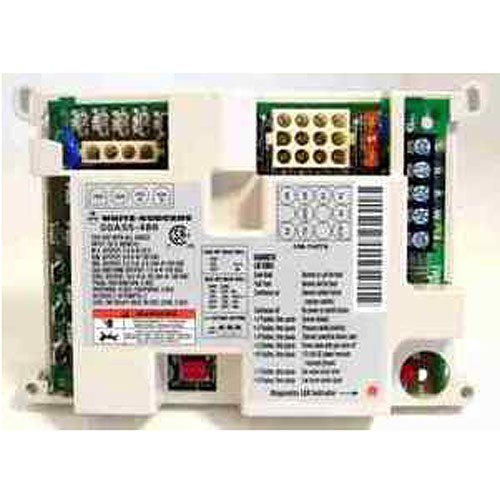
Image: The Trane White Rodgers Upgraded Furnace Control Circuit Board, model D341122P01, showing various terminals and components. This image provides a visual reference for the board's layout during installation.
- Mount the new Trane White Rodgers D341122P01 control board securely in the same location as the old board.
- Refer to your photographs and the wiring instructions included with the upgrade kit to connect all wires to the corresponding terminals on the new board. Ensure all connections are tight and secure.
- Double-check all wiring against your photos and the provided diagrams to prevent misconnections.
- Close the furnace access panel.
Operating Instructions
The Trane White Rodgers D341122P01 control board automatically manages the furnace's heating and cooling cycles based on thermostat commands. After installation, follow these steps:
- Restore electrical power to the furnace at the main service panel.
- Set your thermostat to the desired heating or cooling mode and temperature.
- Observe the furnace's operation. The control board will initiate the appropriate sequence (e.g., inducer fan, igniter, main burner, blower fan).
- Many control boards include a diagnostic LED light that flashes codes to indicate operational status or fault conditions. Refer to the specific wiring instructions for your board's LED code interpretations.
Maintenance
The Trane White Rodgers D341122P01 control board is designed for reliable operation with minimal maintenance. However, periodic checks of the overall furnace system are recommended.
- Annual Inspection: Have a qualified HVAC technician inspect your furnace annually. They can check electrical connections, clean components, and ensure optimal performance.
- Dust Accumulation: While the control board is typically enclosed, excessive dust can affect electronic components. During annual service, ensure the board area is clean. Always disconnect power before any cleaning.
- Wiring Integrity: Periodically check for any loose or corroded wiring connections, especially during routine furnace maintenance.
Troubleshooting
If your furnace is not operating correctly after installing the Trane White Rodgers D341122P01 control board, consider the following common issues:
| Problem | Possible Cause | Solution |
|---|---|---|
| Furnace not starting / No heat | No power to furnace; thermostat setting incorrect; loose wiring connection; safety lockout. | Check circuit breaker; verify thermostat settings; ensure all wires are securely connected; check diagnostic LED for fault codes. |
| Blower fan not operating | Fan setting on thermostat incorrect; fan motor issue; control board fault. | Ensure thermostat fan is set to 'Auto' or 'On'; consult a technician if motor or board is suspected. |
| Intermittent operation | Loose connections; faulty sensor; pressure switch issue; flame sensor dirty. | Inspect all wiring; clean flame sensor; consult a qualified technician for sensor or switch diagnostics. |
| Diagnostic LED flashing a code | Indicates a specific fault condition. | Refer to the wiring instructions or furnace manual for the interpretation of the specific flash code. |
If troubleshooting steps do not resolve the issue, it is recommended to contact a qualified HVAC professional for further diagnosis and repair.
Specifications
- Part Number: D341122P01
- Manufacturer: Trane
- Item Weight: 13 ounces
- Product Dimensions: 4 x 4 x 6 inches
- ASIN: B00DS6NK2S
- Compatibility: Designed as an upgraded replacement for original Trane furnace control boards, specifically replacing D341122P01.
Warranty and Support
For warranty information regarding your Trane White Rodgers Upgraded Furnace Control Circuit Board, model D341122P01, please refer to the documentation provided at the time of purchase or contact the seller directly. Warranty terms and conditions may vary.
For technical support or assistance with installation and troubleshooting beyond the scope of this manual, please contact a qualified HVAC professional or the manufacturer's customer service department.


