
1. Introduction
This manual provides essential information for the proper use, installation, and maintenance of the OMRON D4DS-K2 Safety Interlock Switch Key. Please read this manual thoroughly before using the product to ensure safe and correct operation.
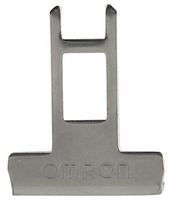
Figure 1: OMRON D4DS-K2 Safety Interlock Switch Key. This image shows the metallic key designed for use with compatible safety interlock switches.
2. Safety Information
Always observe the following safety precautions to prevent injury or damage to the product.
- Ensure the key is used only with OMRON D4DS series safety interlock switches.
- Do not modify or alter the key in any way.
- Store the key in a secure location when not in use to prevent unauthorized access or tampering with safety systems.
- Regularly inspect the key for any signs of wear or damage. Replace immediately if damage is found.
3. Setup
The OMRON D4DS-K2 is a passive component designed to actuate a compatible safety interlock switch. No complex setup is required for the key itself.
- Identify Compatible Switch: Ensure you are using the D4DS-K2 key with an OMRON D4DS series safety interlock switch.
- Inspect Key: Before first use, visually inspect the key for any manufacturing defects or damage.
- Insertion: The key is designed for straightforward insertion into the designated slot of the safety interlock switch.
4. Operating Instructions
The D4DS-K2 key operates by engaging with the internal mechanism of a D4DS series safety interlock switch, typically to enable or disable a safety circuit.
- Insertion: Insert the D4DS-K2 key fully into the key slot of the safety interlock switch. The switch will actuate when the key is correctly inserted and engaged.
- Removal: To disengage the safety circuit, remove the D4DS-K2 key from the switch.
- Function: The key's presence or absence dictates the state of the safety interlock switch, which in turn controls associated machinery or processes. Refer to the specific D4DS switch manual for detailed operational logic.
5. Maintenance
The D4DS-K2 key requires minimal maintenance. Regular inspection is crucial for continued safe operation.
- Cleaning: If necessary, clean the key with a dry, soft cloth. Avoid using abrasive cleaners or solvents that could damage the metal.
- Inspection: Periodically inspect the key for:
- Bending or deformation
- Cracks or fractures
- Excessive wear on the engagement surfaces
- Corrosion or rust
- Replacement: If any damage or significant wear is observed, replace the key immediately with a genuine OMRON D4DS-K2 replacement part.
6. Troubleshooting
Most issues related to the D4DS-K2 key stem from physical damage or incompatibility.
| Problem | Possible Cause | Solution |
|---|---|---|
| Key does not insert smoothly into the switch. | Key is bent or damaged; debris in switch slot; incorrect key for switch model. | Inspect key for damage and replace if necessary. Clean switch slot. Verify key compatibility with the switch. |
| Switch does not actuate when key is inserted. | Key not fully inserted; key is worn; switch malfunction. | Ensure key is fully inserted. Inspect key for wear and replace if needed. If problem persists, inspect the safety interlock switch. |
| Key is difficult to remove. | Key or switch mechanism is damaged or worn. | Inspect key and switch for damage. Do not force removal; this may cause further damage. Consult a qualified technician. |
7. Specifications
| Feature | Detail |
|---|---|
| Model Number | D4DS-K2 |
| Brand | Omron |
| Manufacturer | Omron STI |
| Material | Metal |
| Operation Mode | Manual |
| International Protection Rating | IP54 (Protection against dust and splashing water) |
| Package Dimensions | 6.42 x 3.43 x 0.39 inches |
| Weight | 0.01 ounces (approximately) |
8. Warranty and Support
For warranty information and technical support regarding the OMRON D4DS-K2 Safety Interlock Switch Key, please refer to the official OMRON website or contact your local OMRON representative. Keep your purchase receipt for warranty claims.
OMRON Official Website: www.omron.com


