
Waffletechnology KW3-SFS1B15WS
KICTeam Waffletechnology® Cleaning Cards User Manual
Model: KW3-SFS1B15WS
Introduction
KICTeam Waffletechnology® Cleaning Cards are disposable products designed to safely and effectively clean the internal contact points of electronic devices, particularly document scanners. These cards remove dirt, dust, oils, and other contaminants that can accumulate over time, ensuring optimal device efficiency and preventing costly maintenance or replacement due to failed transactions. Regular cleaning helps maintain image quality and overall scanner performance.

Image: Packaging of KICTeam Waffletechnology® Cleaning Cards, showing the brand logo and product description.
Product Features
- Waffletechnology® Design: Patented waffle-textured surface designed to reach and clean critical sensors and rollers effectively.
- Presaturated: Each card is presaturated with WonderSolvent™, a cleaning solution formulated for safe and efficient contaminant removal.
- Disposable: Designed for single-use application to ensure maximum cleaning efficacy and hygiene.
- Versatile Use: Suitable for various document scanners, including desktop and mobile models.

Image: A close-up view of the Waffletechnology® cleaning card, highlighting its unique textured surface designed for effective cleaning.
Setup
No complex setup is required for KICTeam Waffletechnology® Cleaning Cards. Ensure your scanner is powered on and ready to accept a document. Identify the document feeder slot where you would normally insert paper for scanning.

Image: Illustration showing different types of document scanners, including desktop and mobile models, indicating where the cleaning card can be inserted.
Operating Instructions
Follow these steps to effectively clean your document scanner:
- Power On Scanner: Ensure your document scanner is turned on and in a ready state.
- Open Cleaning Card Packet: Carefully open one individual packet of the KICTeam Waffletechnology® Cleaning Card.
- Insert Card: Insert the cleaning card into the document feeder of your scanner, just as you would a regular document.
- Initiate Scan: Start a scan cycle. The scanner will feed the cleaning card through its rollers and sensors. The unique waffle design will apply pressure and clean the internal components.
- Repeat if Necessary: For heavily soiled scanners, you may need to repeat the process with a new cleaning card.
- Allow Drying: After cleaning, allow a few moments for any residual cleaning solution to evaporate before resuming normal scanning operations.
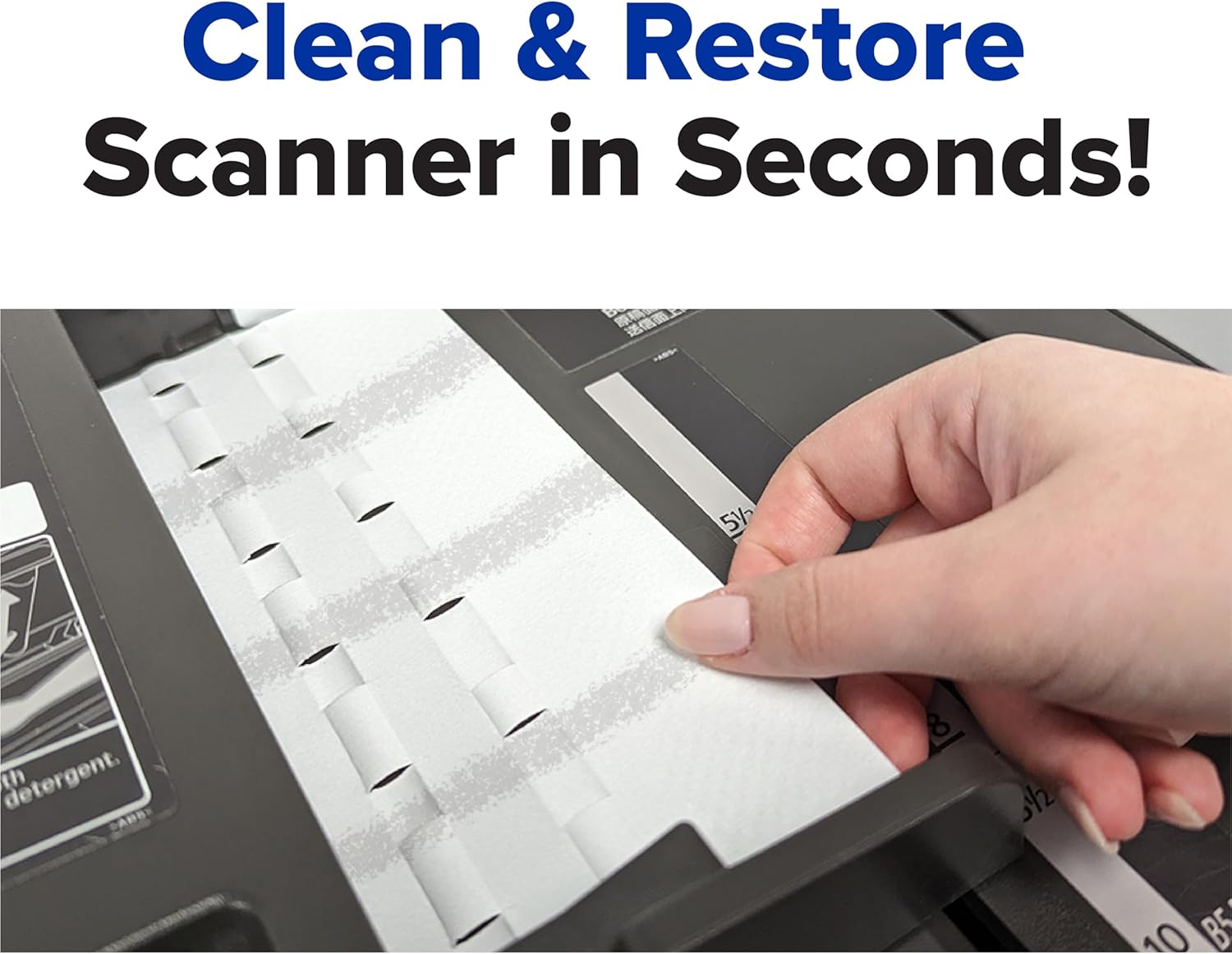
Image: A hand demonstrating the insertion of a Waffletechnology® cleaning card into the document feeder of a scanner, illustrating the cleaning process.

Image: A user operating a document scanner, symbolizing the improved scanning quality and performance achieved through regular cleaning with the cards.
Maintenance
While the cleaning cards themselves are disposable, regular use is key to maintaining your scanner. It is recommended to clean your scanner's feed rollers and optical sensors once a week, especially for high-volume usage, or whenever you notice a degradation in scan quality (e.g., streaks, smudges, or misfeeds).
Store unused cleaning cards in their original sealed packaging in a cool, dry place to prevent premature drying of the WonderSolvent™.
Troubleshooting
- Scanner still producing streaks/smudges:
Solution: The scanner may be heavily soiled. Repeat the cleaning process with a new cleaning card. Ensure the card is fed through all relevant paths of the scanner. For some scanners, you may need to manually guide the card or run multiple cycles.
- Cleaning card gets stuck:
Solution: Carefully remove the card. Check for any obstructions in the scanner's paper path. Ensure the card is inserted straight. If the card is too wet, allow it to air dry slightly before re-inserting, or use a fresh card.
- Card not feeding through:
Solution: Ensure the scanner is powered on and in a ready state. Verify that the card is inserted correctly into the feeder. Some scanners may require a specific setting or mode for cleaning cards; consult your scanner's manual if issues persist.
Specifications
| Feature | Detail |
|---|---|
| Brand | Waffletechnology® |
| Model Number | KW3-SFS1B15WS |
| Product Dimensions (L x W x H) | 27.94 x 3.05 x 21.59 cm (11 x 1.2 x 8.5 inches) |
| Item Weight | 318 g (0.7 lbs) |
| Material Type | Paper |
| Units per Item | 15 cards |
| Sheet Size | A4, Letter |
| UPC | 644218191824 |

Image: Diagram illustrating the dimensions of the Waffletechnology® cleaning card, showing its length and width.
Warranty Information
Specific warranty details for KICTeam Waffletechnology® Cleaning Cards are not provided in this manual. For information regarding product warranty, please refer to the product packaging or contact the manufacturer directly. As a disposable cleaning product, typical warranties may cover manufacturing defects but not wear and tear from use.
Support
For further assistance or inquiries regarding KICTeam Waffletechnology® Cleaning Cards, please contact the manufacturer or your product retailer. You may find additional support resources on the official KICTeam website.
Manufacturer: United Banking Supplies, Inc.