
Introduction
This manual provides essential information for the safe and effective use of your Gemmy Airblown Inflatable Outdoor Movie Screen. Please read all instructions carefully before setup and operation to ensure proper functionality and longevity of the product. This screen is designed to create a large, widescreen viewing area for movies, TV shows, and presentations in an outdoor setting.
Setup Instructions
Follow these steps to set up your inflatable movie screen:
- Unpack Components: Remove the inflatable screen, blower fan, tethers, yard stakes, and storage bag from the packaging.
- Choose a Location: Select a flat, clear area outdoors, free from sharp objects or debris. Ensure there is sufficient space for the screen's dimensions (approximately 138"W x 144"H when inflated).
- Lay Out the Screen: Unfold the inflatable screen completely on the chosen surface. Ensure the screen material is facing the desired viewing direction.
- Connect the Blower: Locate the air intake opening on the inflatable screen and securely attach the included blower fan. Ensure the connection is tight to prevent air leakage.
- Inflate the Screen: Plug the blower fan into a grounded outdoor electrical outlet. The screen will begin to inflate rapidly. During inflation, gently guide any folded sections of the inflatable frame to ensure they expand correctly. Full inflation typically occurs within minutes.
- Attach Screen Material: The white screen material attaches to the inflatable frame using strong Velcro strips. Ensure all Velcro connections are securely fastened to achieve a taut, wrinkle-free viewing surface.
- Secure with Stakes and Tethers: Use the provided yard stakes and tethers to anchor the inflatable screen to the ground. Attach tethers to the designated loops on the screen and secure them with stakes to prevent movement, especially in light wind conditions.
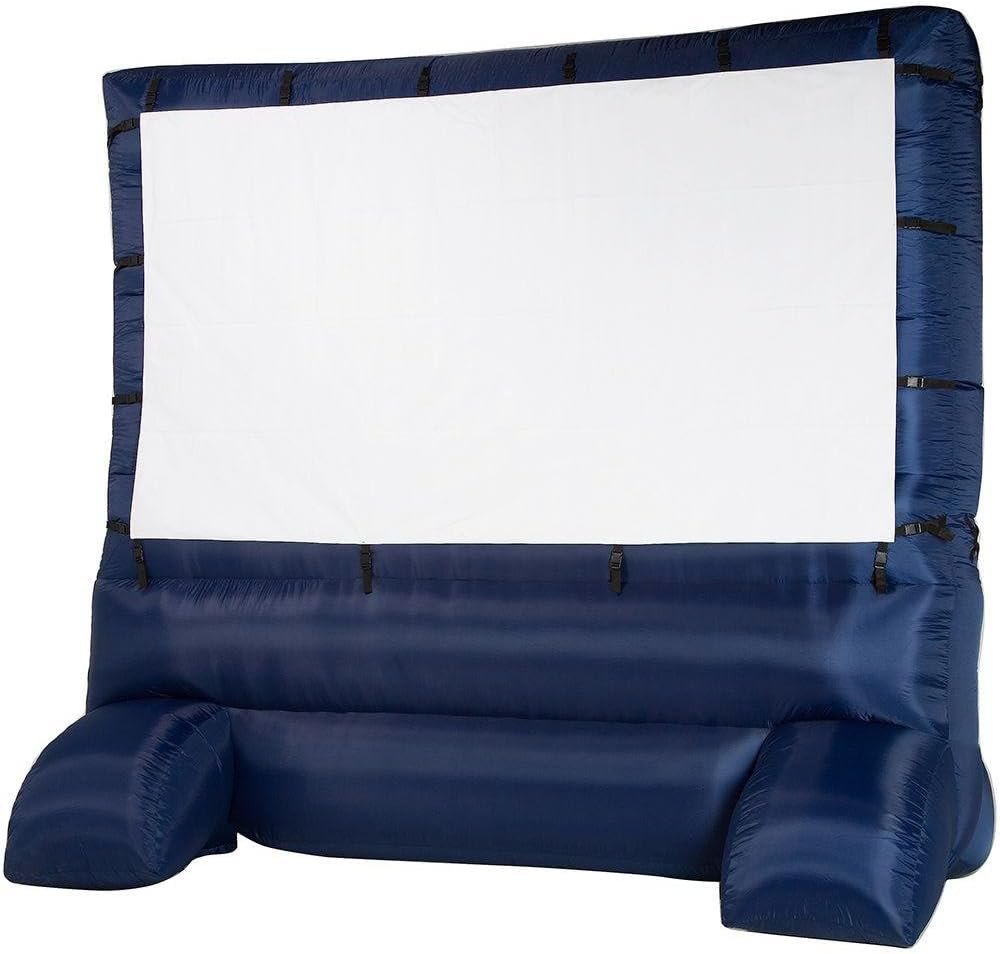
Image: The Gemmy Airblown Inflatable Outdoor Movie Screen fully inflated and ready for use in a backyard.

Image: The inflatable movie screen positioned outdoors near a swimming pool, showcasing its large size.

Image: A visual representation of the screen's diagonal measurement, indicating its substantial viewing area.
Operating Instructions
Once the screen is fully inflated and secured, you can begin your outdoor viewing experience:
- Projector Placement: Position your projector at an appropriate distance and angle to fill the 120"x70" (16:9 aspect ratio) screen area. Adjust the projector's focus and keystone correction as needed for a clear image.
- Audio Setup: Connect your audio system to the projector or media player for sound. The integrated blower fan operates quietly, minimizing distraction during viewing.
- Viewing Experience: While some minor wrinkles may be visible on the screen material when unlit, they typically become unnoticeable once a movie or image is projected, providing a clear and immersive viewing experience.
Maintenance
Proper care will extend the life of your inflatable movie screen:
- Cleaning: Clean the screen material with a soft, damp cloth and mild soap. Avoid harsh chemicals or abrasive cleaners. Ensure the screen is completely dry before storage.
- Deflation: To deflate, simply unplug the blower fan. The screen will quickly lose air.
- Storage: Once deflated and dry, carefully fold the screen and its components. Store them in the provided storage bag in a cool, dry place away from direct sunlight and extreme temperatures. Consider using a plastic storage tub for easier packing and better protection.
Troubleshooting
Here are solutions to common issues:
- Screen Not Inflating: Ensure the blower fan is securely attached to the air intake and plugged into a working electrical outlet. Check for any obstructions in the blower or tears in the inflatable material.
- Screen Appears Wrinkled: Ensure the screen material is tightly fastened to the inflatable frame using all Velcro strips. Minor wrinkles are normal for inflatable screens and typically do not affect the projected image quality during viewing.
- Screen Instability in Wind: Always use the provided tethers and yard stakes to secure the screen. For added stability, ensure the inflatable tubes are properly aligned during inflation. Avoid using the screen in heavy winds.
- Blower Noise: The integrated blower is designed to be quiet. If noise is excessive, ensure the blower is on a stable, flat surface and free from obstructions.
Specifications
| Screen Dimensions (Viewing Area) | 123" x 70" (144" Diagonal) |
| Aspect Ratio | 16:9 |
| Overall Inflated Dimensions | 138"W x 144"H |
| Material | Vinyl (Upgraded thick air blown fabric) |
| Power Source | Corded Electric (Includes 2 Built-in fans) |
| Item Weight | 11.7 pounds |
| Packaged Dimensions | 21.5 x 16 x 15.5 inches |
| Mounting Type | Stakes |
Warranty
For specific warranty details, please refer to the documentation provided with your product or contact Gemmy customer support. Extended protection plans may be available through your retailer.
Support
For further assistance or inquiries, please contact Gemmy customer service or visit the official Gemmy website. The manufacturer of this product is Arett Sales - LG.
