
Kester 24-7068-7601
Kester 24-7068-7601 Solder Wire Instruction Manual
Model: 24-7068-7601 | Brand: Kester
1. Introduction
This manual provides essential information for the safe and effective use of Kester 24-7068-7601 Solder Wire. This product is a high-quality, lead-free solder designed for various electronic and industrial soldering applications. It features a Sn96.5Ag3.0Cu0.5 alloy composition and a No-Clean flux type, making it suitable for processes where post-soldering residue cleaning is not desired.
2. Safety Information
WARNING: FOR INDUSTRIAL USE ONLY.
This product may expose you to chemicals including lead, which is known to the State of California to cause cancer and birth defects or other reproductive harm. For more information go to www.P65Warnings.ca.gov.
Always read and understand the Safety Data Sheet (SDS) for Kester 24-7068-7601 Solder Wire before handling or using this product. The SDS contains detailed information on potential hazards, safe handling procedures, personal protective equipment (PPE), and emergency measures.
When soldering, ensure adequate ventilation to avoid inhaling fumes. Use appropriate personal protective equipment, including safety glasses or goggles, and heat-resistant gloves. Avoid direct contact with molten solder. Wash hands thoroughly after handling.
There are no known significant effects or critical hazards associated with this product when used as directed and in accordance with safety guidelines.
3. Setup and Storage
Upon receiving the Kester 24-7068-7601 Solder Wire, inspect the packaging for any damage. Store the solder wire in its original packaging in a cool, dry environment, away from direct sunlight and sources of heat or moisture. Proper storage helps maintain the solder's integrity and performance over time.
The product is supplied on a spool, ready for use with standard soldering equipment.
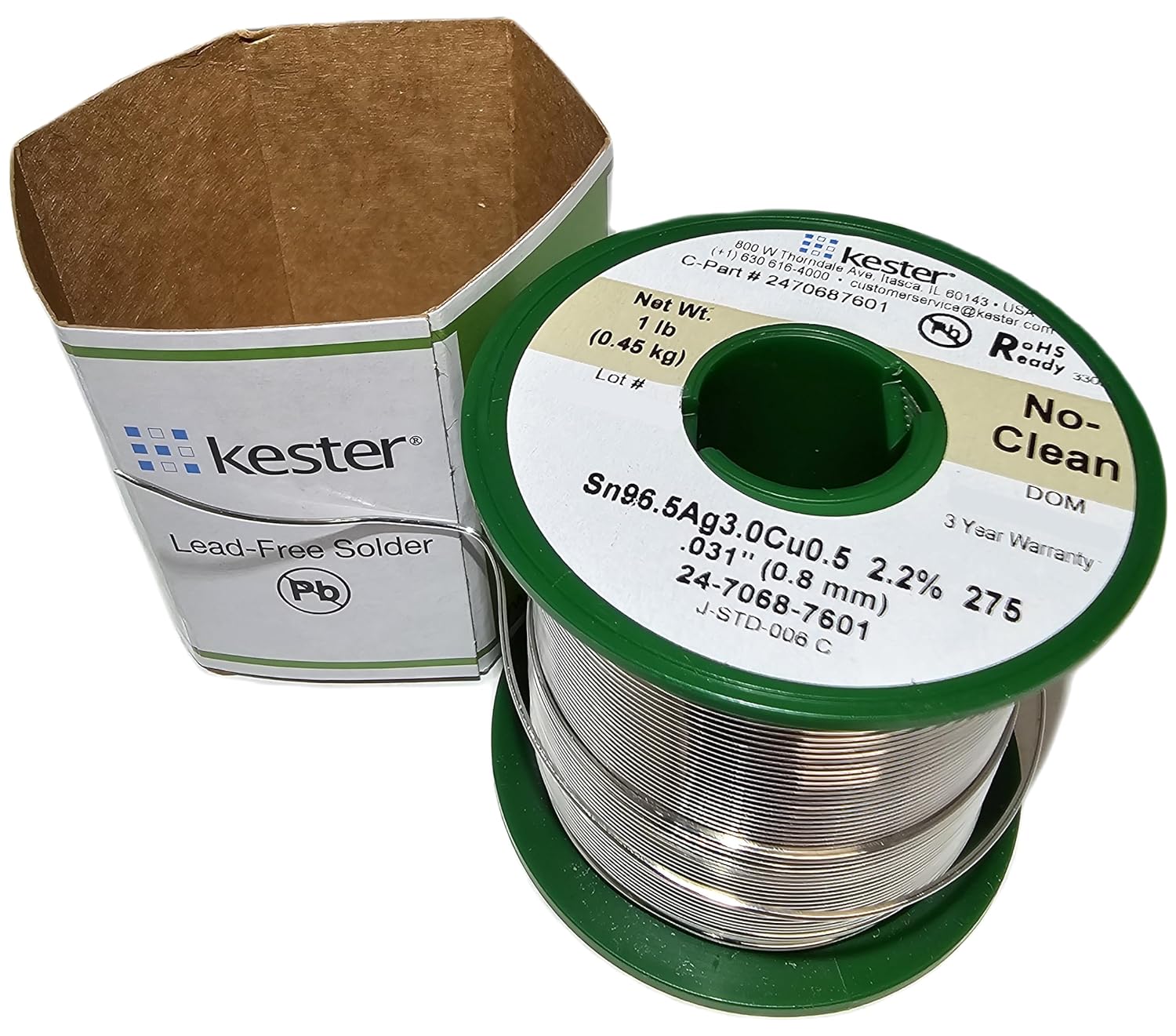
Figure 3.1: Kester 24-7068-7601 Solder Wire spool removed from its packaging.
4. Operating Instructions
Kester 24-7068-7601 is a lead-free solder alloy (Sn96.5Ag3.0Cu0.5) with a melting point of 217°C. Due to its lead-free composition, it typically requires higher soldering temperatures compared to traditional leaded solders. The recommended soldering iron tip temperature will vary depending on the application, component size, and thermal mass, but generally ranges from 350°C to 400°C (662°F to 752°F).
This solder wire incorporates a No-Clean flux, which means that the residues left after soldering are non-corrosive and do not require removal for most applications. This simplifies the post-soldering process.

Figure 4.1: Kester 24-7068-7601 Solder Wire in its original packaging, showing key product details.
4.1. Soldering Process
- Prepare Surfaces: Ensure all surfaces to be soldered are clean, free of oxidation, dirt, and grease.
- Heat Joint: Apply the heated soldering iron tip to both the component lead and the PCB pad simultaneously to heat them to the proper soldering temperature.
- Apply Solder: Once the joint reaches temperature, feed the Kester 24-7068-7601 solder wire into the joint, allowing it to flow around the heated surfaces. Do not apply solder directly to the iron tip.
- Remove Solder and Iron: Remove the solder wire first, then the soldering iron, ensuring the joint solidifies without disturbance.
- Inspect Joint: A good solder joint will appear shiny and smooth, with a concave fillet.
5. Maintenance
To ensure the longevity and performance of your Kester 24-7068-7601 Solder Wire, always return the spool to its protective packaging after use. Avoid exposing the solder wire to high humidity or corrosive environments, which can lead to oxidation and degrade its soldering properties. Handle the wire carefully to prevent kinks or damage to the spool.
6. Troubleshooting
While Kester solder wire is designed for reliable performance, issues can sometimes arise. Here are common troubleshooting tips for lead-free soldering:
- Poor Wetting / Cold Joints: This often indicates insufficient heat. Increase the soldering iron tip temperature or use a tip with higher thermal mass. Ensure the surfaces are clean.
- Excessive Solder / Bridging: Use less solder. Ensure proper tip size and technique to avoid applying too much material.
- Dull, Grainy Joints: This can be normal for some lead-free alloys, but if excessively dull or brittle, it might indicate insufficient heat or movement during solidification.
- Oxidation on Wire: If the wire appears dull or discolored, the outer layer may be oxidized. This can affect flow. Ensure proper storage.
7. Specifications
| Attribute | Value |
|---|---|
| Model Number | 24-7068-7601 |
| Brand | Kester |
| Alloy Composition | Sn96.5Ag3.0Cu0.5 |
| Melting Point | 217°C (422.6°F) |
| Net Weight | 1 lb (0.45 kg) |
| Diameter | .031" (0.8 mm) |
| Flux Type | No-Clean |
| ROHS Compliant | Yes |
| Country of Origin | United States |
| Package Dimensions | 2.5 L x 2.5 H x 2.5 W (inches) |
| Package Weight | 1.0 pounds |
| Color | Kester "Green" Label |

Figure 7.1: Detailed view of the solder spool label, showing alloy composition, diameter, and other specifications.
8. Warranty and Support
Kester 24-7068-7601 Solder Wire comes with a 3-Year Warranty from the date of manufacture (DOM), as indicated on the product label.
For technical support, product inquiries, or to obtain the latest Safety Data Sheet (SDS), please contact Kester directly:
- Manufacturer: Kester (Alpha Assembly Solutions)
- Address: 800 W Thorndale Ave, Itasca, IL 60143, USA
- Phone: +1 (630) 616-4000
- Customer Service Email: customerservice@kester.com
- Emergency Phone: +1 (202) 464-2554
Please have your product model number (24-7068-7601) and Lot # (if available on your spool) ready when contacting support.
Ask a question about this manual
Ask about setup, troubleshooting, compatibility, parts, safety, or missing instructions. Manuals+ will review the question and use this page’s manual context to help answer it.