
1. Introduction
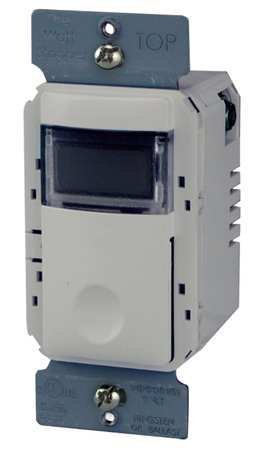
This manual provides comprehensive instructions for the installation, operation, and maintenance of the Wattstopper TS-400-W Digital Time Switch. Please read this manual thoroughly before installation and use to ensure proper function and safety.
2. Safety Information
WARNING: RISK OF ELECTRIC SHOCK. Improper installation can lead to serious injury or death. Always turn off power at the circuit breaker or fuse box before installing or servicing this device.
- Installation should be performed by a qualified electrician in accordance with all national and local electrical codes.
- Do not use this device with loads exceeding its specified ratings.
- Ensure all wire connections are secure and properly insulated.
- This device is for indoor use only.
3. Package Contents
Verify that your package contains the following items:
- Wattstopper TS-400-W Digital Time Switch
- Mounting Screws
- Wire Nuts
4. Setup and Installation
The TS-400-W is designed for in-wall switch box mounting. Follow these steps for safe and correct installation:
- Turn Off Power: Locate the circuit breaker or fuse that supplies power to the switch box and turn it off. Verify power is off using a voltage tester.
- Remove Existing Switch: Carefully remove the wall plate and unscrew the existing switch from the wall box. Disconnect the wires from the old switch, noting their connections.
- Wire the TS-400-W: Connect the wires to the TS-400-W according to the wiring diagram provided with the product. Typically, this involves Line (hot), Load, and Ground connections. The TS-400-W supports 120/277 VAC, 50/60 Hz.
- Mount the Switch: Gently fold the wires into the wall box and secure the TS-400-W to the wall box using the provided mounting screws. Ensure the switch is oriented correctly (the 'TOP' marking on the mounting strap should be at the top).
- Install Wall Plate: Attach the new or existing wall plate over the installed switch.
- Restore Power: Turn the power back on at the circuit breaker or fuse box.
5. Operating Instructions
The TS-400-W is a digital time switch designed for automated control of lighting and other loads. It features a 12-hour preset time switch functionality.
5.1 Initial Power-Up
Upon initial power-up, the display will illuminate. You may need to set the current time and date before programming any schedules.
5.2 Setting Current Time and Date
Refer to the detailed instructions included in the product packaging for specific button sequences to set the current time (hour, minute, AM/PM) and date (month, day, year). This typically involves pressing and holding a 'SET' or 'PROGRAM' button, then using arrow or increment/decrement buttons to adjust values.
5.3 Programming Schedules
The TS-400-W allows for programming ON/OFF schedules. You can typically set multiple events per day or week. Consult the full programming guide for detailed steps on:
- Entering programming mode.
- Selecting days of the week for a program.
- Setting ON and OFF times for each event.
- Saving programs.
5.4 Manual Override
Most digital time switches include a manual override function, often activated by a single press of the main control button. This allows you to temporarily turn the connected load ON or OFF without affecting the programmed schedule.
6. Maintenance
The Wattstopper TS-400-W Digital Time Switch requires minimal maintenance.
- Cleaning: To clean the device, wipe the surface with a soft, damp cloth. Do not use abrasive cleaners, solvents, or spray directly onto the switch.
- Inspection: Periodically inspect the switch for any visible damage or loose connections. If any issues are found, turn off power and consult a qualified electrician.
7. Troubleshooting
| Problem | Possible Cause | Solution |
|---|---|---|
| Switch does not power on. | No power at the circuit breaker; incorrect wiring. | Check circuit breaker/fuse. Verify wiring connections are secure and correct. |
| Load does not turn ON/OFF as programmed. | Incorrect program settings; manual override active. | Review and correct program settings. Deactivate manual override if active. |
| Display is blank or flickering. | Power fluctuation; internal fault. | Turn off power at the breaker for 5 minutes, then restore. If problem persists, contact support. |
8. Specifications
- Part Number: 754182913725
- Type: Digital Time Switch, InteliSwitch
- Voltage: 120/277 VAC; 50/60 Hz
- Load Capacity: 0-800W (ELV), 0-1200W (Motor Loads)
- Color: White
- Mounting: Wall Switch
- Dimensions: Approximately 2 x 2 x 2 inches (Package Dimensions)
- Item Weight: 1 Pound
- Manufacturer: PER - Wattstopper
- UPC: 696498312734
9. Warranty and Support
For warranty information and technical support, please refer to the documentation included with your product or visit the official Watt Stopper website. Keep your purchase receipt as proof of purchase.