
1. Introduction
This manual provides essential information for the safe and efficient use of your Global Industrial Mobile Computer Cabinet, Model 694561. This robust, mobile workstation is designed to securely house computer equipment in various industrial and office environments. Please read these instructions thoroughly before assembly and operation to ensure proper functionality and longevity of the product.

Figure 1.1: The Global Industrial Mobile Computer Cabinet, Model 694561, shown with a monitor, keyboard, printer, and CPU, demonstrating its storage capabilities. The cabinet is blue with a pull-out keyboard tray and a lower compartment with a hinged door.
2. Safety Information
Always observe the following safety precautions to prevent injury or damage to the product.
- Weight Capacity: Do not exceed the recommended weight capacity for shelves and the overall cabinet. Distribute weight evenly.
- Stability: Ensure all casters are locked when the cabinet is stationary to prevent unintended movement.
- Assembly: Some assembly is required. Follow all assembly instructions carefully. Use appropriate tools and ensure all fasteners are securely tightened.
- Movement: When moving the cabinet, ensure all doors are closed and locked, and the path is clear of obstructions. Move slowly and carefully, especially on uneven surfaces.
- Electrical Safety: When installing electrical equipment, ensure proper cable management to prevent tripping hazards and damage to wires. Utilize the provided wire ties and mounting holes.
- Pinch Points: Be aware of pinch points when opening and closing doors and the keyboard tray.
3. Package Contents
Verify that all components are present and undamaged before beginning assembly. If any parts are missing or damaged, contact Global Industrial customer support.
- Cabinet Body (1)
- Adjustable CPU Shelf (1)
- Fixed Middle Shelf (1)
- Slide-out Keyboard Tray with Wrist Rest (1)
- 5" Polyolefin Casters (4) - 2 swivel with brakes, 2 rigid
- Locking Mechanism with Keys (1 set)
- Assembly Hardware (screws, nuts, washers, etc.)
- Wire Ties
4. Assembly Instructions
Some assembly is required. It is recommended to have two people for assembly due to the cabinet's weight (approximately 160.6 lbs).
- Attach Casters: Carefully lay the cabinet on its side or back on a protective surface. Attach the four 5" polyolefin casters to the base of the cabinet using the provided hardware. Ensure the two swivel casters with brakes are positioned at the front for easier maneuverability and locking.
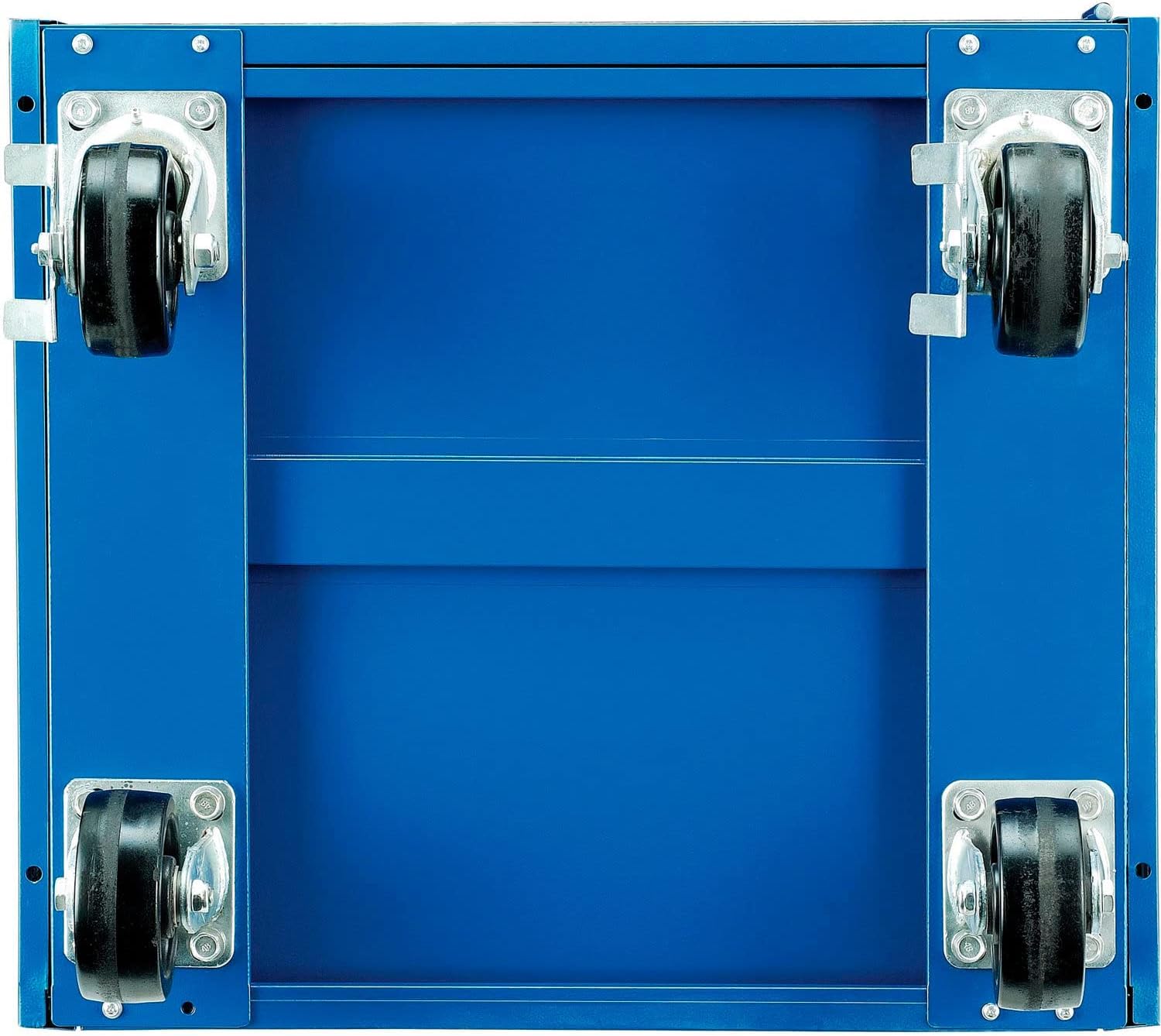
Figure 4.1: View of the cabinet's underside with casters installed. Two casters include locking mechanisms.
- Install Fixed Middle Shelf: Position the fixed middle shelf into the designated slots within the cabinet's interior. This shelf provides 11-1/2"H of space, suitable for a printer or other peripherals.

Figure 4.2: The cabinet interior showing the fixed middle shelf and the adjustable CPU shelf below.
- Install Adjustable CPU Shelf: The lower compartment features an adjustable CPU shelf. Install this shelf at the desired height to accommodate either tower or desktop style CPUs. The lower compartment measures 24-5/8"W x 22-7/8"D x 22-5/8"H.
- Install Slide-out Keyboard Tray: Mount the slide-out keyboard tray into its designated position. This tray includes a comfortable wrist rest area and measures 23"W x 21"D.

Figure 4.3: The mobile computer cabinet with its keyboard tray extended, ready for use.
- Cable Management: Utilize the rear cabinet access-holes and provided wire ties and mounting holes for tidy cable management. This helps prevent cable damage and tripping hazards.

Figure 4.4: Rear view of the cabinet highlighting the circular access holes for cable routing.
- Secure Doors: Ensure the locking mechanism is properly installed and functional. Test the lock with the provided keys.

Figure 4.5: Detail of the secure locking mechanism on the cabinet door.
5. Operation
The Global Industrial Mobile Computer Cabinet is designed for ease of use and secure storage.
- Positioning: Place the cabinet in a desired location. For stability, engage the brakes on the two swivel casters.
- Accessing Equipment:
- The top surface is 47-3/4"H for convenient monitor viewing and has 1-1/2"H back and end-stops to keep items from rolling off.
- Slide out the keyboard tray for keyboard and mouse access.
- Open the lower compartment door to access the CPU and other stored items. Use the key to unlock if secured.
- Mobility: To move the cabinet, unlock the caster brakes. Ensure all doors are securely closed and locked before moving. Push the cabinet slowly and steadily to its new location, then re-engage the caster brakes.
6. Maintenance
Regular maintenance ensures the longevity and optimal performance of your cabinet.
- Cleaning: Wipe down the painted alloy steel surfaces with a damp cloth and mild detergent. Avoid abrasive cleaners that could damage the finish.
- Caster Inspection: Periodically check casters for debris accumulation and ensure they roll freely. Lubricate if necessary. Verify that brakes engage properly.
- Lock Mechanism: Ensure the lock operates smoothly. Lubricate with graphite powder if it becomes stiff.
- Fastener Check: Periodically inspect all screws and bolts to ensure they remain tight. Retighten as needed.
7. Troubleshooting
| Problem | Possible Cause | Solution |
|---|---|---|
| Cabinet difficult to move | Caster brakes engaged; debris in casters; casters require lubrication. | Disengage brakes. Clean casters. Apply lubricant to caster axles. |
| Door not locking properly | Lock mechanism obstructed; key bent or damaged; lock requires lubrication. | Check for obstructions. Use original key. Apply graphite powder to lock. |
| Keyboard tray sticks | Debris in slides; slides require lubrication. | Clean slides. Apply silicone lubricant to slides. |
| Cabinet feels unstable | Caster brakes not engaged; uneven load distribution; loose fasteners. | Engage caster brakes. Redistribute contents evenly. Tighten all fasteners. |
8. Specifications
| Feature | Detail |
|---|---|
| Model Number | 694561 |
| Brand | Global Industrial |
| Dimensions (Overall) | 27" W x 24" D x 49.25" H |
| Material | Alloy Steel |
| Color | Blue |
| Item Weight | 160.6 Pounds |
| Lower Compartment Dimensions | 24-5/8" W x 22-7/8" D x 22-5/8" H (lockable) |
| Middle Shelf Height | 11-1/2" H (fixed) |
| Keyboard Tray Dimensions | 23" W x 21" D (slide-out with wrist rest) |
| Top Surface Height | 47-3/4" H (with 1-1/2" H back and end-stops) |
| Casters | 5" Polyolefin (2 swivel with brakes, 2 rigid) |
| Assembly Required | Yes |
| UPC | 707022125185 |

Figure 8.1: Dimensional drawing of the Global Industrial Mobile Computer Cabinet, showing its height (49.25"), depth (24"), and width (27").
9. Warranty and Support
For warranty information or technical assistance, please contact Global Industrial customer support. Refer to your purchase documentation for specific warranty terms and conditions.
You can typically find support contact information on the Global Industrial website or through your original point of purchase.
Online Resources: For additional product information and support, visit the official Global Industrial website.