
PHILIPS DPM8000
Philips DPM-8000 Professional Digital Pocket Memo User Manual
Model: DPM8000
Introduction
This manual provides detailed instructions for the Philips DPM-8000 Professional Digital Pocket Memo. It covers device setup, operational procedures, maintenance guidelines, troubleshooting steps, and technical specifications to ensure optimal use of your digital voice recorder.
The DPM-8000 is designed for professional dictation, featuring advanced microphone technology and an ergonomic design for efficient recording and playback.
1. Setup
1.1 Unpacking and Package Contents
Carefully unpack all items from the box. Ensure the following components are present:
- Philips DPM-8000 Digital Pocket Memo
- Battery
- Docking Station
- USB Cable
- SpeechExec Software (on CD/DVD)

Figure 1: Philips DPM-8000 package contents. This image displays the digital voice recorder, its docking station, a rechargeable battery, a USB cable, and the SpeechExec software disc, along with documentation.
1.2 Battery Installation
The DPM-8000 uses a Lithium Polymer battery. To install the battery:
- Locate the battery compartment on the back of the device.
- Slide the battery compartment cover open.
- Insert the battery, ensuring the contacts align correctly.
- Close the battery compartment cover.

Figure 2: Battery installation. The image shows the rear of the DPM-8000 with the battery cover removed and the battery being inserted into its slot.
1.3 Charging the Device
Before first use, fully charge the device. Place the DPM-8000 into the docking station, then connect the docking station to a power source using the USB cable. The charging indicator on the docking station will illuminate.

Figure 3: Device in docking station. The DPM-8000 is shown upright in its white docking station, indicating it is ready for charging or data transfer.
1.4 Software Installation (SpeechExec Pro)
The SpeechExec Pro software is included for managing dictations and integrating with speech recognition applications. Install the software from the provided CD/DVD. For systems without an optical drive, Philips may offer downloadable ISO images; refer to the Philips support website for instructions on mounting and installing these files.
System Requirements:
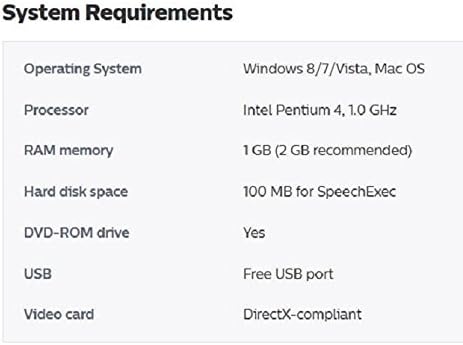
Figure 4: System Requirements. This image displays a table detailing the minimum system requirements for installing and running the associated software, including operating system, processor, RAM, hard disk space, and USB port availability.
- Operating System: Windows 8/7/Vista, Mac OS
- Processor: Intel Pentium 4, 1.0 GHz or higher
- RAM: 1 GB (2 GB recommended)
- Hard Disk Space: 100 MB for SpeechExec
- DVD-ROM drive: Required for CD/DVD installation
- USB: Free USB port
- Video card: DirectX-compliant
2. Operating the Device
2.1 Power On/Off
Locate the power switch on the side of the device. Slide it to the "On" position to power on, and to "Off" to power off. The device also features a motion sensor that automatically enters standby mode when idle and reactivates when picked up.
2.2 Recording Dictations
The DPM-8000 features a 3D microphone system designed for optimal audio quality in various environments. It includes an omnidirectional microphone for 360-degree sound pickup (suitable for meetings) and a unidirectional microphone optimized for single-voice recording.

Figure 5: Recording interface. The device's screen shows recording status, file name, and time elapsed, with visible record and playback buttons.
- Select Microphone Mode: The motion sensor automatically adjusts microphone settings. For specific scenarios, you can manually select the desired microphone mode via the device menu.
- Start Recording: Use the wear-free slide switch on the side of the device to initiate recording. Slide it to the "Record" position.
- Pause/Stop Recording: Slide the switch to "Stop" to pause or end the recording.
- Editing Functions: The slide switch also allows for easy file editing, including insert, overwrite, and append functions.

Figure 6: Slide switch. This image highlights the ergonomic slide switch on the side of the DPM-8000, used for controlling recording and playback.
2.3 Playback
To play back a recorded dictation:
- Navigate to the desired file using the navigation buttons.
- Press the "Play" button or slide the switch to the "Play" position.

Figure 7: Playback interface. The screen shows a visual representation of a tape reel during playback, along with audio level indicators.
2.4 File Management and Transfer
Connect the DPM-8000 to your computer via the USB cable or docking station. Use the SpeechExec Pro software to organize, transfer, and process your dictation files. The device has 32 GB of internal memory.
2.5 Integration with Speech Recognition Software
The DPM-8000 is designed for integration with professional speech recognition software, such as Dragon Professional, Legal, and Medical. The SpeechExec Pro software facilitates this integration, allowing for efficient transcription of recorded dictations.
3. Maintenance
3.1 General Care
- Keep the device clean by wiping it with a soft, dry cloth. Avoid abrasive cleaners or solvents.
- Protect the device from extreme temperatures, direct sunlight, dust, and moisture.
- Avoid dropping the device or subjecting it to strong impacts.
3.2 Battery Care
- To prolong battery life, avoid fully discharging the battery frequently.
- If the device will not be used for an extended period, store it with a partial charge (around 50%).
- Use only the specified Philips battery (ACC8100) for replacement.
4. Troubleshooting
4.1 Common Issues and Solutions
| Problem | Possible Cause | Solution |
|---|---|---|
| Device does not power on. | Battery is discharged or not installed correctly. | Charge the battery. Ensure the battery is correctly inserted. |
| Poor recording quality. | Incorrect microphone setting or environmental noise. | Adjust microphone settings (omnidirectional for meetings, unidirectional for single voice). Reduce background noise. |
| Software activation code not working. | Code already used or incorrect entry. | Verify the activation code. Contact Philips support if the issue persists. |
| Voice activation feature is inconsistent. | Microphone sensitivity or distance from speaker. | Ensure the microphone is close to the speaker. Adjust microphone sensitivity settings in the device menu. |
| Cannot transfer files to computer. | USB connection issue or software not recognized. | Ensure USB cable is securely connected. Reinstall SpeechExec Pro software. Check computer's USB ports. |
5. Specifications
| Feature | Detail |
|---|---|
| Product Dimensions | 2.09 x 0.59 x 4.84 inches |
| Item Weight | 1.3 pounds |
| Model Number | DPM8000 |
| Batteries | 1 Lithium Polymer battery required |
| Manufacturer | Philips |
| Compatible Devices | GearPlayer Transcription Software, Philips Transcription Kit 7277 |
| Hardware Interface | USB |
| Microphone Form Factor | Built-In |
| Headphones Jack | 3.5 millimeters |
| Memory Storage Capacity | 32 GB |
| Screen Size | 2.4 Inches |
| Digital Recording Time | 62.5 hours |
6. Warranty and Support
6.1 Product Warranty
This product is covered by a manufacturer's warranty. Please refer to the warranty documentation included with your purchase for specific terms and conditions. A 30-day return policy is typically offered by retailers for new purchases.
For information regarding extended protection plans, consult your retailer at the time of purchase.
6.2 Customer Support
For technical assistance, software updates, or further inquiries, please visit the official Philips support website or contact their customer service department. Ensure you have your product model number (DPM8000) and purchase details available when seeking support.
Related Documents - DPM8000
 |
Philips SpeechExec Basic Transcribe 11.5 User Manual Comprehensive user manual for Philips SpeechExec Basic Transcribe 11.5 software, covering installation, features, hardware compatibility, and troubleshooting for dictation and transcription workflows. |
 |
Philips DPM6000 Digital Pocket Memo User Manual This document provides comprehensive instructions for using the Philips DPM6000 Digital Pocket Memo voice recorder, covering setup, operation, settings, and troubleshooting. |
 |
Philips Pocket Memo LFH9375 User Manual Comprehensive user manual for the Philips Pocket Memo LFH9375 digital voice recorder, covering setup, operation, recording, playback, software integration, and technical specifications. |
 |
Philips Professional Displays Service und Support Informationen Umfassende Service- und Supportinformationen für Philips Professional Displays, einschließlich Garantiebedingungen, Dead on Arrival (DOA) Verfahren und Kontaktdaten für Philips und Stilus AG. |
 |
Philips 42M2N8900 OLED Monitor User Manual: Setup, Features, and Support Comprehensive user manual for the Philips 42M2N8900 OLED monitor, covering setup, operation, image optimization, connectivity, troubleshooting, and warranty information. |
 |
Philips TAT8506 Headphones User Manual: Setup, Features, and Support Download the official user manual for Philips TAT8506 True Wireless Earbuds. Find setup instructions, feature guides, technical specifications, safety information, and troubleshooting tips. |