

1. Introduction
Welcome to the user manual for your new Epik One Boulder RS550 smartphone. This device is engineered for durability and performance, designed to withstand challenging environments while providing a seamless user experience. The Boulder RS550 is a rugged, waterproof, and dustproof smartphone, featuring advanced capabilities for communication and multimedia.

Image 1.1: The Epik One Boulder RS550, highlighting its robust design.
2. Getting Started: Initial Setup
2.1. Package Contents
Before you begin, please ensure all items are present in your package:
- Epik One Boulder RS550 Smartphone
- USB Charging Cable
- Power Adapter
- User Manual (this document)
2.2. SIM Card and MicroSD Card Installation
The Epik One Boulder RS550 supports dual SIM cards and a MicroSD card for expandable storage. Locate the SIM/MicroSD card tray on the side of the device. Use the provided SIM ejector tool to open the tray. Carefully place your Nano-SIM cards and MicroSD card into the designated slots, ensuring correct orientation. Gently push the tray back into the device until it clicks into place.
2.3. Charging the Device
Before first use, fully charge your Epik One Boulder RS550. Connect the USB charging cable to the phone's charging port and the other end to the power adapter. Plug the adapter into a wall outlet. The battery indicator on the screen will show charging progress. The device features a 3600mAh Li-Poly battery, providing extended usage times.
3. Operating Your Smartphone
3.1. Power On/Off
To power on, press and hold the Power button located on the side of the device until the screen lights up. To power off, press and hold the Power button, then select "Power off" from the options that appear on the screen.
3.2. Screen Navigation
The device features a 5.5-inch IPS LCD touchscreen with USA Corning Gorilla Glass 3rd Generation cover, offering durability and clear visibility even under strong light. Navigate the interface using touch gestures: tap to select, swipe to scroll, pinch to zoom.
3.3. Camera Functions
The Epik One Boulder RS550 is equipped with a 13MP main camera and an 8MP selfie camera. It supports various photography modes, including Panorama Shot, Filter, HDR, Second Beats, Continuous Shooting, and Autofocus. A unique feature is its ability to take photos underwater, thanks to its IP68 waterproof rating.

Image 3.1: Underwater photography capability of the Epik One Boulder RS550.
3.4. NFC (Near Field Communication)
The integrated NFC module allows for convenient mobile payments and device-to-device communication. Simply hold your phone close to a compatible NFC reader or another NFC-enabled device to initiate transactions or data transfer. This feature enhances security and convenience, reducing the need to carry physical cards or cash.
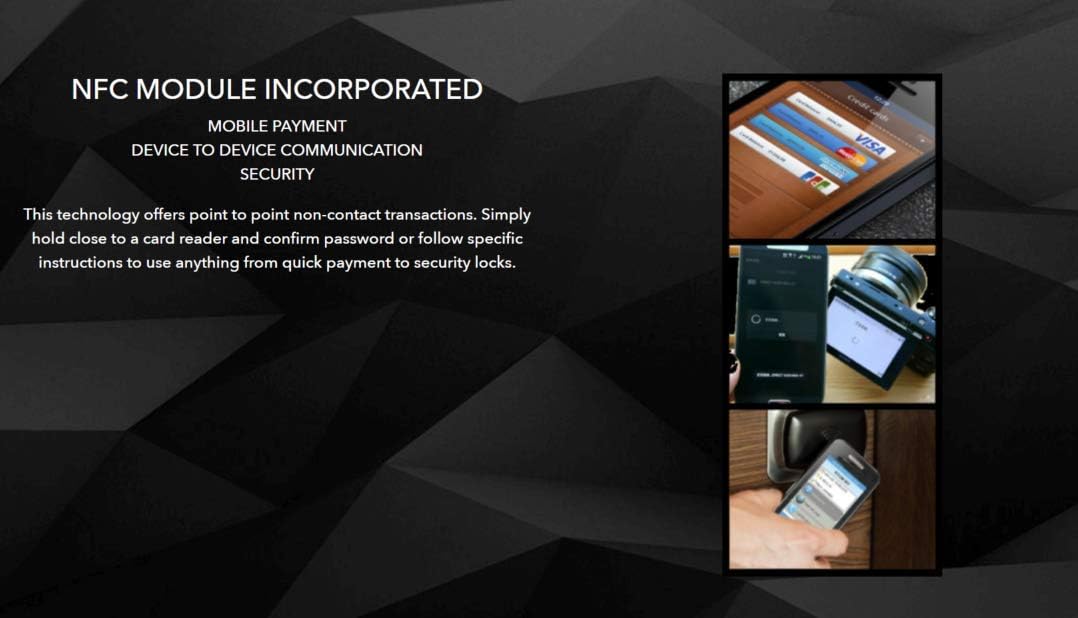
Image 3.2: NFC module functionality for mobile payments and device communication.
3.5. Fingerprint Sensor
For enhanced security and quick access, the Epik One Boulder RS550 includes a fingerprint sensor. You can register your fingerprints to unlock the device or authorize secure transactions, providing both convenience and robust protection for your data.
4. Key Features
4.1. Durability and Protection
The Boulder RS550 is built to endure. It boasts an IP68 international protection level, making it highly resistant to water and dust. It can be submerged up to 1 meter for up to 60 minutes. Furthermore, it meets the MIL-STD-810G military standard for drop protection, ensuring resilience against accidental falls. The 5.5-inch display is protected by USA Corning Gorilla Glass 3rd Generation, offering superior scratch and impact resistance.
4.2. Performance
Powered by a Super Fast 4x4 Octa Core Processor (4 x 2.0GHz + 4 x 1.5GHz), the RS550 delivers smooth and efficient performance for all your applications. With 3GB RAM and 32GB ROM (expandable via MicroSD), you have ample memory and storage for multitasking, apps, and media.

Image 4.1: Highlighting the powerful Octa Core Processor of the Epik One Boulder RS550.
4.3. Battery Life
The large 3600mAh Li-Poly battery provides exceptional endurance. Enjoy up to 405 hours of standby time and 9 hours of talk time, ensuring your device is ready when you need it most.
4.4. Bright LED Flashlight
The Epik One Boulder RS550 features a powerful LED flashlight, capable of emitting light that can reach up to 100 meters, providing reliable illumination in dark environments.

Image 4.2: The bright LED flashlight feature of the Epik One Boulder RS550.
5. Maintenance and Care
To ensure the longevity and optimal performance of your Epik One Boulder RS550, follow these maintenance guidelines:
- Water and Dust Protection: While the device is IP68 rated, ensure all port covers (USB, headphone jack if present) are securely closed before exposing the phone to water or dusty environments. Avoid exposing the phone to high-pressure water jets or hot water.
- Cleaning: Use a soft, lint-free cloth to clean the screen and body. For stubborn smudges, slightly dampen the cloth with water. Avoid using harsh chemicals or abrasive materials.
- Temperature: Do not expose the device to extreme temperatures (below 0°C or above 45°C) or rapid temperature changes, as this can affect battery life and internal components.
- Impact Protection: Although rugged, avoid unnecessary drops or impacts. The Gorilla Glass provides protection, but extreme force can still cause damage.
6. Troubleshooting
If you encounter issues with your Epik One Boulder RS550, refer to the following common solutions:
| Problem | Possible Solution |
|---|---|
| Device does not power on | Ensure the battery is charged. Connect to the charger and wait a few minutes before attempting to power on again. If unresponsive, perform a forced restart (refer to device-specific instructions, usually holding power button for 10-15 seconds). |
| Poor network signal | Check if your SIM card is properly inserted. Move to an area with better network coverage. Restart the device. |
| Apps are slow or crashing | Close background applications. Clear app cache. Ensure sufficient storage space is available. Restart the device. |
| Battery drains quickly | Reduce screen brightness. Disable Wi-Fi, Bluetooth, GPS when not in use. Close power-intensive applications. Check battery usage in settings to identify problematic apps. |
| Touchscreen unresponsive | Restart the device. Ensure the screen is clean and dry. If the issue persists, contact customer support. |
7. Technical Specifications
Below are the detailed technical specifications for the Epik One Boulder RS550:
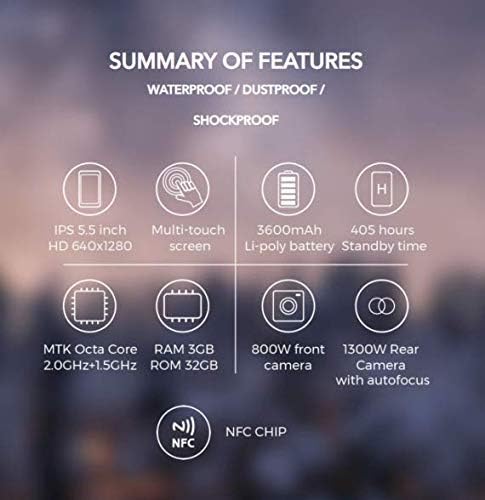
Image 7.1: Visual summary of key features and specifications.
| Feature | Specification |
|---|---|
| Brand | Epik One |
| Model Number | _11579 (RS550) |
| Dimensions | 15.6 x 7.92 x 0.89 cm; 295 g |
| Protection Level | IP68, MIL-STD-810G |
| Display | 5.5 Inches IPS LCD, Corning Gorilla Glass 3rd Gen |
| Processor Type | Octa Core (Snapdragon) |
| RAM | 3 GB |
| Internal Storage (ROM) | 32 GB |
| Main Camera | 13 MP |
| Selfie Camera | 8 MP |
| Battery Capacity | 3600 mAh Li-Poly |
| Standby Time | Up to 405 hours |
| Talk Time | Up to 9 hours |
| Cellular Technology | 4G LTE |
| Connectivity | NFC, Wi-Fi, Bluetooth |
| Human Interface Input | Touchscreen, Fingerprint Sensor |
| Model Year | 2020 |
8. Warranty and Support
For warranty information and technical support, please refer to the warranty card included with your product or visit the official Epik One website. Keep your proof of purchase for any warranty claims. For further assistance, you may contact Epik One customer service directly.