
1. Introduction
This manual provides essential information for the safe and effective use of your Pioneer Carrozzeria AVIC-ZH0009 AV integrated HDD navigation system. Please read this manual thoroughly before installation and operation, and keep it for future reference.
Product Overview
The AVIC-ZH0009 is a 7V wide VGA AV integrated HDD navigation system featuring a digital TV tuner, DVD-V/CD player, Bluetooth connectivity, USB and SD card support, and 5.1ch DSP audio processing. It includes a 100GB HDD for map data and media storage, and supports various external devices like AR HUD units, cruise scouter units, and data communication modules (sold separately).

Figure 1: Front view of the AVIC-ZH0009 navigation system displaying a map.
Safety Information
- Always operate the system when it is safe to do so. Distracted driving can lead to accidents.
- Do not attempt to install or service the unit yourself. Refer to qualified professionals for installation and repairs.
- Ensure all cables are securely connected to prevent short circuits or malfunctions.
- Keep the screen clean and free from obstructions for optimal visibility.
2. Setup
This section covers the basic steps for installing and initially configuring your AVIC-ZH0009 unit. Professional installation is highly recommended.
Installation Guidelines
- Power Connection: Connect the power cables according to your vehicle's wiring diagram and the unit's instructions. Ensure proper grounding.
- Antenna Connection: Connect the digital TV antenna and GPS antenna. Position the GPS antenna in a location with a clear view of the sky.
- Speaker Connections: Connect your vehicle's speakers to the unit. For 5.1ch audio, ensure all channels are correctly wired.
- External Device Connections: If using optional accessories like a data communication module (ND-DC1), AR HUD unit, or cruise scouter unit, connect them as per their respective manuals. HDMI input (AUX1) is available for compatible devices.
- Mounting: Securely mount the unit in the dashboard using the provided mounting hardware. Ensure it is stable and does not obstruct driving controls.
Initial Configuration
- First Power On: Upon first power-on, the system may guide you through initial setup steps, including language selection and time zone settings.
- GPS Calibration: Allow the unit to acquire GPS signals. This may take a few minutes in an open area.
- Map Data Update: Ensure your map data is up-to-date for accurate navigation. The system supports regular map updates.

Figure 2: Screen showing map data update information. Regular updates ensure current navigation data.
3. Operation
This section details the primary functions and how to operate your AVIC-ZH0009 navigation system.
3.1 Navigation Functions
- Destination Entry: Use the touchscreen to enter destinations via address, point of interest (POI), or coordinates.
- Route Guidance: Once a destination is set, the system will calculate and provide turn-by-turn voice and visual guidance.
- Real-time Traffic: The system utilizes real-time traffic information (requires optional data communication module ND-DC1) to suggest optimal routes and avoid congestion.
- High-Precision Positioning: The system features advanced positioning technology for accurate vehicle location, even in complex environments like elevated roads or underground parking.
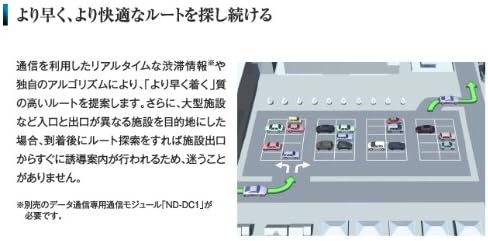
Figure 3: Display showing real-time traffic information and optimized route suggestions.

Figure 4: Illustration of the system's high-precision positioning, accurately tracking the vehicle on multi-level roads.
3.2 Audio and Video Playback
- Digital TV: Access terrestrial digital TV broadcasts.
- DVD/CD Player: Insert DVDs or CDs for playback.
- USB/SD Media: Connect USB devices or insert SD cards (SDXC compatible) to play audio and video files.
- Bluetooth Audio: Stream audio wirelessly from compatible Bluetooth devices.
- HDMI Input: Connect external devices via HDMI (AUX1) for high-quality audio and video playback.
- 5.1ch DSP: The integrated Digital Signal Processor (DSP) provides advanced audio customization and 5.1 channel surround sound capabilities.

Figure 5: Diagram illustrating the system's compatibility with various digital media sources including smartphones, USB, SD cards, and DVD/CD.
3.3 Bluetooth and Smartphone Integration
- Hands-Free Calling: Pair your Bluetooth-enabled smartphone for hands-free calling.
- Linkwith Mode: Operate compatible smartphone applications directly from the navigation system's touchscreen, mirroring the smartphone experience.
- iPod/iPhone Support: Connect your iPod or iPhone (including iPod touch 5th gen, iPod nano 7th gen, iPhone 5 and later) for music playback and control.

Figure 6: Image showing the "Linkwith Mode" interface, allowing smartphone app control directly from the car navigation screen.

Figure 7: Visual representation of smartphone integration, extending smartphone functions to the car environment.
4. Maintenance
Proper maintenance ensures the longevity and optimal performance of your AVIC-ZH0009 system.
Cleaning the Unit
- Screen: Use a soft, dry cloth to gently wipe the touchscreen. For stubborn smudges, slightly dampen the cloth with water or a screen-safe cleaner. Avoid abrasive materials or harsh chemicals.
- Unit Exterior: Wipe the exterior with a soft, dry cloth. Do not use liquid cleaners directly on the unit.
Software and Map Updates
- Regularly check for software and map data updates from the official Pioneer Carrozzeria website.
- Follow the provided instructions carefully when performing updates to prevent data corruption or system malfunction.
5. Troubleshooting
This section addresses common issues you might encounter and provides basic solutions. If the problem persists, contact customer support.
| Problem | Possible Cause | Solution |
|---|---|---|
| No power | Loose power connection, blown fuse. | Check power cables and vehicle fuses. Consult a professional if unsure. |
| No GPS signal | GPS antenna obstructed or disconnected. | Ensure the GPS antenna has a clear view of the sky and is securely connected. |
| No audio | Volume too low, mute activated, speaker wires disconnected. | Increase volume, check mute settings, verify speaker connections. |
| Bluetooth device won't pair | Device not in pairing mode, incorrect PIN, interference. | Ensure device is in pairing mode, re-enter PIN, try pairing in a different location. |
| Touchscreen unresponsive | System freeze, dirty screen. | Restart the unit (if possible). Clean the screen. If persistent, contact support. |
6. Specifications
Detailed technical specifications for the Pioneer Carrozzeria AVIC-ZH0009.
- Model Name: AVIC-ZH0009
- Display: 7V Wide VGA Monitor (LED Backlight)
- Storage: 100GB HDD
- Media Playback: DVD-V, CD, USB, SD (SDXC compatible)
- Tuner: Terrestrial Digital TV Tuner, FM VICS Tuner
- Audio: 5.1ch Multi-channel Processor, DSP
- Connectivity: Bluetooth (Communication, Hands-free, Audio), HDMI Input (AUX1), USB, SD, VGA
- Special Features: L-format data compression technology, Crystal 3D Hybrid Sensor, VICS/VICS WIDE, Hands-free, iPod/iPhone compatibility (iPod touch 5th gen, iPod nano 7th gen, iPhone 5 and later)
- Dimensions: 34.2 x 27.1 x 18 cm (Package Size)
- Weight: 3.51 kg (Product Weight)
- Mounting Type: Dashboard Mount
- Map Type: Street
7. Warranty and Support
For warranty information, please refer to the warranty card included with your product or visit the official Pioneer website. For technical support, product inquiries, or service requests, please contact Pioneer customer service.
Official Pioneer Website: www.pioneer.jp (Please note: This link is for general Pioneer Japan website and may not directly lead to support for this specific model. Refer to your product documentation for specific support contacts.)


