
Sevenoak SK-SW02
Sevenoak SK-SW02N Handheld Stabilizer Steadycam User Manual
Model: SK-SW02
1. Introduction
Thank you for choosing the Sevenoak SK-SW02N Handheld Stabilizer Steadycam. This device is engineered to provide smooth, stable footage for your DV and DSLR cameras, effectively minimizing unwanted camera movements during recording. With its robust carbon fiber construction and precise balancing capabilities, the SK-SW02N allows filmmakers and videographers to capture professional-looking shots with ease.
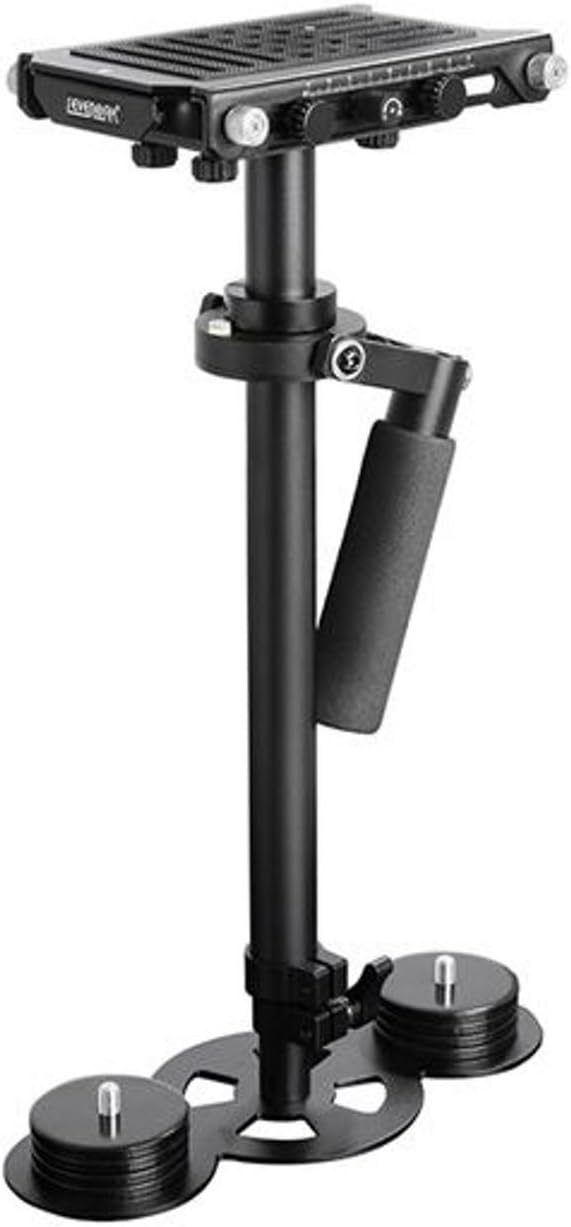
Figure 1.1: Sevenoak SK-SW02N Handheld Stabilizer Steadycam. This image shows the complete stabilizer unit, featuring the camera mounting plate at the top, the central column, the adjustable handle, and the counterweights at the base.
2. Safety Information
Please read and understand all safety instructions before operating the Sevenoak SK-SW02N. Failure to follow these guidelines may result in injury or damage to the product or connected equipment.
- Weight Limit: Do not exceed the maximum supported weight of 6.6 lbs (3 kg). Overloading can cause instability and damage.
- Secure Mounting: Always ensure your camera is securely mounted to the quick release plate before use.
- Handle with Care: While durable, avoid dropping or subjecting the stabilizer to harsh impacts.
- Balance Properly: Incorrect balancing can lead to unstable footage and potential strain on the operator. Follow the balancing instructions carefully.
- Storage: Store the stabilizer in a clean, dry environment away from extreme temperatures.
3. Product Overview
The SK-SW02N is comprised of several key components designed for optimal performance and adjustability.
3.1 Components
- Quick Release Mounting Plate: An anti-slip platform for attaching your camera, with adjustable positions.
- 3-Axis Gimbal: Allows for smooth rotation and movement of the camera.
- Central Post/Column: The main vertical support, adjustable in height.
- Handle: Ergonomically designed for comfortable grip and control.
- Counterweights: Polished chrome weights attached to the base for precise balance adjustment.
- Spirit Level: Integrated into the quick release plate for accurate horizontal leveling.
3.2 Features
- High Density Carbon Fiber Construction Supports up to 6.6 LB (3kg)
- 3-Axis Gimbal for fluid motion
- 360º rotation without limitation
- Polished Chrome Counterweights for fine-tuning balance
- Built-in Spirit Level for balance checking

Figure 3.1: Quick Release Mounting Plate. This image highlights the adjustable quick release plate at the top of the stabilizer, showing the various knobs for precise camera positioning.
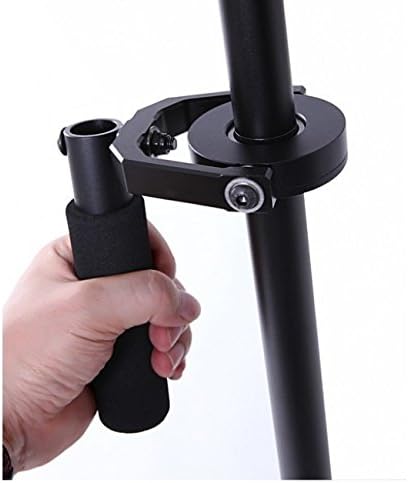
Figure 3.2: Stabilizer Handle. This image provides a close-up view of the ergonomic handle, demonstrating how it is held during operation.
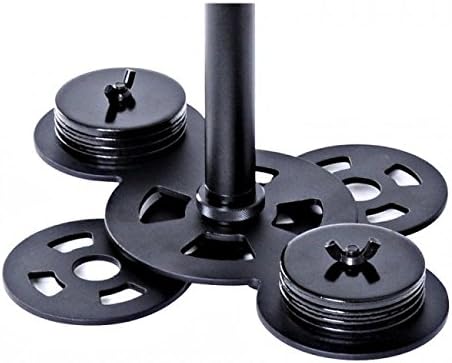
Figure 3.3: Counterweights. This image shows the polished chrome counterweights at the base of the stabilizer, which are crucial for achieving proper balance.
4. Setup
Proper setup and balancing are critical for the effective operation of your Sevenoak SK-SW02N stabilizer.
4.1 Attaching the Camera
- Ensure the quick release plate is detached from the stabilizer.
- Securely attach your DV or DSLR camera to the quick release plate using the mounting screw. Ensure it is tightened firmly to prevent any movement.
- Slide the quick release plate with the mounted camera back onto the stabilizer's top platform until it locks into place.

Figure 4.1: Stabilizer with Camera Mounted. This image displays the Sevenoak SK-SW02N stabilizer with a DSLR camera securely attached to its quick release plate, ready for balancing.
4.2 Balancing the Stabilizer
Balancing is an iterative process that requires patience. The goal is to achieve a state where the stabilizer remains level and upright when held freely, and the camera does not tilt excessively in any direction.
- Initial Weight Distribution: Start by adjusting the number of counterweights at the base. Add or remove weights until the stabilizer feels roughly balanced with your camera attached.
- Horizontal Balance (Side-to-Side): Use the knobs on the quick release plate to slide the camera left or right until the spirit level indicates a perfectly horizontal position.
- Front-to-Back Balance: Adjust the quick release plate forward or backward. The camera should not tilt forward or backward when the stabilizer is held upright.
- Drop Time Adjustment: Hold the stabilizer by the handle and tilt it horizontally (like a pendulum). Release it and observe how quickly it returns to the vertical position. Ideally, it should take 2-3 seconds to swing back to vertical. Adjust the height of the central post (between 39.5 cm and 62.5 cm) to fine-tune this 'drop time'. A shorter post increases drop time, a longer post decreases it.
- Fine-Tuning: Repeat steps 1-4 as necessary. Small adjustments to the quick release plate and counterweights can make a significant difference. The stabilizer is balanced when it remains upright and level, and the camera stays steady when gently nudged.
5. Operating
Once your Sevenoak SK-SW02N is properly balanced, you can begin capturing smooth footage.
- Holding the Stabilizer: Grip the handle firmly but gently. Avoid gripping too tightly, as this can transfer unwanted movements to the camera. The gimbal allows the main column to move independently of your hand.
- Walking Technique: Walk with a smooth, deliberate motion, bending your knees slightly to absorb shocks. Try to keep your upper body as still as possible.
- Panning and Tilting: Use gentle, controlled movements of your wrist and arm to pan (horizontal rotation) or tilt (vertical rotation) the camera. The 3-axis gimbal allows for fluid 360-degree rotation.
- Practice: Achieving truly smooth footage requires practice. Experiment with different walking styles and camera movements in a safe environment before critical shoots.
6. Maintenance
Regular maintenance will ensure the longevity and optimal performance of your stabilizer.
- Cleaning: Wipe down the stabilizer with a soft, dry cloth after each use to remove dust and fingerprints. For stubborn dirt, a slightly damp cloth can be used, followed by immediate drying.
- Lubrication: The gimbal mechanism is designed for smooth operation. Avoid applying lubricants unless specifically instructed by the manufacturer, as this can attract dust and degrade performance.
- Storage: Store the stabilizer in its original packaging or a protective case when not in use. Keep it in a cool, dry place away from direct sunlight and extreme temperatures.
- Inspection: Periodically check all screws, knobs, and connections to ensure they are tight. Inspect the gimbal for any signs of wear or damage.
7. Troubleshooting
If you encounter issues with your Sevenoak SK-SW02N, refer to the following common problems and solutions:
| Problem | Possible Cause | Solution |
|---|---|---|
| Footage is shaky or unstable. | Improper balancing. | Re-balance the stabilizer carefully following the instructions in Section 4.2. Ensure the spirit level is centered and the drop time is correct. |
| Camera tilts to one side. | Horizontal imbalance. | Adjust the quick release plate left or right until the spirit level is centered. |
| Camera tilts forward or backward. | Front-to-back imbalance. | Adjust the quick release plate forward or backward. |
| Stabilizer feels too heavy or too light. | Incorrect counterweight amount. | Add or remove counterweights at the base to achieve the desired feel and balance. |
| Difficulty achieving smooth movements. | Lack of practice or improper grip. | Practice operating the stabilizer in various scenarios. Ensure a relaxed but firm grip on the handle. |
8. Specifications
Key technical specifications for the Sevenoak SK-SW02N Handheld Stabilizer Steadycam:
| Feature | Specification |
|---|---|
| Manufacturer | Sevenoak |
| Model Number | SK-SW02 |
| Product Dimensions | 24 x 15 x 40 cm |
| Item Weight | 2.45 Kilograms |
| Max Load Capacity | 6.6 lbs (3 kg) |
| Adjustable Height Range | 39.5 cm to 62.5 cm |
| Compatible Devices | DV, DSLR Cameras |
| Gimbal Type | 3-Axis |
| Rotation | 360º without limitation |
| Construction Material | High Density Carbon Fiber |
| UPC | 651046453215 |
9. Warranty Information
Specific warranty terms and conditions for the Sevenoak SK-SW02N Handheld Stabilizer Steadycam may vary depending on your region and the retailer from whom you purchased the product. Please retain your proof of purchase.
For detailed warranty information, it is recommended to:
- Consult the documentation provided with your purchase.
- Visit the official Sevenoak website.
- Contact your retailer directly.
10. Customer Support
If you require further assistance or have questions not covered in this manual, please contact customer support.
- Online Resources: Visit the official Sevenoak website for FAQs, product registration, and additional support materials.
- Retailer Support: For purchase-related inquiries or returns, contact the retailer where you bought the Sevenoak SK-SW02N.
Ask a question about this manual
Ask about setup, troubleshooting, compatibility, parts, safety, or missing instructions. Manuals+ will review the question and use this page’s manual context to help answer it.