
LG 840G
LG 840G Mobile Phone User Manual
Model: 840G
1. Introduction
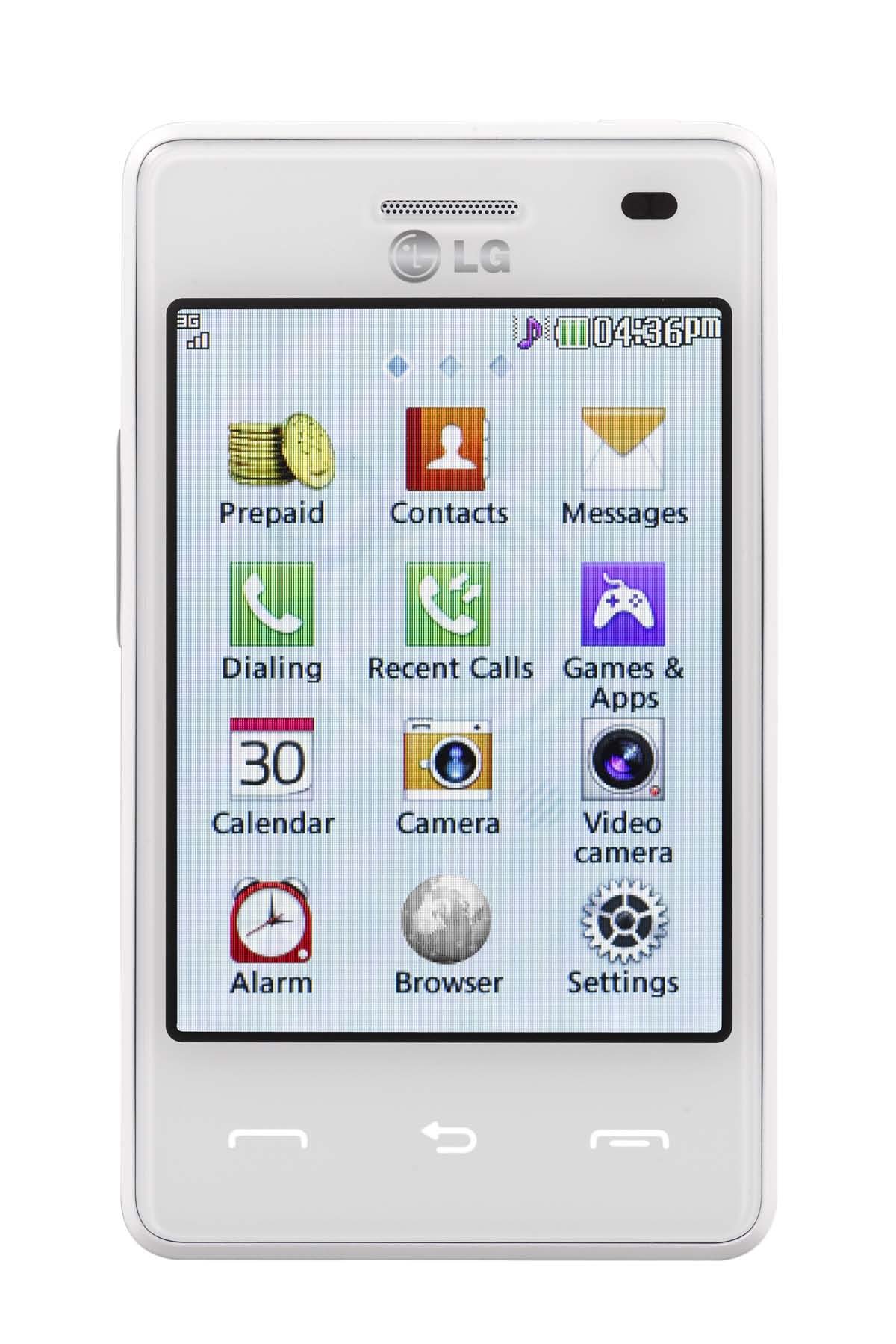
This manual provides essential instructions for setting up, operating, and maintaining your LG 840G mobile phone. The LG 840G is a prepaid mobile phone designed for communication and basic multimedia functions, featuring a touchscreen interface, a 2.0 Megapixel camera, Bluetooth connectivity, and an MP3 player.
2. What's in the Box
Verify that all the following items are included in your product package:
- LG 840G Mobile Phone
- Battery
- Charger (Adapter)
- Activation Card
- Service Guide
- User Manual (this document)
3. Setup
3.1. Installing the Battery
- Locate the notch on the back cover of the phone.
- Carefully remove the back cover.
- Align the battery contacts with the terminals inside the battery compartment.
- Gently press the battery into place until it is secure.
- Replace the back cover, ensuring it clicks into position.
3.2. Installing the SIM Card
The LG 840G uses a Nano SIM card. Ensure your SIM card is the correct size before installation.
- With the back cover and battery removed, locate the SIM card slot.
- Insert the Nano SIM card into the slot with the gold contacts facing down and the cut corner aligned as indicated on the phone.
- Gently push the SIM card until it locks into place.
- Reinstall the battery and back cover.
3.3. Charging the Battery
Before first use, fully charge the phone's battery.
- Connect the charger to the Micro USB port on the phone.
- Plug the charger into a standard electrical outlet.
- The charging indicator will appear on the screen.
- Once fully charged, disconnect the charger.
3.4. Powering On/Off
- To Power On: Press and hold the Power/End key until the LG logo appears.
- To Power Off: Press and hold the Power/End key, then select 'Power off' from the options on the screen.
3.5. Initial Activation (Tracfone)
If you are using Tracfone service, you will need to activate your phone. Follow the instructions provided on the Activation Card included in your package or visit the Tracfone website for activation steps.
4. Operating Instructions
4.1. Touchscreen Navigation
The LG 840G features a 3.2-inch touchscreen. Use your finger to tap, swipe, and drag on the screen to navigate menus, open applications, and input text.
- Tap: Touch the screen once to select an item or open an application.
- Swipe: Drag your finger across the screen to scroll through lists or switch between home screens.
- Drag: Touch and hold an item, then move your finger to reposition it.
4.2. Making and Receiving Calls
- To Make a Call: From the home screen, tap the Phone icon, enter the number using the keypad, and tap the Call button.
- To Answer a Call: When a call comes in, swipe the 'Answer' icon.
- To End a Call: Tap the 'End Call' button on the screen.
4.3. Messaging (SMS/MMS)
- To Send a Message: Tap the Messaging icon, then 'New Message'. Enter the recipient's number or select from contacts, type your message, and tap 'Send'.
- To View Messages: Tap the Messaging icon to see your inbox.
4.4. Camera and Video Recorder
The phone is equipped with a 2.0 Megapixel camera for photos and video recording.
- From the home screen, tap the Camera icon.
- Frame your shot using the screen as a viewfinder.
- Tap the Shutter button to take a photo or the Record button to start/stop video recording.
- Photos and videos are saved to the phone's gallery.
This image displays the back of the LG 840G mobile phone. It features a textured white casing, a square camera lens located in the upper left corner, and the LG logo prominently in the center. The Tracfone logo is visible towards the bottom.
4.5. Bluetooth Connectivity
Bluetooth allows you to connect wirelessly to other compatible devices, such as headsets or other phones, for file transfer or hands-free communication.
- Go to Menu > Settings > Bluetooth.
- Turn Bluetooth On.
- Select Search for devices to find nearby Bluetooth devices.
- Select the desired device and follow the on-screen prompts to pair.
4.6. Mobile Web
Access the internet using the phone's mobile web browser.
- Tap the Browser or Internet icon from the menu.
- Enter the website address in the address bar and press Go.
4.7. MP3 Player
The built-in MP3 player allows you to listen to music files stored on your phone.
- Transfer MP3 files to your phone's memory.
- Tap the Music or MP3 Player icon.
- Select a song or playlist to begin playback.
5. Maintenance
5.1. Battery Care
- Use only LG-approved chargers and batteries.
- Avoid exposing the battery to extreme temperatures.
- Do not puncture or damage the battery.
- For optimal battery life, charge the phone regularly and avoid letting it fully discharge frequently.
5.2. Cleaning the Device
- Wipe the phone's screen and body with a soft, lint-free cloth.
- Avoid using harsh chemicals or abrasive materials.
6. Troubleshooting
If you encounter issues with your LG 840G, refer to the following common solutions:
| Problem | Solution |
|---|---|
| Phone does not turn on | Ensure the battery is correctly installed and charged. Connect the charger and try again. |
| Cannot make or receive calls | Check if the SIM card is properly inserted. Verify that you have active service and sufficient minutes/credit with Tracfone. Check network signal strength. |
| Touchscreen is unresponsive | Restart the phone. Ensure the screen is clean and free of debris. |
| Bluetooth not connecting | Ensure Bluetooth is enabled on both devices. Make sure both devices are in pairing mode and within range. |
| Poor battery life | Reduce screen brightness. Close unused applications. Limit background data usage. |
7. Specifications
| Feature | Specification |
|---|---|
| Brand | LG |
| Model Name | 840G |
| Operating System | Android |
| Screen Size | 3.2 Inches |
| Display Resolution | 320 x 240 |
| Human-Interface Input | Touchscreen |
| Rear Camera Resolution | 2 MP |
| Cellular Technology | 3G |
| Wireless Carrier | Tracfone |
| Connectivity Technology | Bluetooth |
| SIM Card Slot Count | Single SIM |
| SIM Card Size | Nano |
| Connector Type | Micro USB |
| Battery Type | Lithium-Ion |
| Phone Talk Time | Up to 3.7 hours |
| Standby Time | Up to 13 days |
| Color | White |
| Model Year | 2018 |
8. Warranty and Support
For warranty information and customer support, please refer to the service guide included in your package or visit the official LG or Tracfone websites. Keep your proof of purchase for warranty claims.
For further assistance, you may contact Tracfone customer service directly.