
Introduction
This manual provides comprehensive instructions for the Redi-Remote replacement remote control, model RT24140447. This remote is designed to function as a direct replacement for the original ONKYO remote control number 24140447, compatible with ONKYO TXDS595 and RC447M units. It requires no programming and is ready for use upon battery installation.
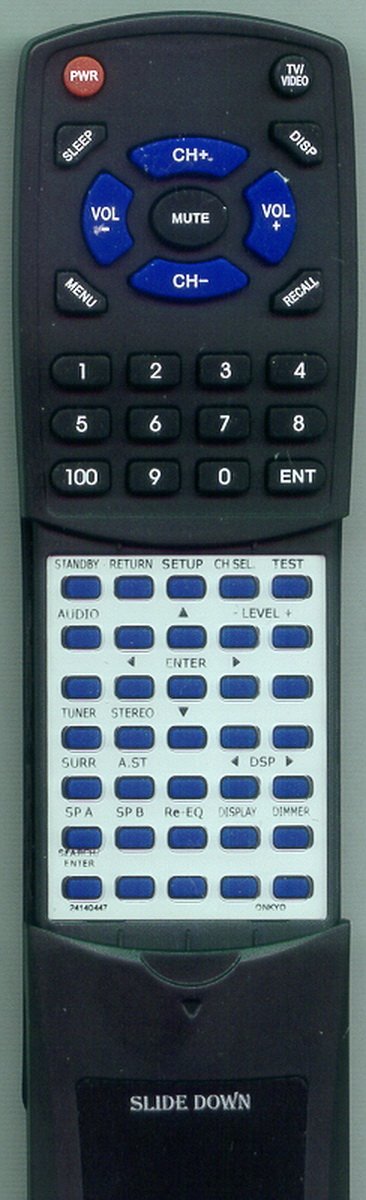
Image of the Redi-Remote replacement remote control, showing its general layout and button arrangement. The remote is black with various function buttons.
Setup
- Battery Installation:
Locate the battery compartment on the back of the remote control. Slide open the cover. Insert four (4) AAA alkaline batteries, ensuring correct polarity (+/-) as indicated inside the compartment. Close the battery cover securely.
- Initial Use:
This Redi-Remote is pre-programmed and requires no additional setup. Once batteries are installed, it is ready to control your compatible ONKYO unit.
Operating Instructions
- Power On/Off: Press the POWER button to turn your ONKYO unit on or off.
- Volume Control: Use the VOLUME + and VOLUME - buttons to adjust the audio level.
- Input Selection: Utilize the dedicated input buttons (e.g., CD, DVD, TUNER) to switch between audio/video sources.
- Navigation and Menu: The directional arrow buttons (UP, DOWN, LEFT, RIGHT) and the ENTER button are used for navigating menus on your ONKYO unit.
- Sliding Cover: The remote features a sliding cover over the lower half of the buttons. Slide this cover down to access additional functions and controls.
- Limitations: This remote is designed exclusively for the specified ONKYO unit. It cannot be programmed to control auxiliary devices and does not include features such as laser pointers or LED lights.
Maintenance
- Cleaning: Wipe the remote control with a soft, dry cloth. Do not use liquid cleaners or abrasive materials.
- Battery Replacement: Replace all four AAA batteries when the remote's performance diminishes or it stops responding. Always use new alkaline batteries.
- Storage: Store the remote in a dry place, away from extreme temperatures and direct sunlight.
Troubleshooting
| Problem | Solution |
|---|---|
| Remote not responding. |
|
| Limited range or intermittent response. |
|
| Specific buttons not working. |
|
Specifications
| Feature | Detail |
|---|---|
| Brand | Redi-Remote |
| Model Name | RT24140447 |
| Compatible Devices | ONKYO TXDS595, 24140447, RC447M (Stereo System) |
| Connectivity Technology | Infrared |
| Special Feature | No Programming Required |
| Max Number of Supported Devices | 1 |
| Button Quantity | 58 |
| Maximum Range | 20 Feet |
| Battery Type | 4 AAA Alkaline batteries (included) |
| Item Dimensions (L x W x H) | 7.5" x 2.25" x 0.75" |
| Item Weight | 4.5 Ounces |
| Color | Black |
Warranty Information
Specific warranty details for this Redi-Remote product are not provided in this manual. For information regarding warranty coverage, terms, and conditions, please refer to the product packaging or contact the seller directly at the point of purchase.
Support
If you encounter any issues or have questions not addressed in this manual, please contact the seller or manufacturer for assistance. Provide your product model number (RT24140447) and a detailed description of the issue when seeking support.