Introduction
This manual provides comprehensive instructions for the setup, operation, and maintenance of your ASUS SDRW-08D2S-U LITE External CD/DVD Burner. This ultra-compact 8x DVD burner supports M-Disc technology and is compatible with both Windows and Mac OS.
Please read this manual thoroughly before using the device to ensure proper functionality and longevity.
Setup
Package Contents
- ASUS SDRW-08D2S-U LITE External CD/DVD Burner
- USB 2.0 Cable
- User Manual (this document)
- Software CD (may include Nero BackItUp)
System Requirements
- Operating System: Windows 8 or later, Mac OS
- Available USB 2.0 port
- Minimum 1GB RAM (recommended for optimal performance)
- Sufficient hard disk space for data storage
Connecting the Device
The ASUS SDRW-08D2S-U LITE connects to your computer via a single USB 2.0 cable, which provides both data transfer and power. No external power adapter is typically required.
- Locate an available USB 2.0 port on your computer.
- Connect the smaller end of the USB cable to the USB port on the back of the ASUS SDRW-08D2S-U LITE.
- Connect the larger end of the USB cable to the USB 2.0 port on your computer.
- The operating system should automatically detect and install the necessary drivers.

Figure 1: Connecting the ASUS SDRW-08D2S-U LITE to a computer.
This image shows the external DVD burner with a disc partially inserted, illustrating its compact design and the USB connection point.
Software Installation (Windows OS)
For enhanced functionality, it is recommended to install the bundled software, such as Nero BackItUp. This software provides comprehensive backup solutions and disc burning features.
- Insert the provided software CD into the drive.
- Follow the on-screen instructions to install Nero BackItUp and other utilities.
- The Disc Encryption feature allows for password control and file name hiding for added security.
Operating Instructions
Inserting and Ejecting Discs
- Press the eject button on the front of the drive to open the disc tray.
- Carefully place the CD or DVD onto the tray with the label side facing up.
- Gently push the tray back into the drive until it clicks into place.
- To eject, press the eject button again or use the eject function from your operating system.

Figure 2: Disc tray open, ready for disc insertion.
This image shows the external DVD burner with its disc tray fully extended, demonstrating how a disc would be placed inside.
Burning Data (Windows OS)
The "Drag-and-Burn" function simplifies the burning process into three easy steps:
- Open the burning software (e.g., Nero BackItUp).
- Drag and drop the files you wish to burn into the software interface.
- Initiate the burning process.
M-Disc Support
The ASUS SDRW-08D2S-U LITE supports M-Disc technology, which provides an archival-grade storage solution. M-Discs are designed to preserve your data, photos, and videos for over 1,000 years, offering superior longevity compared to standard optical media.
Data Backup and Security
Utilize the Nero BackItUp software for comprehensive one-click backup of your photos, videos, documents, and other data. Enhance data security with Disc Encryption, which allows you to control access with passwords and hide file names on your burned discs.
Additionally, the product includes free unlimited storage on ASUS Webstorage for 12 months, providing an alternative cloud backup solution.
Maintenance
Cleaning the Device
- Ensure the device is disconnected from the power source (USB cable) before cleaning.
- Use a soft, dry, lint-free cloth to wipe the exterior of the drive.
- Do not use liquid cleaners, aerosols, or abrasive materials, as they may damage the surface or internal components.
- Avoid touching the optical lens inside the drive. If cleaning is necessary, use a specialized optical drive cleaning disc.
Storage
- Store the drive in a cool, dry place away from direct sunlight and extreme temperatures.
- When not in use, keep the disc tray closed to prevent dust accumulation.
- If transporting the device, ensure it is securely packed to prevent physical damage.
Troubleshooting
| Problem | Possible Cause | Solution |
|---|---|---|
| Drive not detected by computer. | Loose USB connection, insufficient power, driver issue. |
|
| Disc tray does not open. | Power issue, mechanical jam. |
|
| Burning process fails or is slow. | Poor quality disc, background processes, insufficient system resources. |
|
| Disc read errors. | Dirty or scratched disc, dirty optical lens. |
|
Specifications
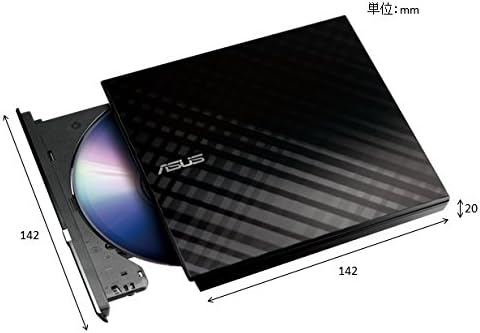
Figure 3: Product dimensions (approximate).
This image provides a visual representation of the external DVD burner's dimensions, indicating its compact size.
| Feature | Detail |
|---|---|
| Model Number | SDRW-08D2S-U LITE |
| Brand | ASUS |
| Color | Black |
| Interface | USB 2.0 |
| Write Speed (Optical Storage) | 8x |
| Operating System Compatibility | Windows 8, Mac OS |
| Dimensions (L x W x H) | 14.61 x 16.99 x 4.19 cm (approx. 5.75 x 6.69 x 1.65 inches) |
| Weight | 281.23 grams (approx. 0.62 lbs) |
| Special Features | M-Disc support, Disc Encryption, Drag-and-Burn function |
Warranty and Support
For warranty information, please refer to the warranty card included with your product or visit the official ASUS support website. ASUS provides technical support and service for its products.
For further assistance, driver downloads, or troubleshooting guides, please visit the official ASUS support website: www.asus.com/support


