
Introduction
The Minelab X-TERRA 305 is an entry-level metal detector designed for coin and treasure hunting. It features Minelab's proprietary True Digital VFLEX technology, offering versatility with interchangeable coils and frequencies. This lightweight and user-friendly detector provides essential functions for effective metal detection, including accurate ground balance and noise cancellation. This manual provides detailed instructions for assembly, operation, maintenance, and troubleshooting to ensure optimal performance of your X-TERRA 305.
1. Setup and Assembly
Proper assembly is crucial for the performance of your Minelab X-TERRA 305. Follow these steps carefully:
- Attach the Search Coil: Secure the search coil to the lower shaft using the provided bolt and washers. Ensure it is firmly attached but do not overtighten.
- Connect the Lower and Middle Shafts: Slide the lower shaft into the middle shaft and secure it with the spring clip or locking collar.
- Attach the Control Box: Mount the control box to the upper shaft. Ensure the control box is securely fastened and the display is easily visible.
- Wrap the Coil Cable: Carefully wrap the search coil cable around the shaft, ensuring it is snug but not overly tight. Leave enough slack near the coil for movement. Plug the coil connector into the corresponding port on the control box.
- Install Batteries: The X-TERRA 305 requires batteries for operation. Open the battery compartment, insert the correct type and number of batteries, observing polarity, and close the compartment securely.
- Adjust the Shaft Length: Adjust the shaft length to a comfortable position that allows the search coil to be parallel to the ground when you are standing upright. The adjustable length feature ensures ergonomic use.
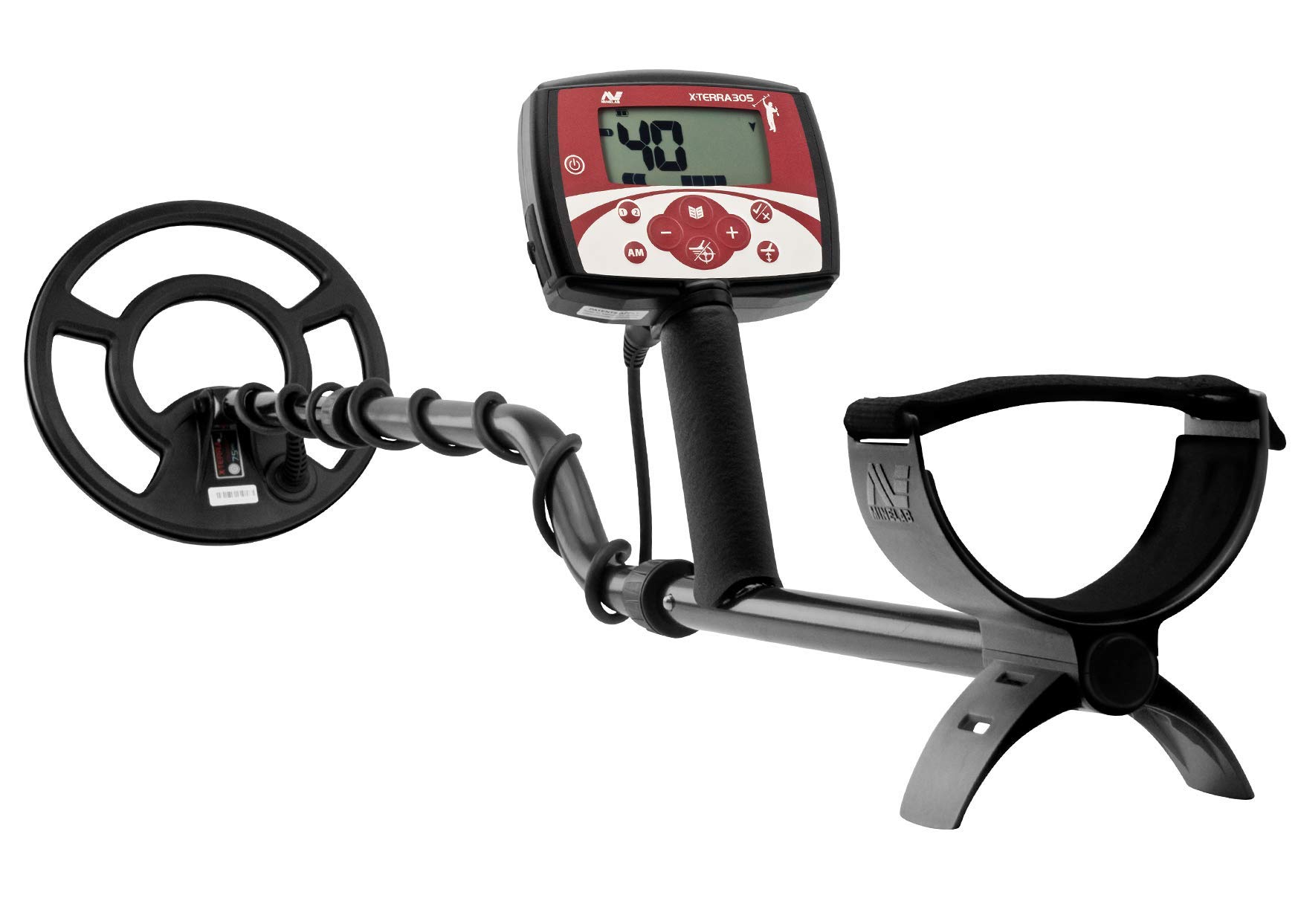
Image: The control panel of the Minelab X-TERRA 305, showing the display and button layout for operation.
2. Operating Instructions
Familiarize yourself with the detector's functions for effective treasure hunting.
2.1 Power On/Off
- To power on, press and hold the power button until the display illuminates.
- To power off, press and hold the power button again until the display turns off.
2.2 Display and Controls
The digital display provides visual information about detected targets. Key controls include:
- Target ID (VDI): A numerical value (0-99) indicating the probable type of metal. Higher numbers generally correspond to more conductive metals.
- Depth Indicator: Estimates the depth of the detected target.
- Discrimination Buttons: Allows you to accept or reject certain target IDs, filtering out unwanted junk metals.
- Sensitivity Control: Adjusts the detector's sensitivity to ground conditions and target size.
- Volume Control: Adjusts the audio output level.
2.3 Ground Balance
Ground balancing is essential to eliminate false signals caused by ground mineralization.
- The X-TERRA 305 features accurate ground balance capability with manual adjustment from 0-20.
- To perform a manual ground balance, locate a clear patch of ground free of metal.
- Hold the coil parallel to the ground and pump it up and down from about 6 inches to 1 inch above the surface.
- Adjust the ground balance setting until the audio response is minimal or disappears during the pumping motion.
2.4 Discrimination and Noise Cancel
- Discrimination: Use the discrimination settings to ignore unwanted targets like iron. The X-TERRA 305 offers a choice of up to 3 tone IDs plus multi-tone Target ID, providing flexibility in how targets are represented audibly.
- Noise Cancel: This function helps reduce electromagnetic interference from power lines, other detectors, or environmental sources. It has 3 manual settings. Select the quietest channel for optimal detecting.
2.5 Search Coils and Frequencies
The X-TERRA 305 utilizes Minelab's VFLEX technology, allowing for easy frequency changes by swapping coils.
- It is compatible with Medium Frequency 7kHz and High Frequency 18.75kHz coils.
- Different frequencies are optimized for different target types and ground conditions.

Image: An individual operating the Minelab X-TERRA 305 metal detector in an open field, demonstrating typical usage.

Image: A user handling the Minelab X-TERRA 305 metal detector while near an ATV, illustrating portability and outdoor use.
3. Maintenance
Regular maintenance ensures the longevity and optimal performance of your detector.
- Cleaning: After each use, wipe down the search coil and shaft with a damp cloth to remove dirt and debris. Avoid using harsh chemicals. The control box should be kept dry and clean.
- Battery Care: Remove batteries if the detector will not be used for an extended period to prevent leakage. Use high-quality batteries for best performance.
- Storage: Store the detector in a cool, dry place, away from direct sunlight and extreme temperatures.
- Coil Protection: Consider using a coil cover to protect the search coil from scratches and impacts.
4. Troubleshooting
If you encounter issues with your X-TERRA 305, refer to the following common problems and solutions:
| Problem | Possible Cause | Solution |
|---|---|---|
| No power | Dead or incorrectly installed batteries. | Replace batteries with fresh ones, ensuring correct polarity. |
| Excessive false signals | Poor ground balance, high sensitivity, or electromagnetic interference. | Perform ground balance, reduce sensitivity, or use the Noise Cancel function. |
| Poor depth detection | Incorrect ground balance, low sensitivity, or highly mineralized ground. | Re-ground balance, increase sensitivity (if conditions allow), or use a different frequency coil if available. |
| Intermittent operation | Loose coil cable connection or damaged cable. | Check coil cable connection; ensure it is tight. Inspect cable for damage. |
If the problem persists after attempting these solutions, please contact Minelab customer support.
5. Specifications
Key technical specifications for the Minelab X-TERRA 305 Metal Detector:
- Brand: MINELAB
- Model Number: 305 (Manufacturer Part Number) / 3704-0107 (Model Number)
- Operating Frequency: 7 KHz (compatible with 7kHz and 18.75kHz coils)
- Power Source: Battery Powered (Batteries Required: Yes)
- Display Type: Digital
- Number of Programs: 5
- Adjustable Length: Yes
- Item Weight: 3 Pounds
- Material: Metal
- International Protection Rating: IP54
- Recommended Uses: Metal Detection
6. Warranty Information
The Minelab X-TERRA 305 Metal Detector is covered by a manufacturer's warranty. Please refer to the warranty card included with your product or visit the official Minelab website for detailed terms and conditions, including warranty period and claim procedures. Keep your proof of purchase for warranty claims.
7. Customer Support
For further assistance, technical support, or inquiries regarding your Minelab X-TERRA 305, please contact Minelab customer service or visit their official website.
Official Minelab Store: Visit the MINELAB Store on Amazon


