
1. Introduction
This manual provides detailed instructions for the assembly, operation, and maintenance of your Sky-Watcher Virtuoso S11750 Maksutov-Cassegrain telescope. Please read this manual thoroughly before using your telescope to ensure proper function and longevity.
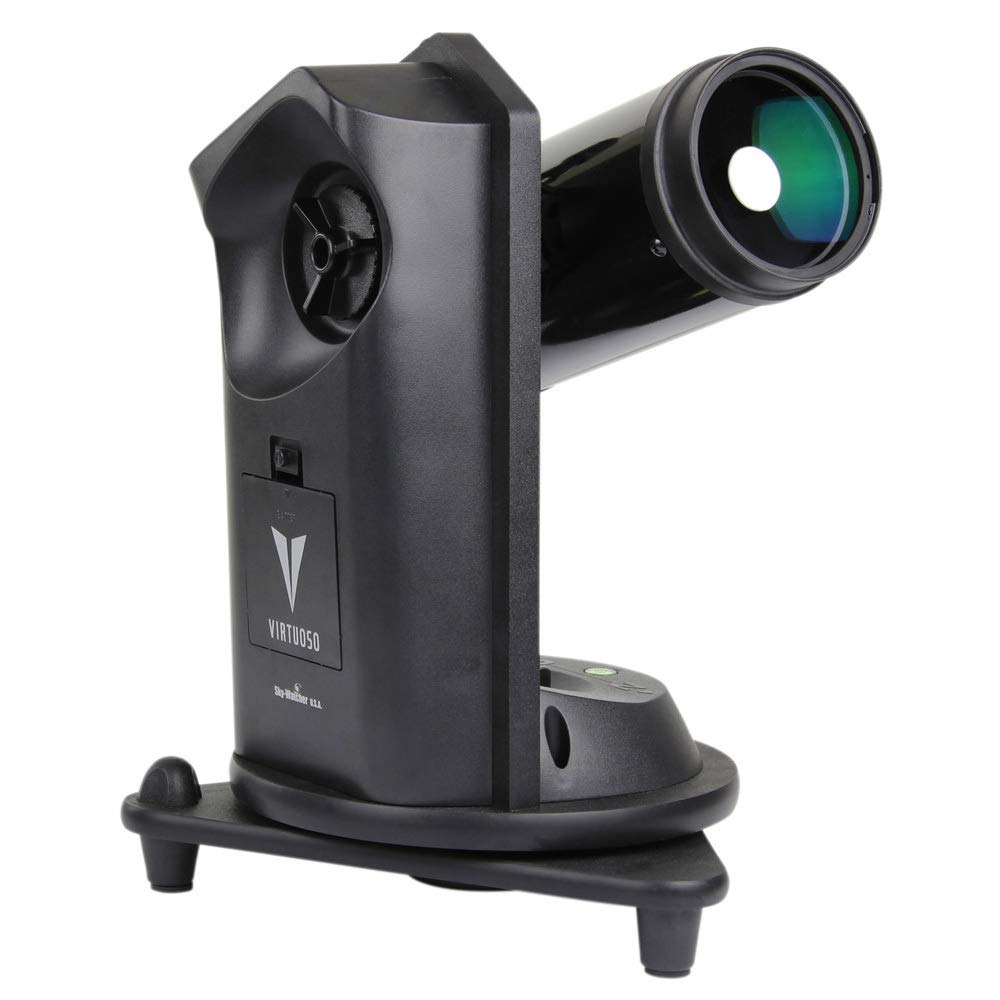
The Sky-Watcher Virtuoso S11750 features a 90 mm Maksutov-Cassegrain optical tube, a multi-function motorized alt-azimuth mount, and includes accessories for both astronomical and terrestrial viewing.
2. What's in the Box
Carefully unpack all items and verify that all components are present:
- Optical tube (90mm Maksutov-Cassegrain)
- Multi-function motorized alt-azimuth mount
- 5x24 finder scope
- Mounting bracket for finder scope
- Solar filter
- Solar finder
- 10 mm 1.25" eyepiece
- 20 mm 1.25" eyepiece
- 1.25" Star Diagonal
- Bracket for DSLR, camcorder or cell phone
- Remote shutter release cable (for Canon Rebel EOS DSLR cameras)

3. Assembly and Initial Setup
3.1. Unpacking and Inspection
Remove all components from the packaging. Inspect each part for any signs of damage. Retain the packaging for future transport or storage.
3.2. Attaching the Optical Tube to the Mount
Place the motorized alt-azimuth mount on a stable, level surface. Secure the 90mm Maksutov-Cassegrain optical tube to the mount using the provided dovetail clamp. Ensure it is firmly attached to prevent accidental dislodgement.
3.3. Installing the Finder Scope
Attach the 5x24 finder scope to its mounting bracket. Slide the bracket into the receptacle on the optical tube and tighten the retaining screw. The finder scope aids in locating objects before viewing them through the main telescope eyepiece.
3.4. Inserting the Star Diagonal and Eyepiece
Insert the 1.25" Star Diagonal into the focuser of the optical tube. Secure it with the thumbscrew. Then, insert either the 10 mm or 20 mm eyepiece into the star diagonal and tighten its thumbscrew. The 20 mm eyepiece provides a wider field of view, suitable for initial object location, while the 10 mm eyepiece offers higher magnification for detailed observation.
3.5. Powering the Mount
The motorized mount requires 8 AA batteries (not included). Open the battery compartment on the mount and insert the batteries, observing correct polarity. Alternatively, an external 12V DC power supply (not included) can be used.

4. Operation
4.1. Basic Operation
Turn on the mount using the power switch. Use the directional buttons on the control panel to move the telescope in altitude (up/down) and azimuth (left/right). The mount features dual axis encoders, allowing manual movement of the telescope without losing its alignment or tracking capabilities.
4.2. Aligning the Finder Scope
Before observing, align the finder scope with the main telescope. Point the main telescope at a distant, stationary object (e.g., a distant tree or street light) during daylight hours. Center the object in the main telescope's eyepiece. Then, adjust the screws on the finder scope bracket until the same object is centered in the finder scope's crosshairs.
4.3. Astronomical Observation
For astronomical viewing, point the telescope towards your desired celestial object. Use the 20 mm eyepiece for a wide field of view to locate the object, then switch to the 10 mm eyepiece for higher magnification. Adjust the focus knob until the image is sharp.
4.4. Solar Observation (WARNING: Use Extreme Caution)
NEVER look directly at the Sun without a certified solar filter. Permanent eye damage or blindness will result.
To safely observe the Sun, attach the provided solar filter securely to the front of the optical tube. Use the solar finder to safely aim the telescope at the Sun. The solar finder projects a small image of the Sun onto a screen, allowing you to center it without looking directly at the Sun. Once centered, you can view the Sun through the main telescope with the solar filter in place.
4.5. Terrestrial Observation
The Virtuoso S11750 can also be used for terrestrial viewing. The alt-azimuth mount allows for easy panning across landscapes. The included star diagonal provides a comfortable viewing angle, though it will present an image that is correctly oriented vertically but reversed horizontally.
4.6. Photography with the Virtuoso Mount
The mount includes a bracket for attaching a DSLR, camcorder, or cell phone. A remote shutter release cable is provided for Canon Rebel EOS DSLR cameras, enabling automatic shutter release functionality. This allows for stable imaging without touching the camera.
5. Maintenance
5.1. Cleaning Optics
Dust on the optical surfaces should be removed with a soft brush or compressed air. For smudges or fingerprints, use a specialized optical cleaning solution and a microfiber cloth. Apply the solution to the cloth, not directly to the lens, and wipe gently in a circular motion from the center outwards. Avoid touching optical surfaces with bare hands.
5.2. Cleaning the Mount
Wipe the mount with a soft, damp cloth. Do not use abrasive cleaners or solvents. Keep the mount free from dust and moisture.
5.3. Storage
When not in use, store the telescope in a dry, dust-free environment. It is recommended to keep the original packaging for safe storage and transport. Replace all lens caps and covers.
6. Troubleshooting
| Problem | Possible Cause | Solution |
|---|---|---|
| No power to mount | Batteries are dead or incorrectly inserted; power cable disconnected. | Replace batteries, ensuring correct polarity. Check power cable connection if using external power supply. |
| Image is blurry | Out of focus; atmospheric conditions; dirty optics. | Adjust the focus knob. Wait for better seeing conditions. Clean optics as described in Maintenance section. |
| Cannot find objects with main telescope | Finder scope is not aligned. | Align the finder scope with the main telescope as described in Section 4.2. |
| Motorized tracking is inaccurate or not working | Mount not properly aligned; low batteries; mechanical issue. | Ensure the mount is level and properly aligned. Replace batteries. If issues persist, contact customer support. |
| Finder scope view is poor or difficult to use | Low quality finder scope; uncomfortable viewing angle. | Consider upgrading to a red dot finder or a right-angle correct-image finder for improved usability. |
7. Specifications
| Feature | Detail |
|---|---|
| Optical Design | Maksutov-Cassegrain |
| Aperture | 90 mm |
| Mount Type | Multi-function Motorized Alt-Azimuth |
| Finder Scope | 5x24 |
| Eyepieces Included | 10 mm (1.25"), 20 mm (1.25") |
| Star Diagonal | 1.25" |
| Power Requirements | 8 AA batteries (not included) |
| Product Dimensions | 14 x 14 x 19 inches |
| Item Weight | 17 pounds |
| Model Number | S11750 |
8. Warranty and Customer Support
For warranty information and technical assistance, please refer to the official Sky-Watcher website or contact their customer support directly. Keep your purchase receipt as proof of purchase.
Manufacturer: Sky-Watcher


