
Important Safety Instructions
Please read all instructions carefully before using your Ativa LD800 shredder. Keep this manual for future reference.
- Read Instructions: Always read and understand all operating instructions and safety information before use.
- Keep Away from Children: This shredder is not a toy. Keep children and pets away from the shredder, especially during operation.
- Power Source: Connect the shredder to a properly grounded power outlet with the correct voltage as indicated on the label.
- Avoid Overloading: Do not exceed the specified sheet capacity (8 sheets of 20 lb bond paper). Overloading can damage the shredder.
- No Metal Objects: Do not shred metal objects such as paper clips, staples, CDs/DVDs, or credit cards unless explicitly stated in the operating instructions for specific slots. This model is designed for paper and credit cards.
- Loose Clothing and Hair: Keep loose clothing, jewelry, hair, and ties away from the paper entry slot to prevent injury.
- Unplug When Not in Use: Always unplug the shredder before moving, cleaning, or emptying the waste bin, and when not in use for extended periods.
- Do Not Open: Do not attempt to open or repair the shredder yourself. Refer all servicing to qualified service personnel.
- Avoid Liquids: Do not expose the shredder to water or other liquids. Do not operate with wet hands.
Package Contents
Verify that all items are present in the package:
- Ativa LD800 Shredder Head
- Waste Bin
- User Manual (this document)
Setup
1. Unpacking
- Carefully remove the shredder from its packaging.
- Remove any protective materials or plastic bags from the shredder head and waste bin.
- Retain packaging for future transport or storage.
2. Placement
- Place the shredder on a flat, stable surface.
- Ensure there is adequate space around the shredder for ventilation and to access the waste bin.
- Do not place the shredder near heat sources or in direct sunlight.
3. Power Connection
- Place the shredder head securely onto the waste bin. Ensure it is properly seated.
- Plug the power cord into a standard 120V AC grounded electrical outlet.
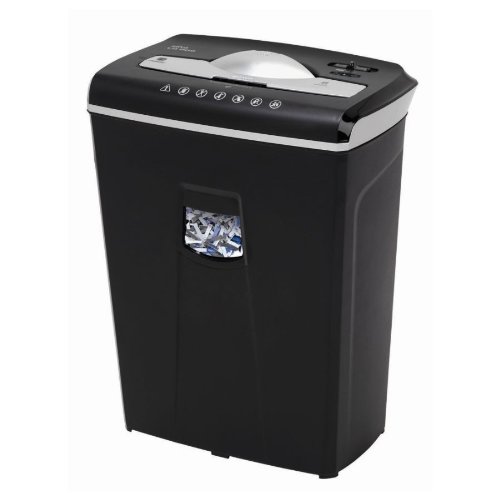
Image: The Ativa LD800 8-Sheet Cross-Cut Shredder. This image shows the shredder head placed on top of its waste bin, ready for operation. The design is compact and suitable for office or home use.
Operating Instructions
1. Control Panel Overview
The Ativa LD800 shredder typically features a slide switch with three positions:
- AUTO (I): The shredder is in standby mode. When paper is inserted into the feed slot, the shredder will automatically start and stop once shredding is complete.
- OFF (O): The shredder is powered off. This position is recommended when emptying the waste bin or when the shredder is not in use.
- REV (R): The shredder blades operate in reverse. This is used to clear paper jams or to retrieve an accidentally inserted document.
2. Shredding Documents
- Ensure the shredder is plugged in and the control switch is set to AUTO (I).
- Insert up to 8 sheets of paper (20 lb bond) straight into the paper entry slot. Do not force paper.
- The shredder will automatically start and shred the paper into small cross-cut particles.
- Once the paper has passed through, the shredder will stop automatically.
3. Shredding Credit Cards
- Ensure the shredder is plugged in and the control switch is set to AUTO (I).
- Insert one credit card at a time into the designated credit card entry slot (if present, otherwise use the main paper slot).
- The shredder will automatically start and shred the credit card.
- Once shredded, the shredder will stop automatically.
4. Overload Protection
If too many sheets of paper are inserted, the shredder may stop or struggle. If this occurs:
- Set the switch to REV (R) to clear the paper.
- Remove the excess paper.
- Re-insert a smaller quantity of paper.
5. Overheat Protection
The shredder is equipped with a thermal protection device. If the shredder operates continuously for too long, it may automatically shut off to prevent overheating. If this happens:
- Turn the shredder off and unplug it.
- Allow the shredder to cool down for at least 30 minutes.
- Plug it back in and resume operation.
Maintenance
1. Emptying the Waste Bin
Empty the waste bin regularly to prevent paper jams and ensure optimal performance.
- Set the control switch to OFF (O) and unplug the shredder.
- Carefully lift the shredder head off the waste bin.
- Dispose of the shredded paper.
- Place the shredder head back onto the waste bin securely.
2. Lubricating the Shredder Blades
Regular lubrication is essential for cross-cut shredders to maintain performance and extend lifespan. Use shredder oil sheets or liquid shredder oil.
- Using Shredder Oil Sheets: Feed one oil sheet into the paper entry slot as you would a piece of paper. Shred it completely.
- Using Liquid Shredder Oil: Apply a thin line of shredder oil across the paper entry slot. Run the shredder in REV (R) for 10 seconds, then in AUTO (I) for 10 seconds.
Lubricate the shredder every 30 minutes of continuous use or at least twice a month for light use.
3. Cleaning the Shredder
Always unplug the shredder before cleaning.
- Wipe the exterior of the shredder with a soft, dry cloth.
- Do not use abrasive cleaners or solvents.
- Do not spray cleaning solutions directly onto the shredder.
Troubleshooting
| Problem | Possible Cause | Solution |
|---|---|---|
| Shredder does not turn on. | Not plugged in; Power switch in OFF position; Overheat protection activated; Shredder head not properly seated. | Check power cord connection; Set switch to AUTO; Allow to cool for 30 minutes; Re-seat shredder head. |
| Paper jam. | Too much paper inserted; Paper inserted at an angle. | Set switch to REV to clear; Remove excess paper; Lubricate blades if frequent. |
| Shredder runs continuously. | Sensor is blocked or dirty. | Unplug and clean the paper entry slot and sensors with a soft brush. |
| Shredder is noisy or slow. | Blades need lubrication; Waste bin is full. | Lubricate shredder blades; Empty waste bin. |
Specifications
- Model: LD800
- Cut Type: Cross Cut
- Sheet Capacity: 8 sheets (20 lb bond paper)
- Waste Bin Capacity: 11.8 gallons
- Operation Mode: Automatic
- UPC: 735854814991
- Power: 120V AC, 60Hz (typical, check product label for exact rating)
Warranty and Support
This product is covered by a limited warranty. Please refer to the warranty card included with your purchase for specific terms and conditions, including warranty period and coverage details.
For technical support, troubleshooting assistance, or to inquire about warranty service, please contact the manufacturer's customer service department. Contact information can typically be found on the product packaging or the manufacturer's official website.