
Sony DSC-HX50V
Sony DSC-HX50V 20.4MP Digital Camera Instruction Manual
Model: DSC-HX50V
Introduction
This manual provides essential information for the safe and effective operation of your Sony DSC-HX50V 20.4MP Digital Camera. Please read it thoroughly before using the camera and retain it for future reference.
The Sony DSC-HX50V is a compact digital camera featuring a 20.4MP Exmor R CMOS sensor, 30x optical zoom, and Optical SteadyShot image stabilization. It is designed for capturing high-quality still images and Full HD videos with ease.
Package Contents
Verify that all items are present in your camera package:
- Sony DSC-HX50V Digital Camera
- Battery
- HDMI Cable
- Instruction Manual (this document)
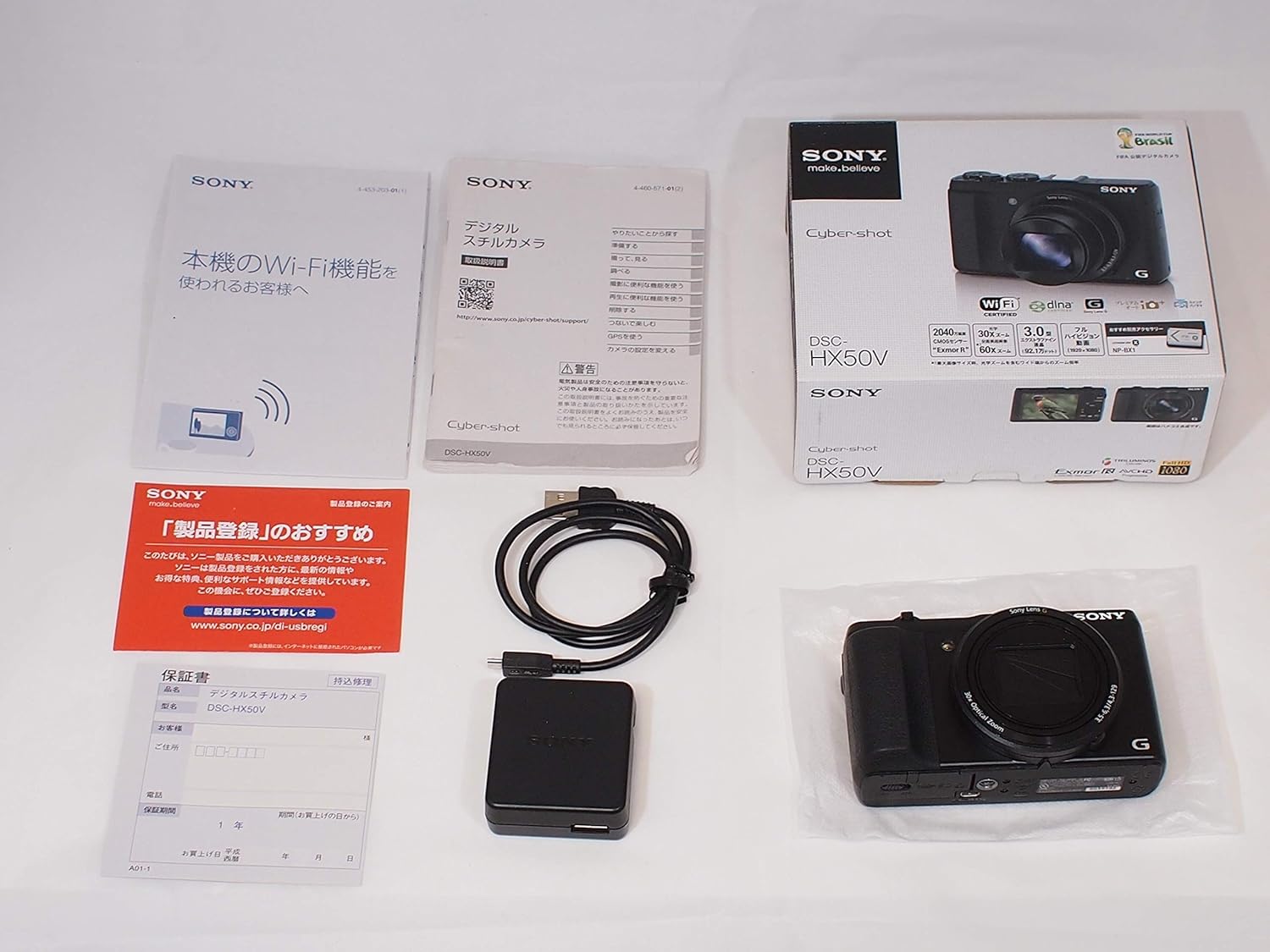
Image: Contents of the Sony DSC-HX50V package, including the camera, battery, HDMI cable, and manual.
Setup
1. Battery Installation
- Open the battery/memory card cover located on the bottom of the camera.
- Insert the supplied battery (Lithium Ion) into the battery compartment, ensuring correct orientation.
- Close the battery/memory card cover securely.
2. Memory Card Insertion
The camera supports SD/SDHC/SDXC/Memory Stick Duo/Memory Stick Pro Duo, Memory Stick Pro-HG Duo cards.
- Open the battery/memory card cover.
- Insert a compatible memory card into the memory card slot with the correct orientation until it clicks into place.
- Close the battery/memory card cover securely.
3. Initial Power On
Press the ON/OFF button to power on the camera. Follow any on-screen prompts for initial setup, such as setting the date and time.
Operating Instructions
Basic Photography
For quick and easy shooting, set the mode dial to Intelligent Auto. The camera will automatically detect the scene and adjust settings for optimal results.

Image: Front view of the Sony DSC-HX50V Digital Camera, showing the lens and grip.
Zoom Functionality
The DSC-HX50V features a 30x optical zoom lens, extendable to 60x with Clear Image Digital Zoom. Use the zoom lever around the shutter button to adjust the focal length.
- Move the zoom lever towards W (Wide) to zoom out.
- Move the zoom lever towards T (Telephoto) to zoom in.
Image Stabilization (Optical SteadyShot)
The camera is equipped with Optical SteadyShot image stabilization, including a 3-way active mode, to reduce blur caused by camera shake, especially at longer zoom settings or in low light conditions.
Video Recording
Record Full HD (1080/60p) videos by pressing the dedicated MOVIE button. The camera also supports dual recording of stills and movies simultaneously.
Manual Controls
For more creative control, rotate the mode dial to select from various exposure modes:
- P (Program Auto): The camera sets exposure automatically, but you can adjust other settings.
- A (Aperture Priority): Manually set the aperture, and the camera adjusts shutter speed.
- S (Shutter Speed Priority): Manually set the shutter speed, and the camera adjusts aperture.
- M (Manual Exposure): Manually set both aperture and shutter speed.
A dedicated EV control dial allows for quick exposure compensation adjustments.
Continuous Shooting
Capture fast-moving subjects with continuous shooting at up to 10 frames per second (fps) at full 20.4 megapixel resolution.
Intelligent Sweep Panorama
To capture wide panoramic scenes, select Intelligent Sweep Panorama mode. Simply press the shutter button and sweep the camera across the scene. The camera automatically stitches images together, even compensating for moving subjects.
Connectivity (Wi-Fi & GPS)
The camera features built-in Wi-Fi for easy transfer of images to smartphones and tablets, and remote control via a dedicated app. GPS tagging is also available to record location data with your photos.

Image: Back view of the Sony DSC-HX50V Digital Camera, showing the LCD screen and control buttons.
Maintenance
Battery Care
- The camera's battery provides approximately 400 shots per charge.
- Charge the battery using the supplied charger and cable.
- Avoid exposing the battery to extreme temperatures.
Cleaning the Camera
- Use a soft, dry cloth to clean the camera body.
- For the lens, use a lens brush or a soft, lint-free cloth specifically designed for optical surfaces.
- Avoid using harsh chemicals or abrasive materials.
Troubleshooting
If you encounter issues with your camera, try the following basic troubleshooting steps:
- Camera does not power on: Ensure the battery is fully charged and correctly inserted.
- Images are blurry: Check that Optical SteadyShot is enabled. Ensure sufficient lighting and a stable grip.
- Memory card error: Reinsert the memory card. If the issue persists, try a different compatible memory card.
- Wi-Fi connection issues: Ensure the camera and smart device are within range and Wi-Fi is enabled on both. Refer to the app's instructions for specific connection steps.
For more detailed troubleshooting, refer to the comprehensive digital manual available on the Sony support website.
Specifications
| Feature | Specification |
|---|---|
| Model Name | Sony DSCHX50V/B |
| Photo Sensor Resolution | 20.4 MP |
| Optical Zoom | 30x |
| Digital Zoom | 60x |
| Image Stabilization | Optical |
| Video Resolution | FHD 1080p |
| Screen Size | 3 Inches (921k dots LCD) |
| Connectivity Technology | HDMI, USB, Wi-Fi |
| Battery Type | Lithium Ion |
| Battery Average Life | 400 Photos |
| Item Weight | 9.6 ounces |
Warranty and Support
This product comes with a 90-day Limited Hardware Warranty. For warranty claims or technical support, please contact Sony customer service or visit the official Sony support website.
For additional resources and product information, visit the Sony Store on Amazon.
Related Documents - DSC-HX50V
 |
SONY DSC-HX50/HX50V Cyber-shot Lietotāja rokasgrāmata Detalizēta lietotāja rokasgrāmata digitālajai fotokamerai SONY Cyber-shot DSC-HX50/HX50V, kas aptver lietošanas pamācības, drošības informāciju un tehniskās specifikācijas latviešu, igauņu un lietuviešu valodās. |
 |
Sony DSC-WX350 Digital Camera Instruction Manual Comprehensive guide for the Sony DSC-WX350 digital camera, covering setup, basic operations, shooting modes, playback, software integration, specifications, and important safety information. |
 |
Sony DSC-V1 Cyber-shot Digital Camera User Manual and Operating Instructions This is the official operating manual for the Sony DSC-V1 Cyber-shot digital still camera. It provides detailed instructions on setup, operation, shooting modes, image viewing, movie recording, troubleshooting, and care for your camera. |
 |
Sony HXR-NX100 Full HD Compact Professional NXCAM Camcorder The Sony HXR-NX100 is an affordable, compact Full-HD NXCAM camcorder featuring a large 1.0-type Exmor R CMOS sensor for high sensitivity and excellent image quality, a 29mm wide-angle Sony G Lens with up to 48x zoom, and professional manual controls. It supports multiple recording formats including XAVC S 50Mbps, AVCHD, and DV, offering flexibility for various workflows. Ideal for professionals seeking a high-performance, user-friendly camcorder. |
 |
Sony Cyber-shot Digital Still Camera Startup Guide: DSC-HX99, HX95, WX800, WX700 Get started with your Sony Cyber-shot digital camera. This startup guide covers setup, basic operations, shooting, viewing, transferring images, and important notes for models DSC-HX99, DSC-HX95, DSC-WX800, and DSC-WX700. |
 |
Sony DSC-W5/W7/W15/W17 Service Manual - Technical Repair Guide Detailed service manual for Sony Cyber-shot DSC-W5, DSC-W7, DSC-W15, and DSC-W17 digital cameras, covering specifications, disassembly, block diagrams, schematics, and repair parts. Published by Sony EMCS Co. in 2007. |