
1. Introduction
The Brodit 854885 ProClip is a vehicle-specific mounting platform designed to provide a secure and stable base for attaching various device holders in your Skoda Octavia III (models from 2013 onwards). This ProClip is engineered for dashboard installation, specifically to the right of the steering wheel, ensuring optimal positioning without obstructing vehicle controls or airbags. It allows for the attachment of device holders for mobile phones, GPS units, tablets, and other electronic devices.
The ProClip is designed for a precise fit, integrating seamlessly with your vehicle's interior without causing damage or leaving permanent marks upon removal.
2. Package Contents
Please verify that all components are present before beginning installation:
- Brodit ProClip for Skoda Octavia III (2013-)
- Mounting Screws (quantity as supplied)
- Assembly Instructions (this document)
- Gap Opener Tool (plastic wedge)
3. Compatibility
This Brodit ProClip (Model 854885) is specifically designed for the following vehicle:
- Vehicle Model: Skoda Octavia III
- Model Year: 2013 and newer
Ensure your vehicle matches these specifications for proper fit and function.
4. Installation Instructions
Follow these steps carefully to install your Brodit ProClip. No special tools are required beyond the included gap opener.
Step 1: Prepare the Installation Area
Locate the installation point on your dashboard, to the right of the steering wheel, as indicated in the diagram. Use the provided gap opener tool to gently pry open the gap between the dashboard trim and the air vent housing. This creates space for the ProClip's lower edge.
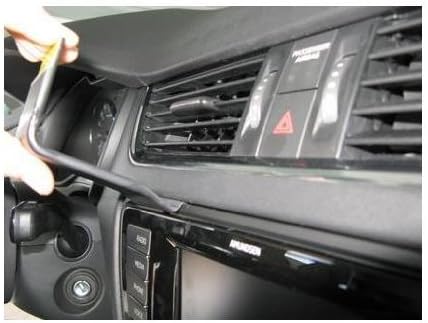
Image Description: A line drawing of a car's dashboard, viewed from the driver's seat. The steering wheel is prominent. An arrow points to the area right of the steering wheel, above the central display and air vents. A 'GAP OPENER A ProClip tool' is depicted, showing where it should be inserted to create a gap for the ProClip.
Step 2: Insert the Lower Edge of the ProClip
Insert the lower, angled edge of the ProClip into the gap you created in Step 1. Ensure it slides fully into place and is securely seated against the dashboard trim.
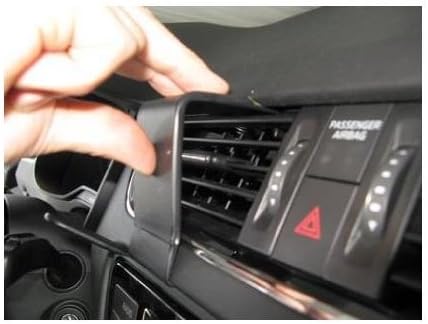
Image Description: A close-up photo of a hand inserting the bottom lip of the black Brodit ProClip into the seam between the dashboard and the air vent assembly, to the right of the steering wheel.
Step 3: Secure the Upper Edge of the ProClip
Once the lower edge is in place, gently push the upper part of the ProClip upwards and inwards until it snaps into position, securing itself against the upper dashboard trim or air vent. The ProClip should now be firmly attached to the dashboard.

Image Description: A close-up photo showing a hand pressing the top section of the Brodit ProClip firmly into the dashboard, above the central air vents, to ensure it is fully seated and secure.
Step 4: Final Check
Verify that the ProClip is stable and does not move when gently pulled. The installation is complete. You can now attach your specific device holder to the ProClip using the provided mounting screws.

Image Description: A view of the car's dashboard, showing the Brodit ProClip holder installed vertically between the central air vents and the dashboard trim, to the right of the steering wheel. The holder is black and blends with the interior.
5. Usage
Once the Brodit ProClip is securely installed, you can attach any compatible device holder to its flat surface. Most Brodit device holders, and many third-party holders, are designed to screw directly onto the ProClip. Ensure the device holder is firmly attached to prevent movement during vehicle operation.
6. Maintenance
The Brodit ProClip requires minimal maintenance. To clean, simply wipe with a soft, damp cloth. Avoid using harsh chemicals or abrasive cleaners, as these may damage the plastic material or the vehicle's interior surfaces.
7. Troubleshooting
- ProClip feels loose: Re-check all installation steps. Ensure both the lower and upper edges are fully seated and snapped into place. Apply firm, even pressure during installation.
- Difficulty inserting ProClip: Ensure you are using the gap opener tool to create sufficient space. Do not force the ProClip, as this may damage the vehicle's interior. Verify vehicle compatibility.
- Device holder not attaching: Ensure you are using the correct screws and that the device holder is compatible with the ProClip's mounting pattern.
8. Specifications
| Feature | Detail |
|---|---|
| Brand | Brodit |
| Model Number | 854885 |
| Model Name | ProClip |
| Compatible Devices | Skoda Octavia III (2013-) |
| Mounting Type | Dashboard |
| Material Type | Plastic |
| Special Features | Hands-Free Device Mounting |
| Product Dimensions | 9.9 x 9.7 x 5.8 cm |
| Item Weight | 58.97 g (0.13 Pounds) |
9. Warranty and Support
For warranty information and technical support, please refer to the official Brodit website or contact your authorized Brodit dealer. Keep your purchase receipt as proof of purchase.