
Meyin RS-802/S2
Meyin RS-802/S2 Remote Shutter Release Cable User Manual
Model: RS-802/S2
Introduction
This manual provides detailed instructions for the proper use and maintenance of your Meyin RS-802/S2 Remote Shutter Release Cable. This device is designed to provide precise control over your camera's shutter, enabling stable and shake-free photography, especially useful for long exposures, macro photography, and telephoto shots.
The RS-802/S2 is compatible with a wide range of Sony cameras. Please refer to the compatibility list in the specifications section to ensure your camera is supported.
Safety Information
- Do not expose the cable to extreme temperatures, direct sunlight, or high humidity.
- Avoid dropping or subjecting the device to strong impacts.
- Keep out of reach of children.
- Do not attempt to disassemble or modify the device. This may void the warranty and cause damage.
- Ensure the cable is properly connected to the camera's remote terminal before use.
Package Contents
Verify that all items are present in your package:
- 1 x Meyin RS-802/S2 Remote Shutter Release Cable
- 1 x User Manual (this document)
Product Overview
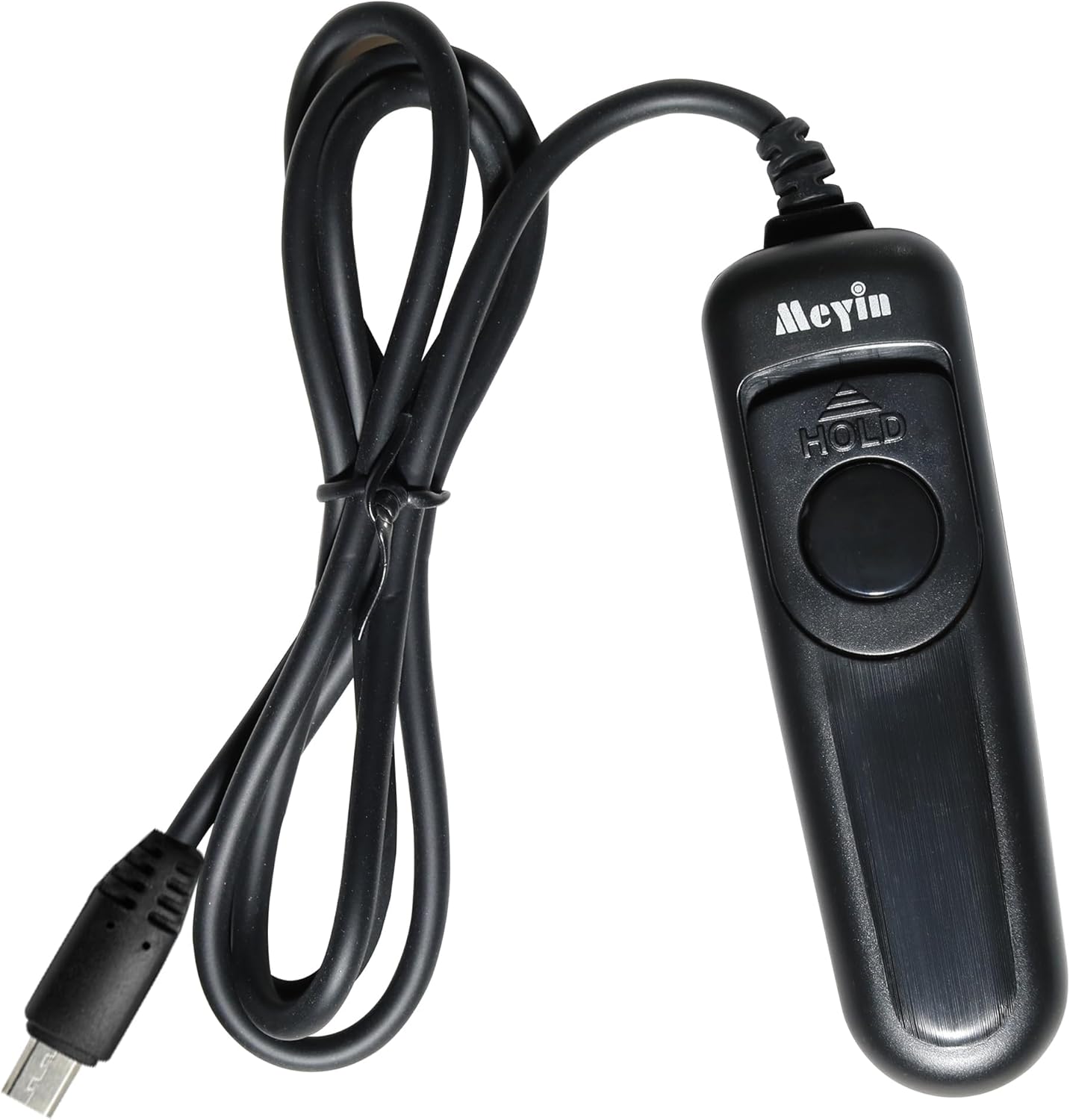
Figure 1: Overall view of the RS-802/S2 remote shutter release cable, showing the remote control unit and the camera connection cable.

Figure 2: Close-up view of the remote control unit, highlighting the main shutter button and the 'HOLD' switch.
The Meyin RS-802/S2 consists of a handheld remote control unit and an integrated connection cable. The remote unit features a two-stage shutter button and a 'HOLD' switch for bulb exposures.
- Shutter Button: A two-stage button for autofocus and shutter release.
- HOLD Switch: Used to lock the shutter button in the fully pressed position for bulb exposures.
- Connection Cable: Approximately 70cm long, designed to connect to your compatible Sony camera's remote terminal.
Setup
- Locate Camera Remote Terminal: Identify the remote control terminal on your Sony camera. This is typically a small port, often covered by a rubber flap, labeled with a remote control icon.
- Connect the Cable: Gently insert the connector end of the RS-802/S2 cable into your camera's remote terminal. Ensure it is fully seated to establish a secure connection. Do not force the connector.
- Power On Camera: Turn on your camera. The remote shutter release cable does not require batteries as it is powered by the camera.

Figure 3: Example of a camera with the remote shutter release cable properly connected to its port.
Operating Instructions
Standard Shutter Release
- Autofocus: Gently press the shutter button on the remote halfway down. The camera will activate its autofocus system.
- Shutter Release: Once focus is achieved, press the shutter button fully down to take a picture.
This method helps to eliminate camera shake that can occur when pressing the camera's built-in shutter button directly, resulting in sharper images.

Figure 4: Illustrates the improvement in image sharpness when using a remote shutter release compared to direct camera operation.
Bulb Exposure Mode
For exposures longer than the camera's maximum shutter speed (e.g., 30 seconds), use the bulb mode. Your camera must be set to Bulb mode for this function to work.
- Set Camera to Bulb Mode: Refer to your camera's manual to set it to Bulb exposure mode.
- Press and Hold Shutter Button: Press the shutter button on the remote fully down.
- Engage HOLD Switch: While holding the shutter button down, slide the 'HOLD' switch (if present on your model) to the locked position. This will keep the shutter open for the desired duration.
- End Exposure: To close the shutter, slide the 'HOLD' switch back to the unlocked position.
Bulb mode is ideal for night photography, light painting, and capturing star trails.

Figure 5: An example of a long exposure photograph, demonstrating the capability of the remote shutter release for extended exposures.
Maintenance
- Cleaning: Use a soft, dry cloth to wipe the surface of the remote control unit and cable. Do not use liquid cleaners or solvents.
- Storage: When not in use, store the cable in a cool, dry place, away from direct sunlight and extreme temperatures. Avoid tightly coiling the cable to prevent damage.
- Cable Care: Do not pull on the cable to disconnect it from the camera. Always grasp the connector firmly.
Troubleshooting
| Problem | Possible Cause | Solution |
|---|---|---|
| Remote does not trigger shutter. |
|
|
| Autofocus works, but shutter does not release. |
|
|
| Bulb mode does not work. |
|
|
Specifications
| Model | RS-802/S2 |
| Brand | Meyin |
| Cable Length | Approx. 70 cm (27.5 inches) |
| Power Source | Powered by camera (no battery required) |
| Dimensions (Remote Unit) | Approximately 2.4 x 1.1 x 4.7 inches (6.1 x 2.8 x 11.9 cm) |
| Weight | Approximately 2.08 ounces (59 grams) |
| Compatible Devices | Sony: A99II, A77II, A58, A68, A7, A7II, A7R, A7RII, A7S, A7SII, A3000, A5100, A5000, A6000, A6300, A6500, NEX-3NL, RX1RII, RX10II, RX10III, RX100II, RX100III, RX100IV, HX300, HX400, HX400V, HX50V, HX60V, HX60, HX90, HX90V, HX80, ILCE-QX1, DSC-QX30, DSC-WX500, DSC-RX10M3, DSC-RX1RM2, DSC-RX100M4, DSC-RX100M5, DSC-RX10M2, DSC-WX500, DSC-HX60, DSC-RX100M2, DSC-RX100M3, ILCA-77M2, ILCE 6300, ILCE 6500, ILCE-7SM2, ILCE-7RM2, ILCE 5000. |
Warranty and Support
This Meyin product is covered by a standard manufacturer's warranty. For specific warranty terms and conditions, please refer to the documentation provided at the time of purchase or contact your retailer.
For technical support, troubleshooting assistance, or inquiries regarding product functionality, please contact Meyin customer service through their official website or the contact information provided with your purchase. When contacting support, please have your product model (RS-802/S2) and purchase details ready.
For the latest information and support resources, please visit the official Meyin website.
Ask a question about this manual
Ask about setup, troubleshooting, compatibility, parts, safety, or missing instructions. Manuals+ will review the question and use this page’s manual context to help answer it.