
Introduction
This manual provides instructions for the setup, operation, and maintenance of your TFA Dostmann 60.2014.01 Digital Alarm Clock. This versatile device functions as a digital clock, an alarm clock, a countdown timer, and a stopwatch. Its compact size and durable rubber coating make it suitable for various daily uses, from timing cooking to managing personal schedules.
Product Features
- Digital Alarm Clock: Features an alarm with an increasing sound to ensure you wake up.
- Timer Function: Can be set for countdowns, ideal for cooking or timed activities.
- Stopwatch Function: Measures elapsed time with precision, useful for sports or laboratory tasks.
- Compact and Portable: Small size and rubber coating ensure easy handling and portability.
- Versatile Mounting: Equipped with a magnetic back for attachment to metallic surfaces and a fold-out stand for tabletop use.
- Quartz Clock: Provides accurate timekeeping.
Package Contents
- 1 x TFA Dostmann 60.2014.01 Digital Alarm Clock
- 1 x CR2032 Battery
- 1 x Instruction Manual
Device Overview
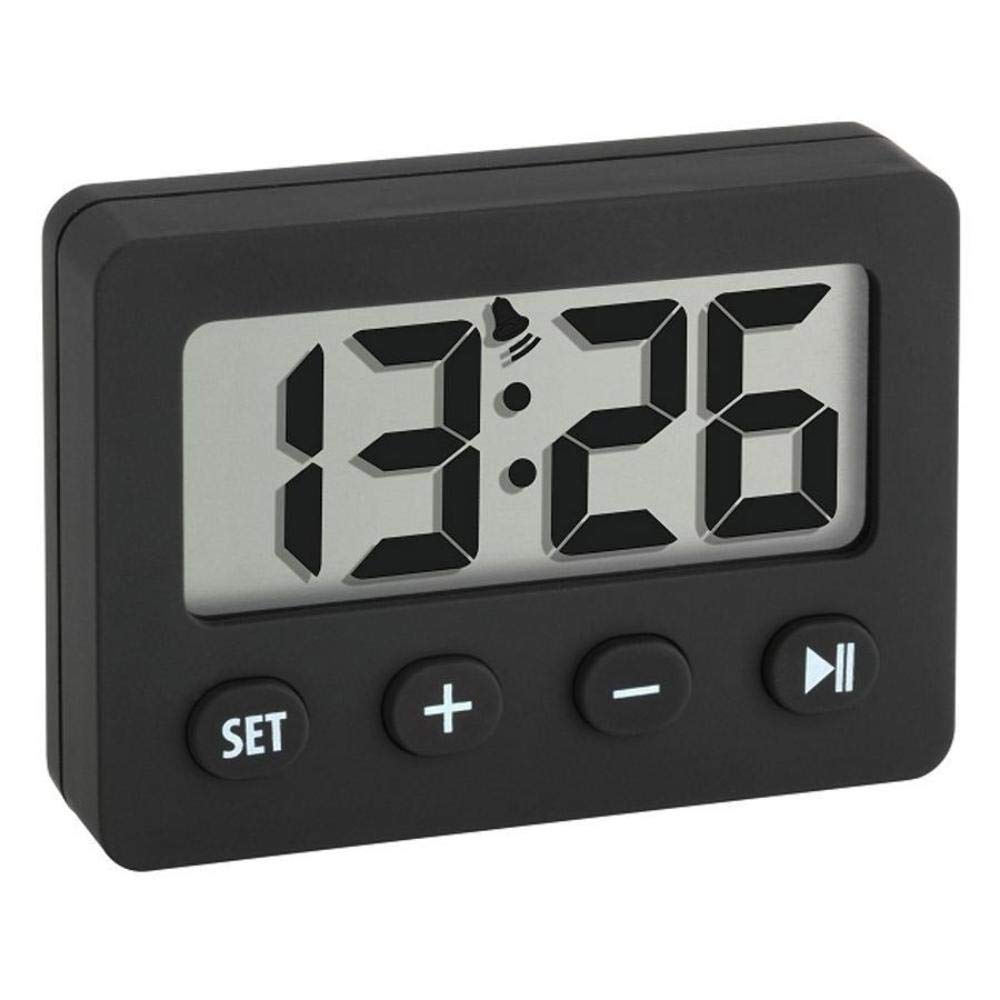
Figure 1: Digital Display with Alarm Icon. The display shows the current time or timer/stopwatch values. The alarm icon indicates if the alarm is active.

Figure 2: Control Buttons. The 'SET' button is used to enter and confirm settings. The '+' and '-' buttons adjust values. A fourth button (often a play/pause or mode button) is typically present for starting/stopping functions.
Components:
- Digital Display: Shows time, alarm, timer, and stopwatch readings.
- SET Button: Used to enter setting modes and confirm selections.
- '+' Button: Increases values or moves forward in settings.
- '-' Button: Decreases values or moves backward in settings.
- Play/Pause/Mode Button: (Often indicated by a triangle or similar icon) Used to start/stop timer/stopwatch or switch modes.
- Magnetic Back: Allows attachment to metal surfaces.
- Fold-out Stand: For freestanding placement on flat surfaces.
- Battery Compartment: Located on the back for CR2032 battery.
Setup
1. Battery Installation
- Locate the battery compartment cover on the back of the device.
- Use a small screwdriver or coin to open the compartment cover.
- Insert one CR2032 battery, ensuring the correct polarity (+/-) as indicated inside the compartment.
- Replace the battery compartment cover and secure it.
2. Initial Power On
Upon inserting the battery, the display should light up, and the default time (e.g., 12:00 AM) will be shown. The device is now ready for time setting.
Operating Instructions
1. Setting the Current Time
- Press and hold the SET button for a few seconds until the hour digits begin to flash.
- Use the '+' or '-' buttons to adjust the hour.
- Press the SET button again to move to the minute digits.
- Use the '+' or '-' buttons to adjust the minutes.
- Press the SET button one more time to confirm the time and exit the setting mode.
2. Alarm Function
- Setting the Alarm Time: From the normal time display, press the SET button once briefly to cycle through modes until the alarm time (often indicated by an alarm icon) is displayed. Press and hold SET until the alarm hour flashes. Adjust with '+' or '-'. Press SET to move to minutes, adjust with '+' or '-'. Press SET to confirm.
- Activating/Deactivating Alarm: While the alarm time is displayed, press the '+' button to toggle the alarm ON or OFF. An alarm icon on the display indicates when the alarm is active.
- Stopping the Alarm: When the alarm sounds, press any button to silence it. The alarm will typically sound again after 24 hours if not deactivated.
3. Timer (Countdown) Function
- Entering Timer Mode: Press the mode button (often the fourth button, or repeatedly press SET) until 'TIMER' or 'COUNTDOWN' is indicated on the display, or the display shows '00:00'.
- Setting the Countdown Time: Use the '+' and '-' buttons to set the desired countdown time (e.g., minutes and seconds).
- Starting/Pausing/Resetting: Press the mode button (or a dedicated start/stop button) to start the countdown. Press it again to pause. To reset the timer to the set value or to zero, press and hold the mode button or a dedicated reset button.
4. Stopwatch Function
- Entering Stopwatch Mode: Press the mode button (often the fourth button, or repeatedly press SET) until 'STOPWATCH' is indicated or the display shows '00:00:00'.
- Starting/Stopping: Press the mode button (or a dedicated start/stop button) to start the stopwatch. Press it again to stop.
- Resetting: While the stopwatch is stopped, press and hold the mode button or a dedicated reset button to clear the time to '00:00:00'.
Mounting Options
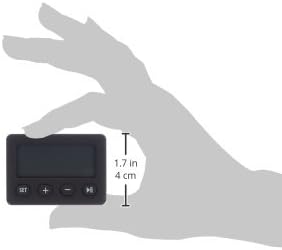
Figure 3: Compact Size for Portability. The device is small enough to be held comfortably in one hand.
- Magnetic Attachment: The back of the alarm clock features a strong magnet. This allows you to securely attach the device to any metallic surface, such as a refrigerator, oven, or magnetic board.
- Fold-out Stand: For use on non-metallic surfaces, a small stand can be folded out from the back of the device. This provides stable placement on desks, countertops, or shelves.
Maintenance
- Cleaning: Wipe the device with a soft, dry cloth. Do not use abrasive cleaners or solvents, as these may damage the rubber coating or display.
- Battery Replacement: When the display dims or functions become erratic, it is time to replace the CR2032 battery. Follow the battery installation steps in the Setup section.
- Storage: If storing the device for an extended period, remove the battery to prevent leakage.
Troubleshooting
- No Display / Dim Display: Check if the battery is correctly inserted with the correct polarity. Replace the CR2032 battery if it is old or depleted.
- Incorrect Time: Reset the time following the 'Setting the Current Time' instructions. Ensure the battery is not low.
- Alarm Not Sounding: Verify that the alarm function is activated (check for the alarm icon on the display). Ensure the alarm time is set correctly.
- Buttons Unresponsive: Remove and reinsert the battery to perform a soft reset. If the issue persists, the battery might be too low.
Specifications
| Model Number | 60.2014.01 |
| Brand | TFA Dostmann |
| Functions | Digital Clock, Alarm Clock, Timer, Stopwatch |
| Power Source | 1 x CR2032 Battery (included) |
| Material | Rubber Coating |
| Color | Black |
| Dimensions (L x W x H) | 5.89 x 1.4 x 4.19 cm |
| Item Weight | 25 grams |
| Display Size | 4.2 cm |
| Country of Origin | China |
Warranty and Support
This product is covered by a manufacturer's warranty. For specific warranty details, claims, or technical support, please refer to the documentation provided with your purchase or contact your retailer. Keep your proof of purchase for warranty purposes.


