
1. Product Overview
The Jesco Lighting LT3143-ST is a 3-light die-cast fixture designed for ceiling mount applications. It features a built-in 50-watt electronic transformer and is compatible with (3) MR16G 12-Volt 50W bulbs (lamps not included). This fixture provides focused illumination suitable for various indoor settings.
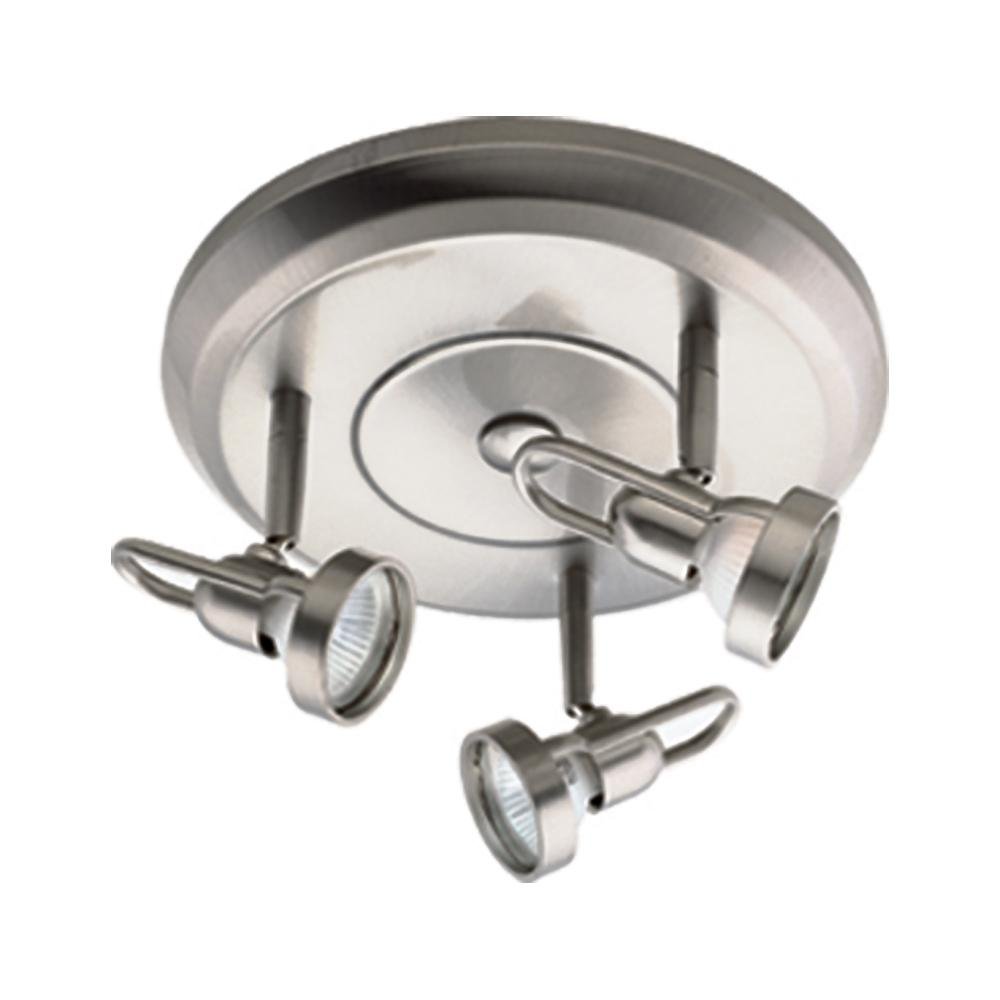
Image 1.1: The Jesco Lighting LT3143-ST 3-Light Fixture in Satin Chrome finish. This image displays the overall design of the fixture, highlighting its three light heads and the satin chrome housing.
Key Features:
- Die-cast construction for durability.
- Integrated 50-watt electronic transformer.
- Designed for three MR16G 12-Volt 50W bulbs (sold separately).
- Satin Chrome finish.
2. Safety Information
WARNING: Risk of electric shock. Installation should be performed by a qualified electrician.
- Always disconnect power at the circuit breaker before installation, maintenance, or bulb replacement.
- Ensure all electrical connections comply with local codes and ordinances.
- Do not exceed the maximum wattage specified for the bulbs (3 x 50W MR16G 12V).
- This fixture is designed for indoor use only.
- Do not operate the fixture with damaged wiring or components.
- Keep flammable materials away from the light fixture.
3. Package Contents
Verify that all components are present before beginning installation:
- Jesco Lighting LT3143-ST 3-Light Fixture (1 unit)
- Mounting hardware (screws, wire nuts, etc.)
- Instruction Manual
Note: MR16G 12-Volt 50W bulbs are not included and must be purchased separately.
4. Setup and Installation
This fixture requires assembly and ceiling mounting. Professional installation by a licensed electrician is highly recommended to ensure safety and proper functionality.
Tools Required (Not Included):
- Screwdriver (Phillips and/or flathead)
- Wire strippers
- Pliers
- Voltage tester
- Ladder
- Safety glasses
Installation Steps:
- Turn off Power: Locate the circuit breaker controlling the light fixture location and turn off the power. Verify power is off using a voltage tester.
- Prepare Mounting Surface: Ensure the ceiling junction box is securely mounted and capable of supporting the fixture's weight (approximately 2.5 lbs).
- Connect Wiring:
- Connect the fixture's ground wire (usually bare copper or green) to the house ground wire.
- Connect the fixture's neutral wire (usually white) to the house neutral wire.
- Connect the fixture's hot wire (usually black) to the house hot wire.
- Secure all connections with wire nuts and electrical tape.
- Mount Fixture: Carefully align the fixture base with the mounting holes on the junction box. Secure the fixture to the ceiling using the provided mounting screws.
- Install Bulbs: Insert three MR16G 12-Volt 50W bulbs into the lamp holders. Ensure bulbs are seated correctly.
- Restore Power: Turn the power back on at the circuit breaker.
- Test Fixture: Test the fixture to ensure proper operation.
5. Operating Instructions
The Jesco Lighting LT3143-ST fixture is controlled via a remote control (if included with your specific model) or a standard wall switch connected to the circuit. The fixture is designed for simple on/off operation.
Basic Operation:
- Power On/Off: Use the connected wall switch or the designated button on your remote control to turn the light fixture on or off.
- Adjusting Light Heads: The individual light heads can be adjusted to direct light to specific areas. Gently pivot or tilt each head to achieve the desired illumination angle.
6. Maintenance
Regular maintenance ensures the longevity and optimal performance of your light fixture.
Cleaning:
- Always disconnect power before cleaning.
- Wipe the fixture with a soft, dry, or slightly damp cloth.
- Do not use abrasive cleaners, solvents, or polishes as they may damage the finish.
Bulb Replacement:
- Ensure power is off and the bulbs have cooled completely before attempting replacement.
- Gently remove the old MR16G 12-Volt 50W bulb from its socket.
- Insert a new MR16G 12-Volt 50W bulb, ensuring it is securely seated.
- Restore power and test the new bulb.
7. Troubleshooting
If you encounter issues with your Jesco Lighting LT3143-ST fixture, refer to the following common problems and solutions:
| Problem | Possible Cause | Solution |
|---|---|---|
| Fixture does not light up. |
|
|
| Lights flicker or dim. |
|
|
| Remote control not working. |
|
|
For issues not resolved by the above steps, please contact Jesco Lighting customer support or a qualified electrician.
8. Specifications
| Feature | Detail |
|---|---|
| Model Number | LT3143-ST |
| Brand | Jesco Lighting |
| Color | Satin Chrome |
| Material | Metal (Die Cast) |
| Number of Light Sources | 3 |
| Bulb Base Type | MR16G 12-Volt 50W (Bulbs not included) |
| Built-in Transformer | 50-Watt Electronic Transformer |
| Voltage | 120 Volts |
| Total Wattage (Max) | 150 watts (3 x 50W) |
| Power Source | Corded Electric |
| Mounting Type | Ceiling Mount |
| Control Method | Remote (if applicable) / Wall Switch |
| Item Weight | 2.5 Pounds |
| Required Assembly | Yes |
| Certification | ETL |
9. Warranty and Support
Manufacturer's Warranty:
This Jesco Lighting fixture is covered by a 1-year manufacturer's warranty from the date of purchase. This warranty covers defects in materials and workmanship under normal use. Please retain your proof of purchase for warranty claims.
Customer Support:
For technical assistance, warranty inquiries, or replacement parts, please contact Jesco Lighting customer support. Refer to the official Jesco Lighting website or your purchase documentation for current contact information.
Jesco Lighting
www.jescolighting.com (Example link, actual link may vary)