
1. Introduction and Overview
The Honeywell 6110 Fire Resistant Digital Safe Box is designed to provide secure storage for your valuable documents, personal items, and electronics. Constructed with double steel walls and fire-resistant insulation, it offers protection against both theft and fire. This safe features a programmable digital lock for convenient access and includes emergency override keys for additional security. Its compact design and integrated carry handle make it suitable for various home or office environments.
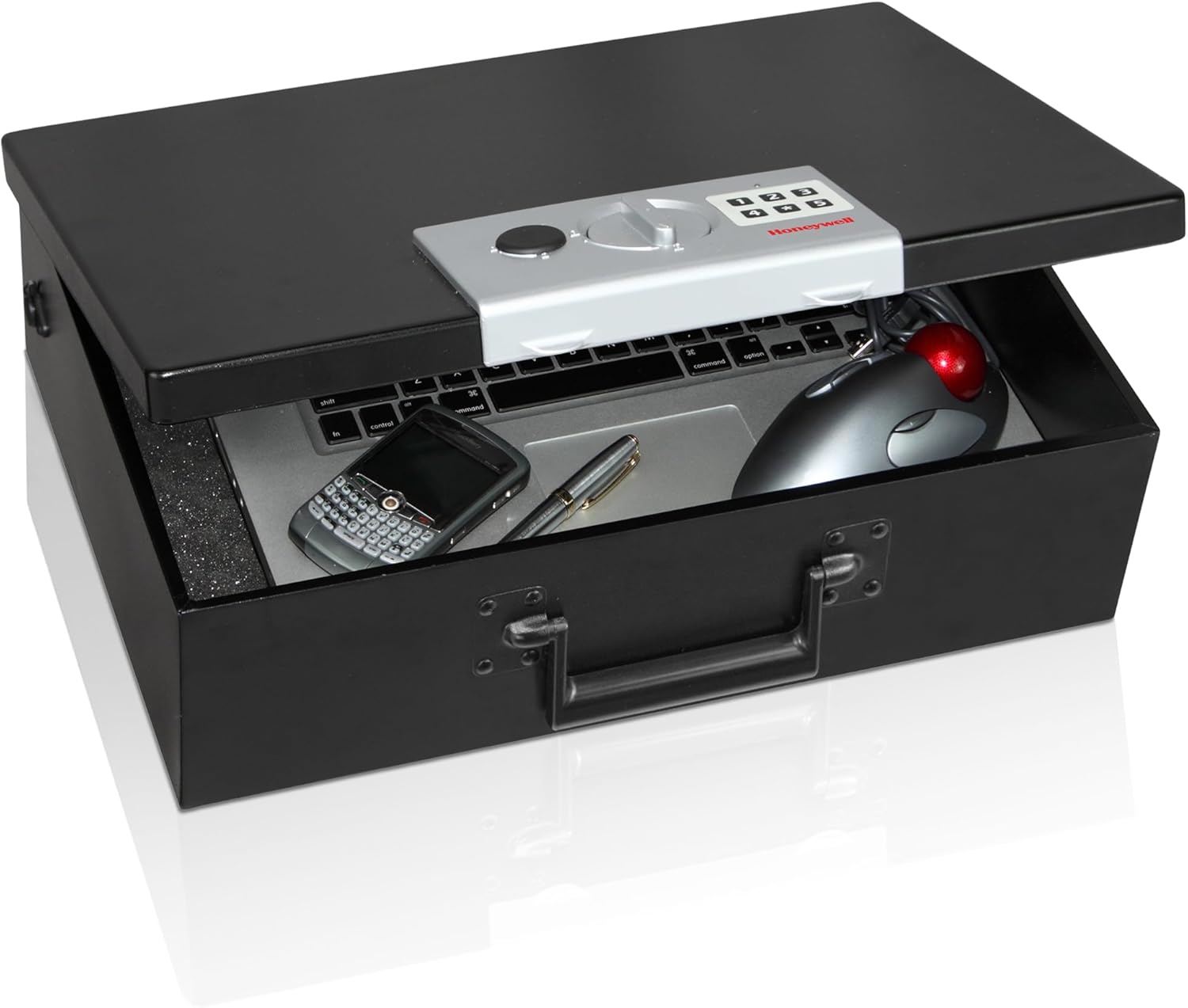
Image 1.1: The Honeywell 6110 Digital Safe Box, showcasing its digital lock, carry handle, and security cable.
2. Product Features
- Robust Steel Construction: Features double steel walls for enhanced durability and protection.
- Fire-Resistant Insulation: Provides protection for contents against fire damage.
- Programmable Digital Lock: Allows users to set a personalized access code.
- Emergency Override Keys: Two keys are included for manual access in case of digital lock malfunction or forgotten code.
- Concealed Hinges: Designed to resist prying attempts, enhancing security.
- Secure Cable Tether: Includes a high-strength cable for anchoring the safe, preventing unauthorized removal.
- Foam-Padded Interior: A foam-padded floor protects delicate items from scratches and damage.
- Convenient Carry Handle: Integrated handle for easy portability.
- Compact Capacity: 0.48 cubic feet capacity, suitable for small documents, jewelry, and electronics.

Image 2.1: Close-up view of the programmable digital lock and keypad on the Honeywell 6110 safe.

Image 2.2: The Honeywell 6110 safe box on a desk, illustrating its capacity for documents and small electronics.
3. Setup
3.1 Unpacking and Initial Inspection
Carefully remove the safe from its packaging. Inspect the safe for any signs of damage. Ensure all components, including the safe box, emergency override keys, and user manual, are present.
3.2 Battery Installation
The digital lock requires batteries to operate. Locate the battery compartment, typically on the inside of the safe door or on the control panel. Insert the required number and type of batteries (usually AA, not included) according to the polarity markings. Close the battery compartment securely.
3.3 Setting Your Personal Digital Code
- With the safe door open, locate the red or green reset button on the inside of the door or near the battery compartment.
- Press the reset button. The indicator light on the keypad should illuminate, indicating it is ready to accept a new code.
- Enter your desired 3-8 digit code on the keypad.
- Press the '#' or 'B' button (or as indicated on your specific model) to confirm your new code. The indicator light should flash or beep to confirm successful programming.
- Test your new code several times with the door open before closing it to ensure it works correctly.
3.4 Securing the Safe with the Cable Tether
The safe includes a steel cable tether for added security. To use it, loop the cable around a secure, immovable object (e.g., a heavy piece of furniture, a pipe). Thread the end of the cable through the designated slot on the safe and secure it as instructed in the detailed manual provided with the product. This helps prevent the safe from being easily carried away.

Image 3.1: The Honeywell 6110 safe box with its security cable tether attached, demonstrating how it can be secured.
4. Operating Instructions
4.1 Opening the Safe with Your Digital Code
- Enter your programmed 3-8 digit code on the keypad.
- Press the '#' or 'B' button (or as indicated on your specific model) to confirm.
- If the code is correct, the indicator light will turn green, and you will hear a click.
- Within 5 seconds, turn the knob clockwise to open the safe door.
4.2 Opening the Safe with the Emergency Override Key
In case of forgotten code or battery failure, the safe can be opened using the emergency override key.
- Locate the keyhole cover on the digital lock panel.
- Remove the cover to expose the keyhole.
- Insert one of the provided emergency override keys into the keyhole and turn it counter-clockwise.
- While holding the key turned, turn the main knob clockwise to open the safe door.
- Once open, remove the key.
4.3 Closing and Locking the Safe
- Close the safe door firmly.
- Turn the main knob counter-clockwise until it clicks into the locked position. The safe is now secured.
Video 4.1: An official video demonstrating the features and operation of a Honeywell Security Chest, including the digital lock and portability. This video is relevant to the Honeywell 6110 model.
5. Maintenance
5.1 Battery Replacement
When the batteries are low, the indicator light may flash red or the safe may emit a warning sound when attempting to open. Replace all batteries with new ones of the same type (e.g., AA alkaline) to ensure proper functionality. Do not mix old and new batteries or different battery types.
5.2 Cleaning
Clean the exterior of the safe with a soft, damp cloth. Avoid using abrasive cleaners or solvents, as these can damage the finish. The interior foam padding can be gently wiped with a dry cloth if needed.
5.3 Key Storage
Store the emergency override keys in a secure location away from the safe. Do not store them inside the safe, as this would defeat their purpose in an emergency.
6. Troubleshooting
6.1 Safe Does Not Open with Digital Code
- Check Batteries: Ensure batteries are correctly installed and have sufficient power. Replace if necessary.
- Re-enter Code: Double-check that you are entering the correct code. Try re-entering it slowly and carefully.
- Timing: Ensure you turn the knob within 5 seconds after entering the correct code.
- Use Override Key: If the digital lock is unresponsive, use the emergency override key to open the safe.
6.2 Safe Door Does Not Close Properly
- Obstructions: Check for any items inside the safe that might be preventing the door from closing completely.
- Alignment: Ensure the door is properly aligned with the safe body before attempting to close and lock.
6.3 Forgotten Digital Code
If you forget your digital code, you must use the emergency override key to open the safe. Once open, you can reset the digital code by following the instructions in Section 3.3.
7. Specifications
| Feature | Specification |
|---|---|
| Brand | Honeywell |
| Model Number | 6110 |
| Product Dimensions (D x W x H) | 5.2"D x 17.5"W x 12.8"H |
| Capacity | 0.48 Cubic Feet |
| Lock Type | Electronic, Key |
| Color | Black |
| Material | Metal |
| Special Features | Durable, Fire Resistant, Resistant to tampering |
| Item Weight | 9.1 Pounds |
| Water Resistance Level | Not Water Resistant |
8. Warranty and Support
8.1 Manufacturer's Warranty
This Honeywell safe box is covered by a manufacturer's warranty. For specific details regarding the warranty period and coverage, please refer to the warranty information included with your product packaging or contact Honeywell customer service directly. Warranty claims typically require proof of purchase.
8.2 Customer Support
For technical assistance, troubleshooting, or to request replacement parts (such as emergency override keys), please contact Honeywell customer service. Contact information can usually be found on the Honeywell website or in the product documentation.