
1. Introduction
This manual provides comprehensive instructions for the proper use, setup, operation, maintenance, and troubleshooting of the Baseline Analog/Digital Hand Dynamometer, Model 12-0021. Please read this manual thoroughly before using the device to ensure safe and effective operation.
2. Product Overview
The Baseline Analog/Digital Hand Dynamometer is a precision instrument designed for measuring hand grip strength. It features both analog and digital readouts for versatile data collection. This device is a stand-alone Bims dynamometer.

Figure 2.1: The Baseline Analog/Digital Hand Dynamometer, showing its main body, handles, and the integrated analog gauge with a connected cable for digital output.
Key features include:
- Integrated transducer for generating electric signals readable by a computer.
- Latex-free construction for user safety and comfort.
- Durable design for consistent and accurate measurements.
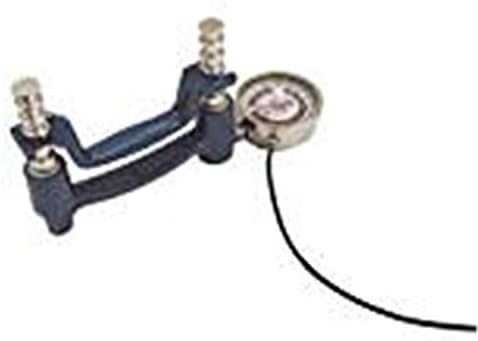
Figure 2.2: A closer view of the Baseline Analog/Digital Hand Dynamometer, highlighting the measurement mechanism and the overall compact design.
3. Setup
Before first use, ensure the dynamometer is free from any packaging materials. No assembly is typically required for this stand-alone unit. If connecting to a computer for digital readings, ensure the appropriate software and drivers are installed on your computer as per the software's instructions (software not included with this unit).
- Unpack the dynamometer carefully from its protective packaging.
- Inspect the device for any visible damage. Do not use if damaged.
- Place the dynamometer on a stable, flat surface before use.
- If using the digital output, connect the cable from the dynamometer to the compatible data acquisition system or computer interface.
4. Operating Instructions
To obtain accurate grip strength measurements, follow these steps:
- Ensure the subject is seated comfortably with their arm supported, elbow flexed at 90 degrees, and forearm in a neutral position.
- Adjust the dynamometer handle to fit the subject's hand comfortably. The base of the fingers should rest on the lower handle, and the upper handle should be gripped firmly.
- Instruct the subject to squeeze the dynamometer with maximum effort for approximately 3-5 seconds.
- Observe the reading on the analog gauge. If connected, the digital reading will also be captured by the connected system.
- Record the peak measurement.
- Allow a brief rest period between trials if multiple measurements are taken.
Important Note:
Always ensure the dynamometer is reset to zero before each measurement to ensure accuracy. Consult relevant clinical guidelines for standardized testing protocols.
5. Maintenance
Proper maintenance ensures the longevity and accuracy of your dynamometer.
- Cleaning: Wipe the dynamometer with a soft, damp cloth after each use. Use a mild disinfectant if necessary. Do not immerse the device in water or use abrasive cleaners.
- Storage: Store the dynamometer in a dry, cool place, away from direct sunlight and extreme temperatures. Keep it in its original case or a protective container to prevent damage.
- Calibration: Regular calibration is crucial for maintaining accuracy. It is recommended to have the dynamometer calibrated annually by a qualified service technician.
- Inspection: Periodically inspect the device for any signs of wear, loose parts, or damage. If any issues are found, discontinue use and contact customer support.
6. Troubleshooting
| Problem | Possible Cause | Solution |
|---|---|---|
| Inaccurate readings | Not calibrated; improper technique; device damage. | Ensure proper technique; check last calibration date; contact service for calibration or repair. |
| Digital output not working | Loose cable connection; software issue; transducer malfunction. | Check cable connection; verify software installation and drivers; contact customer support. |
| Device not resetting to zero | Internal mechanism issue. | Do not force. Contact customer support for assistance. |
7. Specifications
- Model Number: 12-0021
- Brand: Fabrication Enterprises
- Product Dimensions: 12 x 10 x 6 inches
- Item Weight: 3 Pounds
- Material: Latex
- Manufacturer: Baseline
- Date First Available: March 9, 2013
- UPC: 714905014474
8. Warranty and Support
This product is manufactured by Baseline, a brand of Fabrication Enterprises. For specific warranty details, please refer to the documentation included with your purchase or contact Fabrication Enterprises directly. Protection plans may be available for extended coverage.
For technical support, calibration services, or inquiries regarding parts and repairs, please contact the manufacturer or your authorized distributor.
Manufacturer Contact Information:
- Brand: Fabrication Enterprises
- Please refer to product packaging or official website for contact details.
Note: Specific contact details and warranty terms are subject to change and are typically provided with the product packaging or on the manufacturer's official website.