
Introduction
This manual provides essential information for the safe and efficient operation of your Onkyo TX-NR525 5.2-Channel Network Audio/Video Receiver. Please read it thoroughly before using the unit and retain it for future reference.
Safety Information
To reduce the risk of electric shock, do not remove the cover (or back). No user-serviceable parts inside. Refer servicing to qualified service personnel. Do not expose this appliance to rain or moisture. Do not place objects filled with liquids, such as vases, on the apparatus. Do not install near any heat sources such as radiators, heat registers, stoves, or other apparatus (including amplifiers) that produce heat. Only use attachments/accessories specified by the manufacturer.
Front Panel Controls
The front panel of the TX-NR525 provides access to essential controls and connections for daily use.
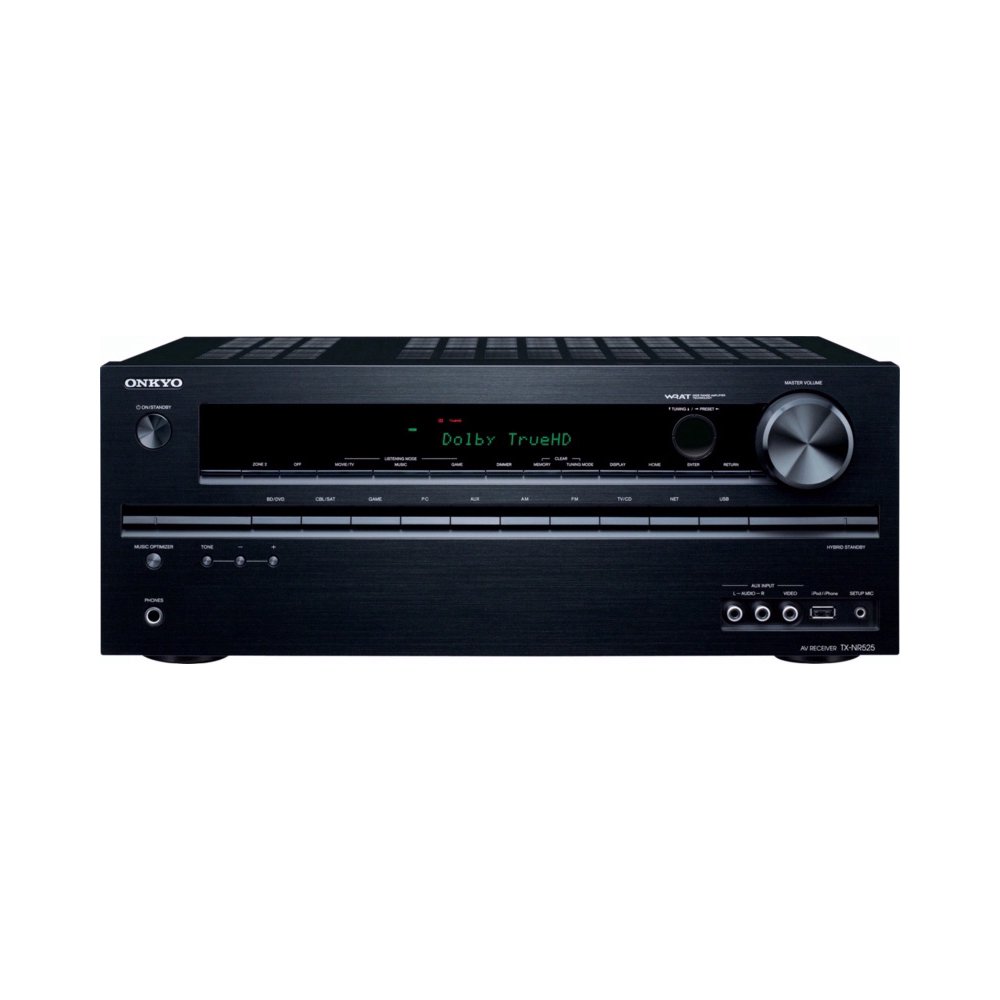
- Power Button: Turns the unit on or off.
- Display: Shows current input, volume level, and audio format (e.g., Dolby TrueHD).
- Input Selectors: Buttons for choosing various audio/video sources (e.g., BD/DVD, CBL/SAT, GAME, PC, AUX, NET).
- Master Volume: Adjusts the overall sound level.
- Front USB Port: For connecting USB storage devices or compatible Apple devices (iPod/iPhone).
- Headphone Jack: For private listening.
Rear Panel Connections
The rear panel houses all the necessary ports for connecting your speakers, video sources, and network devices.

- HDMI Inputs (6): Connect your HDMI-enabled devices such as Blu-ray players, game consoles, and cable/satellite boxes.
- HDMI Output (1): Connects to your TV or projector. Supports Audio Return Channel (ARC).
- Ethernet Port: For wired network connection to access internet radio and streaming services.
- Speaker Terminals: Connect your 5.2 channel speakers (Front L/R, Center, Surround L/R, Subwoofer Pre-Outs). Compatible with banana plugs.
- Optical/Coaxial Digital Audio Inputs: For connecting devices with digital audio outputs.
- Analog Audio/Video Inputs: For connecting older devices using RCA cables.
- Component Video Inputs/Output: For connecting devices with component video outputs.
- Rear USB Port: For connecting optional accessories like the UWF-1 Wireless LAN Adapter or UBT-1 Bluetooth Adapter.
- FM/AM Antenna: Connect the supplied antennas for radio reception.
- Remote Control (RI) Port: For system integration with other Onkyo components.
- Zone 2 Line Out: For distributed audio playback in another room.
Remote Control
The supplied remote control allows you to operate all functions of the TX-NR525 from a distance.

- RECEIVER/ZONE2/SOURCE Buttons: Select the operating mode (Receiver or Zone 2) and the input source.
- Input Selector Buttons: Directly select specific input sources (e.g., BD/DVD, CBL/SAT, GAME, PC, AUX, AM, FM, USB, NET).
- VOL +/-: Adjusts the volume level.
- Muting: Mutes or unmutes the audio.
- Navigation Buttons (Up/Down/Left/Right/ENTER): Used for menu navigation and selection.
- SETUP: Accesses the on-screen setup menu.
- HOME: Displays the home menu.
- Playback Controls: Play, Pause, Stop, Skip, Fast Forward, Rewind for media playback.
- Listening Mode Buttons: Select various audio listening modes (e.g., MOVIE, MUSIC, GAME).
Setup
1. Speaker Connection
Connect your speakers to the corresponding terminals on the rear panel. Ensure correct polarity (+ to + and - to -) for optimal sound performance. For 5.1 channel setup, connect Front L/R, Center, and Surround L/R speakers. Connect your powered subwoofer to the SUBWOOFER PRE OUT jack.
2. HDMI Connections
Connect your source devices (e.g., Blu-ray player, game console) to the HDMI INPUTs. Connect your TV to the HDMI OUT port. If your TV supports Audio Return Channel (ARC), ensure it is enabled on your TV and the receiver to send audio from the TV back to the receiver via the HDMI cable.
3. Network Connection
For network features, connect an Ethernet cable from your router to the receiver's Ethernet port. Alternatively, use the optional UWF-1 Wireless LAN Adapter plugged into the rear USB port for wireless connectivity. Follow the on-screen instructions to configure network settings.
4. Audio Calibration (Audyssey MultEQ)
The TX-NR525 features Audyssey MultEQ room-correction technology. Use the supplied setup microphone and follow the on-screen prompts to automatically calibrate your speakers for optimal sound in your listening environment. This process measures speaker distances, levels, and crossover frequencies.
Operating
1. Basic Operation
- Power On/Off: Press the Power button on the front panel or remote control.
- Input Selection: Use the input selector buttons on the front panel or remote to choose your desired source.
- Volume Adjustment: Use the Master Volume knob on the front panel or VOL +/- buttons on the remote.
2. Network Features
Once connected to your network, the receiver can access various internet streaming services and internet radio. Use the NET input and navigate through the on-screen menu. You can also control the receiver using the free Onkyo Remote App available for smartphones.
3. High-Resolution Audio Playback
The TX-NR525 supports high-resolution audio formats such as FLAC, DSD, and Dolby TrueHD, providing superior sound quality. Play these files from connected USB devices or network sources.
4. Video Features
- 4K Pass-through: The receiver supports 4K video pass-through from compatible source devices to a 4K display.
- 3D Video: Enjoy 3D content from compatible sources when connected to a 3D-ready TV.
- InstaPrevue: This feature allows you to view live thumbnail video previews of your HDMI sources, making it easy to switch between inputs.
5. Zone 2 Operation
The Zone 2 Line Out allows you to send audio to a separate amplifier and speakers in another room. Select Zone 2 mode on the remote and choose the desired audio source for that zone.
6. Product Introduction Video
Watch this official video for an overview of the Onkyo TX-NR525's features and capabilities.
Maintenance
To maintain the performance and appearance of your receiver:
- Wipe the unit with a soft, dry cloth.
- Do not use abrasive cloths, thinners, alcohol, or other chemical solvents, as they may damage the finish.
- Ensure adequate ventilation around the unit to prevent overheating. Do not stack other components directly on top of the receiver.
Troubleshooting
If you experience issues with your TX-NR525, refer to the following common problems and solutions:
- No Sound: Check all speaker connections for correct polarity. Ensure the correct input source is selected. Verify that the volume is not muted or set too low. Perform a factory reset if sound issues persist, though this will erase custom settings.
- Network Connection Issues: Ensure the Ethernet cable is securely connected or the optional wireless adapter is properly installed. Check your router and internet connection. Restart the receiver and your network equipment.
- Unit Gets Hot: It is normal for the receiver to generate some heat during operation. Ensure there is sufficient space around the unit for ventilation. Avoid placing it in enclosed cabinets without proper airflow.
- Remote Control Not Working: Check the batteries and ensure there are no obstructions between the remote and the receiver's IR sensor.
Specifications
| Feature | Specification |
|---|---|
| Brand | Onkyo |
| Model Number | TX-NR525 |
| Channels | 5.2 |
| Output Power (per channel) | 80 Watts (8 Ohms, 20 Hz-20 kHz, 0.7% THD, 2 Channels Driven); 100 Watts (6 Ohms, 1 kHz, 0.7% THD, 2 Channels Driven) |
| Total HDMI Ports | 7 (6 In / 1 Out) |
| Connectivity Technology | Wireless; Bluetooth (with optional adapters) |
| Special Features | Wireless networking, Internet streaming services, Remote app music streaming, 4K video pass-through, Hi-res audio codecs, Audyssey MultEQ |
| Audio Output Mode | Surround |
| Supported Internet Services | Internet Radio |
| Item Weight | 18.7 Pounds |
Warranty and Support
The Onkyo TX-NR525 comes with a 2-year warranty on parts and labor. For technical support, service, or warranty claims, please contact Onkyo customer service or visit the official Onkyo website for detailed support resources.