
Umbro Umb-123-1
Umbro Men's Sport Anadigi Watch Model Umb-123-1 Instruction Manual
Model: Umb-123-1
Introduction
Thank you for choosing the Umbro Men's Sport Anadigi Watch, Model Umb-123-1. This watch combines classic analog timekeeping with modern digital functions, including an alarm, chronograph, and illumination. Designed for durability and style, this manual will guide you through its features, setup, operation, and maintenance to ensure optimal performance and longevity.
Product Overview
The Umbro Umb-123-1 watch features a robust design suitable for daily wear and sports activities. Its anadigi display offers versatility, allowing you to read time in both analog and digital formats. Key features include:
- Anadigi Display: Simultaneous analog and digital time display.
- Alarm Function: Set daily alarms.
- Chronograph: Stopwatch functionality for timing events.
- Illumination: Backlight for visibility in low-light conditions.
- Water Resistance: Rated for 50 meters (5 ATM), suitable for showering and swimming in shallow water.
- Durable Construction: Polycarbonate case, acrylic glass, and polyurethane strap.
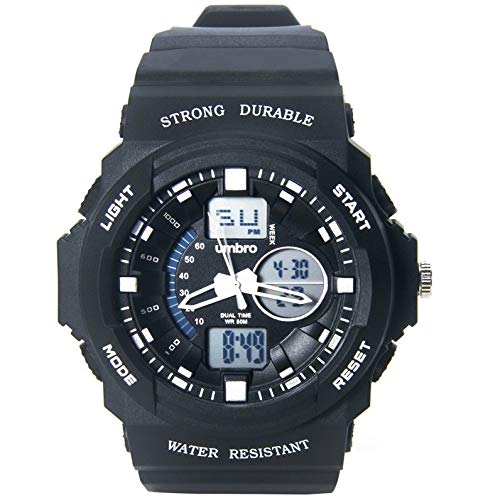
Figure 1: Front view of the Umbro Umb-123-1 Anadigi Watch. This image displays the watch face with both analog hands and the digital display, highlighting its anadigi functionality. The robust black case and strap are also visible.
Setup
1. Unpacking and Initial Inspection
Carefully remove the watch from its packaging. Inspect the watch for any visible damage. Ensure all protective films are removed from the watch face and case back.
2. Setting the Analog Time
- Pull the crown (the small knob on the right side of the watch case) out to the first position.
- Turn the crown clockwise or counter-clockwise to set the analog hour and minute hands to the correct time.
- Once the analog time is set, push the crown back into its normal position to start the analog movement.

Figure 2: Side view of the watch, illustrating the crown and pushers. The crown is used for setting the analog time, while the pushers control digital functions.
3. Setting the Digital Time and Date
The digital display typically has multiple modes (Time, Date, Alarm, Chronograph). Use the pushers on the side of the watch to navigate and set these functions.
- Mode Button: Usually cycles through different display modes (Time, Alarm, Chronograph).
- Adjust Button: Used to enter setting mode for the selected function.
- Start/Reset Buttons: Used to increment values during setting or to start/stop/reset the chronograph.
Refer to the specific button labels on your watch (e.g., "MODE", "ADJUST", "START", "RESET") for precise operation. The exact sequence for setting digital time and date varies slightly by movement, but generally involves:
- Press the MODE button until the digital time display is shown.
- Press and hold the ADJUST button until the seconds begin to flash.
- Use the MODE button to cycle through seconds, hours, minutes, year, month, and day.
- Use the START or RESET button to change the flashing value.
- Once all settings are correct, press the ADJUST button again to exit the setting mode.
Operating Instructions
1. Basic Time Display
The watch displays time simultaneously in analog (hands) and digital formats. The digital display can be toggled between 12-hour and 24-hour formats, typically by pressing a specific button (e.g., RESET) while in time mode.
2. Using the Alarm Function
- Press the MODE button until the alarm time is displayed (often indicated by "AL" or a bell icon).
- Press and hold the ADJUST button until the alarm hour flashes.
- Use the MODE button to select between hour and minute settings.
- Use the START or RESET button to set the desired alarm time.
- Press the ADJUST button to confirm and exit.
- To activate/deactivate the alarm, press the START button while in alarm mode. An alarm icon will appear/disappear.
3. Using the Chronograph (Stopwatch)
- Press the MODE button until the chronograph display is shown (often indicated by "ST" or "CHRO").
- Press the START button to begin timing.
- Press the START button again to pause timing.
- Press the RESET button to reset the chronograph to zero.
- To record split times, press the RESET button while the chronograph is running. The display will show the split time while the internal timer continues. Press RESET again to return to the running time.
4. Using the Illumination
To illuminate the digital display in low-light conditions, press the LIGHT button (usually located on the top left or bottom left of the watch case). The backlight will typically stay on for a few seconds.
5. Water Resistance Guidelines (50m / 5 ATM)
Your Umbro watch is water resistant up to 50 meters (5 ATM). This means it is suitable for:
- Daily use, splashes, rain.
- Showering (avoid hot water and steam).
- Swimming in shallow water.
Important Precautions:
- DO NOT operate any buttons or the crown while the watch is wet or submerged.
- DO NOT expose the watch to hot water, steam, or extreme temperature changes, as this can compromise the water seals.
- After exposure to saltwater, rinse the watch with fresh water and dry thoroughly.
Maintenance
1. Cleaning Your Watch
To maintain the appearance of your watch:
- Wipe the case and strap regularly with a soft, dry cloth.
- For stubborn dirt, use a slightly damp cloth with mild soap, then wipe dry immediately.
- Avoid using chemical cleaners, solvents, or abrasive materials, as these can damage the watch's finish and materials.
2. Battery Replacement
The watch is powered by a battery. When the digital display becomes dim or the watch stops functioning, the battery may need replacement. Battery life varies depending on usage, especially for functions like illumination and alarm.
Recommendation:
Battery replacement should be performed by a qualified watch technician to ensure proper sealing and maintain water resistance. Attempting to replace the battery yourself may void the warranty and compromise the watch's water resistance.
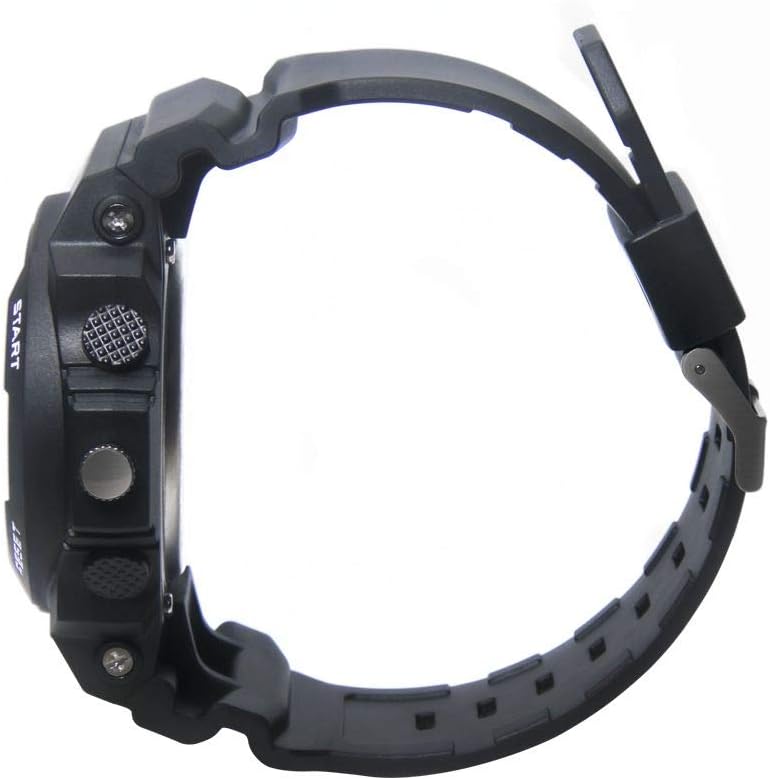
Figure 3: Back view of the watch strap and case back. This view highlights the durable polyurethane strap and the screwed case back, which protects the internal movement.
3. Storage
When not in use, store your watch in a cool, dry place away from direct sunlight, extreme temperatures, and strong magnetic fields. Keeping it in its original box or a watch case can help protect it from dust and scratches.
Troubleshooting
| Problem | Possible Cause | Solution |
|---|---|---|
| Analog hands not moving | Battery depleted; Crown pulled out; Mechanical issue. | Push crown back in. If still not working, battery replacement may be needed by a professional. |
| Digital display is dim or blank | Battery depleted. | Battery replacement is required. Consult a professional watch technician. |
| Digital time is incorrect | Time not set correctly; Accidental button press. | Refer to "Setting the Digital Time and Date" section to reset the time. |
| Watch fogging up internally | Water ingress; Sudden temperature change. | Stop using the watch immediately. Seek professional service to prevent further damage. |
Specifications
| Feature | Detail |
|---|---|
| Model Number | Umb-123-1 |
| Display Type | Anadigi (Analog-Digital) |
| Case Material | Polycarbonate |
| Case Diameter | 48 mm |
| Strap Material | Polyurethane |
| Glass Material | Acrylic |
| Water Resistance | 50 meters (5 ATM) |
| Functions | Alarm, Chronograph, Illumination, Calendar |
| Power Source | Battery |
| Weight | Approximately 500 g |
Note: Product specifications are subject to change without prior notice.
Warranty and Support
Warranty Information
This Umbro watch comes with a 1-year limited warranty from the date of purchase. The warranty covers manufacturing defects in materials and workmanship under normal use. It does not cover:
- Damage resulting from improper handling, lack of care, accidents, or normal wear and tear.
- Damage caused by unauthorized repair or modification.
- Battery life.
- Water damage if the watch was used outside of its specified water resistance limits or if buttons were operated underwater.
Please retain your proof of purchase for warranty claims.
Customer Support
For technical assistance, warranty service, or inquiries about your Umbro watch, please contact your retailer or the authorized Umbro service center in your region. Contact information can usually be found on the Umbro official website or through your point of purchase.
Ask a question about this manual
Ask about setup, troubleshooting, compatibility, parts, safety, or missing instructions. Manuals+ will review the question and use this page’s manual context to help answer it.