
Pyle PP555
Pyle PP555 Mini Phono Preamp Instruction Manual
Model: PP555 | Brand: Pyle
1. Product Overview
The Pyle PP555 is an ultra-compact phono turntable pre-amplifier designed to convert phono signals to line-level signals. This allows you to connect your turntable to modern audio equipment that lacks a dedicated phono input. Featuring state-of-the-art circuitry, it accommodates magnetic pickups and provides ultra-low noise audio operation for improved sound performance. The PP555 offers versatile power options, operating via a 9-Volt battery or a 12V DC power adapter.
2. What's in the Box
- Pyle Pro Ultracompact Phono Turntable Preamp (PYLPP555)
- Power Adapter

Image: The Pyle PP555 Mini Phono Preamp shown with its included power adapter and dimensions. The preamp features RCA input/output jacks and a 1/4'' output jack.
3. Setup and Installation
Follow these steps to properly set up your Pyle PP555 Mini Phono Preamp:
3.1 Power Connection
The PP555 offers flexible power options:
- Using the DC Power Adapter: Connect the included 12V DC power adapter to the "12V=" port on the preamp and plug it into a standard wall outlet.
- Using a 9V Battery: For portable use, you can install a 9-Volt battery (not included). Unscrew the bottom panel, connect the battery to the internal connector, and secure the panel. The "ON" indicator light will illuminate when powered.

Image: The Pyle PP555 Mini Phono Preamp demonstrating connection of the 12V DC power adapter and the internal 9V battery compartment.
3.2 Audio Connections
- Connect Turntable to Input: Use RCA (L/R) cables to connect the output of your turntable to the "INPUT" jacks on the PP555.
- Connect Preamp to Audio System: Use RCA (L/R) cables to connect the "OUTPUT" jacks on the PP555 to a line-level input (e.g., AUX, CD, TAPE) on your amplifier, receiver, or powered speakers. The PP555 also features a 1/4'' output jack for additional connectivity.
- Grounding (Optional but Recommended): If your turntable has a separate ground wire and you experience humming or buzzing, connect the turntable's ground wire to the "GND" screw terminal on the PP555. This helps to eliminate ground loop noise.
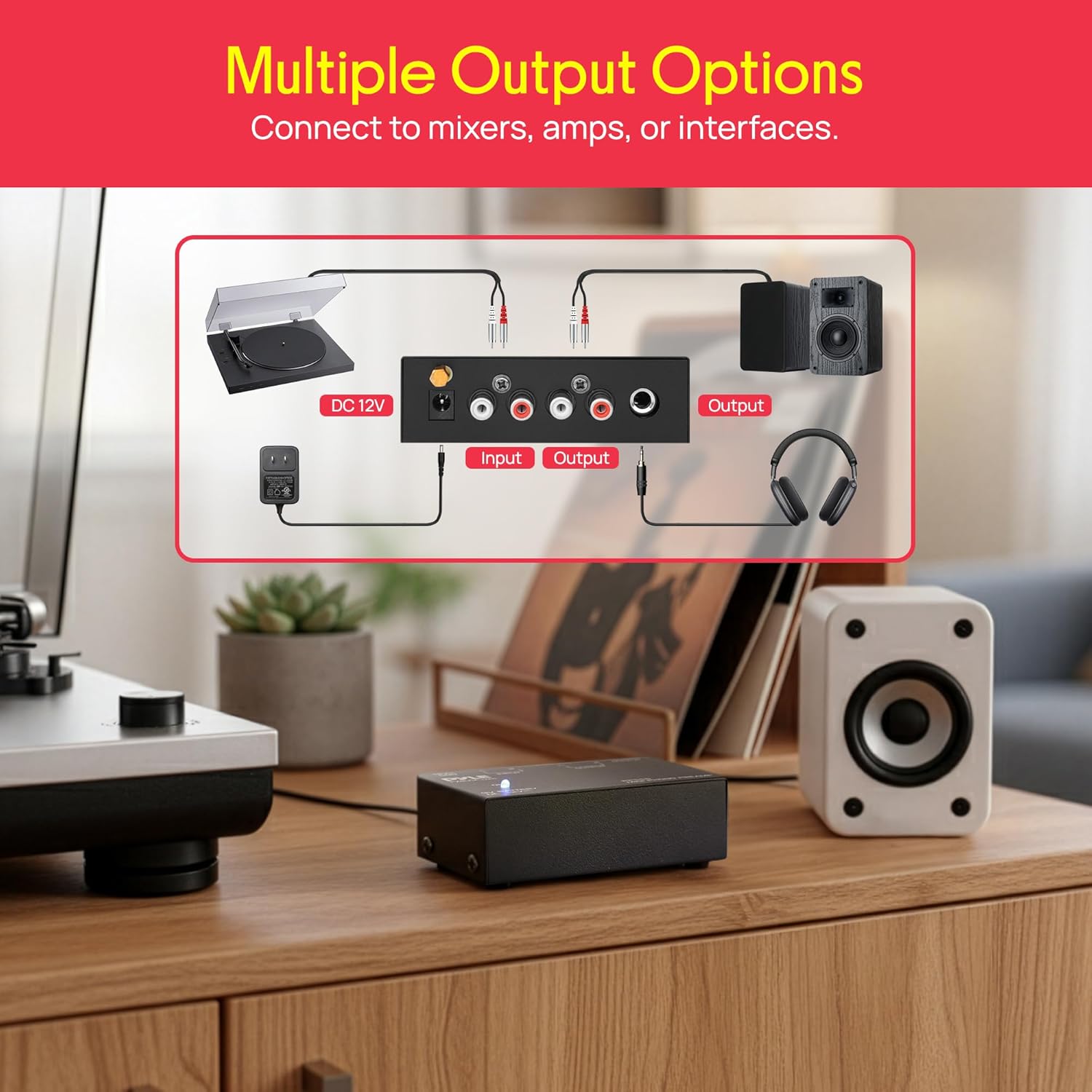
Image: A diagram illustrating various output options for the Pyle PP555, including connections to mixers, amplifiers, or interfaces.

Image: The Pyle PP555 Mini Phono Preamp connected to a turntable, converting the phono signal to line level for a stereo system.
3.3 Setup Video Guide
Video: A detailed guide on how to connect the Pyle PP555 Phono Pre-Amp, highlighting its features and benefits. This video demonstrates the physical connections and setup process.
4. Operating Instructions
Once all connections are made and the preamp is powered on (indicated by the blue "ON" light), your Pyle PP555 is ready for use. The preamp automatically boosts the low-level phono signal from your turntable to a standard line-level, allowing it to be properly processed by your audio system.
- Ensure your audio system's input is set to the corresponding line-level input where the PP555 is connected.
- Adjust the volume on your amplifier or receiver as needed. The PP555 provides a consistent line-level output, so all volume control will be managed by your connected audio equipment.
- The ultra-low noise audio operation of the PP555 ensures a clear and clean signal, enhancing your vinyl listening experience.

Image: A visual comparison demonstrating the Pyle PP555's ability to convert a noisy signal into a clean, crystal-clear vinyl sound.
5. Technical Specifications
| Feature | Specification |
|---|---|
| S/N Ratio | 70dB |
| THD | 0.08% @ 1kHz and 3mV |
| Output | 2V max (P-P) at 10K Ohms |
| Frequency Response | 20Hz to 20kHz @ 2dB |
| Input Sensitivity | 3mV at 50K Ohms (Phono) |
| Load Impedance | 10K Ohms - Reference Voltage: 1V d |
| Battery Operated | Requires (1) x '9V' Battery (Not Included) |
| Dimensions (W x H x D) | 3.54'' x 2.13'' x 1.02'' -inches |
| Item Weight | 9.6 ounces |
| Color | BLACK |
| Material | Plastic |
6. Troubleshooting
- No Sound:
- Ensure the power adapter is securely connected or a fresh 9V battery is installed. The "ON" indicator light should be illuminated.
- Verify all RCA cables are correctly connected to the "INPUT" and "OUTPUT" jacks.
- Check that your amplifier/receiver is set to the correct line-level input.
- Confirm the volume on your audio system is turned up.
- Humming or Buzzing Noise:
- Connect your turntable's ground wire to the "GND" screw terminal on the PP555. This is a common solution for ground loop issues.
- Ensure all audio cables are in good condition and securely connected.
- Position the preamp close to the turntable to minimize cable length and potential interference.
- Low Volume:
- Confirm your turntable is connected to the "INPUT" of the PP555, not directly to a line-level input on your receiver, as the phono signal requires amplification.
- Adjust the volume on your connected amplifier or receiver.
7. Safety Information
This product contains chemicals known to the State of California to cause cancer and birth defects or other reproductive harm. Please handle with care and refer to local regulations for disposal.
8. Warranty and Support
The Pyle PP555 Mini Phono Preamp comes with a 1-Year Warranty. Register your product within 7 days of purchase to receive a 3-Month Extended Warranty. For technical support or warranty claims, please visit the official Pyle website or contact their customer service.
Related documentsPP555


Ask a question about this manual
Ask about setup, troubleshooting, compatibility, parts, safety, or missing instructions. Manuals+ will review the question and use this page’s manual context to help answer it.