1. Introduction to Your Camera
The Sony DSC-TX30/P is an 18.2 MP digital camera designed for capturing high-quality images and videos in various environments. Its durable construction makes it waterproof, dust-proof, freeze-proof, and shock-proof, allowing for versatile use from underwater adventures to everyday moments. Featuring a 5x optical image stabilized zoom and a vibrant 3.3-inch OLED touch screen, this camera combines advanced technology with user-friendly operation.
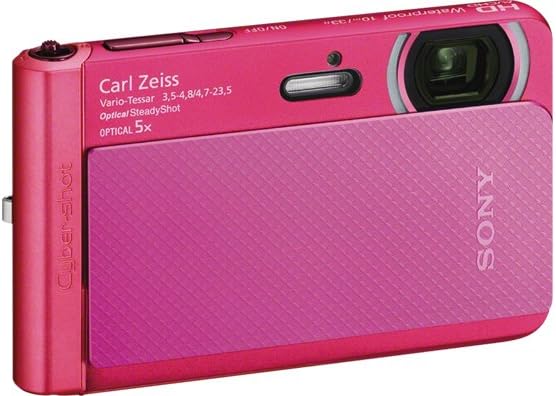
Image: The Sony DSC-TX30/P Digital Camera, showcasing its sleek pink design and prominent Carl Zeiss Vario-Tessar lens with 5x optical zoom. The camera also features an ON/OFF button and indicates its waterproof capability.
2. Setup and First Use
2.1. Battery Installation and Charging
Your camera comes with one Lithium Ion battery. Ensure the battery is fully charged before first use. Connect the camera to the AC adaptor using the Micro USB cable provided. The charging indicator will illuminate during charging and turn off when complete.
2.2. Memory Card Insertion
The camera requires a compatible memory card (not always included, but essential for storing photos and videos). Locate the memory card slot, typically near the battery compartment. Insert the memory card firmly until it clicks into place. Ensure the card is inserted in the correct orientation to avoid damage.
3. Operating Your Camera
3.1. Powering On/Off
Press the ON/OFF button located on the top of the camera to power it on or off. The 3.3-inch OLED touch screen will activate upon startup.
3.2. Taking Photos
Frame your shot using the OLED display. The 18.2MP Exmor R CMOS sensor and Carl Zeiss Vario-Tessar lens capture ultra-high definition images. Press the shutter button (usually a larger button on the top-right) halfway to focus, then fully to take the picture.
3.3. Zoom Functionality
Utilize the 5x optical zoom for clear close-ups. The camera also features 10x Clear Image digital zoom technology, which intelligently processes adjacent pixels to create higher-quality zoomed images compared to standard digital zoom. Use the zoom lever/buttons, typically located near the shutter button, to adjust the zoom level.
3.4. Recording Videos
The DSC-TX30/P supports HD 1080/60i AVCHD video capture. To start recording, press the dedicated movie button. Press it again to stop. The camera also offers dual record functionality, allowing you to capture still photos while recording video.
3.5. Camera Modes and Features
- Sweep Panorama: Capture wide landscapes with a single sweep of the camera.
- Smile Shutter: Automatically detects and captures smiles.
- Enhanced Superior Auto: Optimizes settings for various scenes, including dynamic motion and low-light conditions.
- Continuous Shooting: Capture up to 10 frames per second at full 18.2-megapixel resolution.
- Picture and Beauty Effects: Apply creative filters and enhancements to photos, such as skin smoothing, eye widening, and teeth whitening.
- Magnifying Glass Plus with LED Lights: For intricate close-ups, built-in LED lights illuminate subjects as close as 1/3 inch without casting shadows.
4. Maintenance and Durability
The Sony DSC-TX30/P is built for durability and designed to withstand challenging environments:
- Waterproof: Certified to IEC60529 IPX8 standard, allowing submersion up to 33 feet (10 meters).
- Dust-proof: Certified to IEC 60529 IP5X standard, protecting against dust ingress.
- Freeze-proof: Operable in temperatures as low as 14°F (-10°C).
- Shock-proof: Certified to MIL-STD-810F Method 516.5-Shock, protecting against falls up to approximately 5 feet.
After using the camera in water, ensure all covers are securely closed and rinse the camera with fresh water to remove any salt or debris. Allow it to dry completely before opening any compartments.
5. Troubleshooting
If you encounter issues with your camera, please refer to the following general advice:
- Camera not powering on: Ensure the battery is fully charged and correctly inserted.
- Memory card error: Reinsert the memory card or try a different compatible card. Ensure the card is not full or corrupted.
- Poor image quality: Check lighting conditions, adjust camera settings (e.g., flash, ISO), and ensure the lens is clean.
- Water/dust ingress warning: Immediately power off the camera, ensure all seals are clean and properly closed, and allow it to dry thoroughly. Do not open compartments if you suspect moisture inside.
For more detailed troubleshooting, consult the full instruction manual or contact Sony customer support.
6. Specifications
| Feature | Detail |
|---|---|
| Product Dimensions | 0.6 x 2.4 x 3.9 inches |
| Item Weight | 5 ounces |
| Item model number | DSC-TX30/P |
| Batteries | 1 Lithium Ion batteries required. (included) |
| Photo Sensor Technology | BSI CMOS |
| Supported File Format | JPEG |
| Image Stabilization | Optical |
| Optical Zoom | 5x |
| Maximum Aperture | 3.5 Millimeters |
| Expanded ISO Minimum | 80 |
| Metering Description | Automatic |
| Manufacturer | Sony |
| Date First Available | February 25, 2013 |
7. What's in the Box
- Sony DSC-TX30/P 18 MP Digital Camera
- AC adaptor
- Micro USB cable
- Wrist Strap
- Instruction Manual
8. Warranty and Support
This product is manufactured by Sony. For warranty information, technical support, or service inquiries, please refer to the official Sony Electronics Inc. documentation included with your product or visit the official Sony support website. Reproduction in whole or in part without written permission from Sony Electronics Inc. is prohibited.
© 2013 Sony Electronics Inc. All rights reserved.