
1. Introduction
This manual provides essential information for the MTC 8551/41022-AC171 Transmission Mount. It is designed to assist in understanding the product's function, specifications, and general installation considerations. This transmission mount is a critical component designed to support the transmission and absorb vibrations, ensuring smooth operation of your vehicle's drivetrain.
2. Product Overview
The MTC 8551/41022-AC171 is a high-quality replacement transmission mount, specifically designed for automatic FWD vehicles. It serves to secure the transmission to the vehicle's chassis, preventing excessive movement and reducing noise and vibration transfer to the cabin. This part is engineered to meet OEM fit and finish standards.

Figure 2.1: Front view of the MTC 8551/41022-AC171 Transmission Mount. This image displays the primary structure of the mount, highlighting its sturdy black rubber and metal components, along with the visible mounting holes and threaded studs for secure attachment.
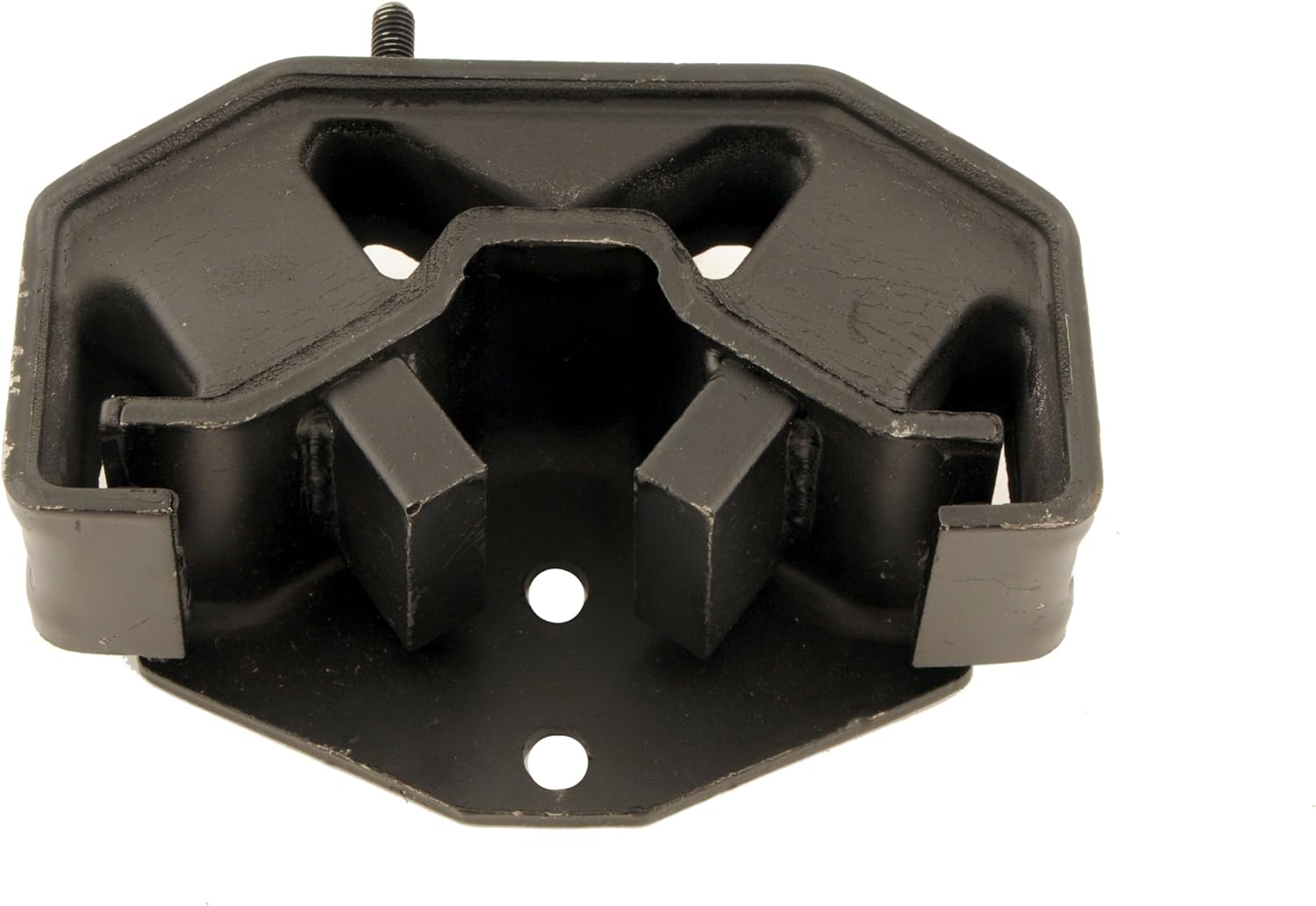
Figure 2.2: Top view of the MTC 8551/41022-AC171 Transmission Mount. This perspective provides a clear view of the mount's upper surface and the strategically placed internal rubber dampeners designed to absorb engine and transmission vibrations.

Figure 2.3: Side view of the MTC 8551/41022-AC171 Transmission Mount. This image highlights the profile and overall thickness of the mount, demonstrating its robust construction and the depth of its vibration-dampening material.

Figure 2.4: Angled view of the MTC 8551/41022-AC171 Transmission Mount. This dynamic perspective showcases multiple surfaces of the mount, providing a comprehensive view of its design and the various mounting points for installation.
3. Safety Information
Working on automotive components can be hazardous. Always prioritize safety. It is highly recommended that installation be performed by a qualified automotive technician.
- Always wear appropriate personal protective equipment (PPE), including safety glasses and gloves.
- Ensure the vehicle is securely supported on jack stands or a lift before working underneath it. Never rely solely on a jack.
- Disconnect the vehicle's battery before beginning any work to prevent accidental electrical shorts.
- Allow the engine and transmission to cool down completely before handling components.
- Refer to your vehicle's specific service manual for detailed instructions and torque specifications.
4. Installation Considerations
The MTC 8551/41022-AC171 Transmission Mount is designed for direct replacement. While specific installation steps vary by vehicle model, the general process involves:
- Safely lift and support the vehicle.
- Support the transmission using a transmission jack or suitable support.
- Locate and remove the old transmission mount. Note the orientation of the original mount.
- Clean the mounting surfaces.
- Install the new MTC transmission mount, ensuring proper alignment.
- Tighten all fasteners to the vehicle manufacturer's specified torque settings.
- Carefully lower the transmission and vehicle.
- Perform a visual inspection to ensure all components are securely fastened.
Note: Professional installation is strongly recommended due to the complexity and safety requirements involved in working with vehicle drivetrain components.
5. Usage Considerations
Once installed, the transmission mount requires no specific user operation. Its function is passive, providing support and vibration dampening. After installation, it is advisable to:
- Drive the vehicle for a short period to ensure proper function and listen for any unusual noises or vibrations.
- Re-check the tightness of all mounting bolts after approximately 50-100 miles of driving, as vibrations can sometimes cause fasteners to loosen slightly.
6. Maintenance
Transmission mounts are generally maintenance-free components. However, periodic inspection is recommended as part of routine vehicle maintenance:
- Visually inspect the mount for signs of wear, cracking, or deterioration of the rubber components.
- Check for any excessive play or looseness in the mount.
- Ensure all mounting bolts remain tight.
- Replace the mount if significant wear or damage is observed to prevent further issues with the drivetrain.
7. Troubleshooting
If you experience issues after replacing your transmission mount, consider the following common problems and solutions:
| Symptom | Possible Cause | Solution |
|---|---|---|
| Excessive vibration in cabin | Loose mounting bolts, incorrect installation, or other worn mounts (engine mounts). | Check all fasteners for proper torque. Verify correct mount orientation. Inspect other engine/transmission mounts. |
| Clunking noise during acceleration/deceleration | Loose mount, damaged mount, or other drivetrain component issues. | Inspect mount for damage or looseness. Consult a technician for drivetrain diagnosis. |
| Transmission shifting issues | While less common, excessive transmission movement due to a faulty mount can affect shift linkage. | Ensure mount is securely installed. If issues persist, consult a transmission specialist. |
If troubleshooting steps do not resolve the issue, it is recommended to consult a certified automotive technician.
8. Specifications
| Attribute | Detail |
|---|---|
| Manufacturer | MTC |
| Brand | MTC |
| Model | 8551 / 41022-AC171 |
| Item Model Number | 8551 / 41022-AC171 |
| OEM Part Number | 41022-AC171 |
| Exterior Finish | OEM Fit and Finish |
| Item Weight | 1.86 kg |
| Parcel Dimensions | 19.05 x 12.06 x 6.98 cm |
| ASIN | B00BDVMSWS |
| Date First Available | Feb. 16 2015 |
9. Warranty and Support
MTC products are manufactured to high standards. For specific warranty information regarding your MTC 8551/41022-AC171 Transmission Mount, please refer to the documentation provided with your purchase or contact the retailer where the product was acquired. General return policies typically allow for returns within 30 days of purchase, subject to retailer terms and conditions.
For technical support or inquiries, please contact MTC customer service or your authorized MTC dealer. Always provide your product model number (8551 / 41022-AC171) and any relevant purchase details when seeking support.