
Starrett 3811A
Starrett 3811A Portable Hardness Tester User Manual
Model: 3811A | Brand: Starrett
1. Introduction and Overview
The Starrett 3811A is a digital, portable hardness tester designed for measuring the hardness of large, hard metal parts. This instrument provides precise measurements that can be converted to various popular hardness scales, including Rockwell, Brinell, Vickers, and Shore. Its compact design, fast testing speed, ample memory, and USB output make it suitable for both industrial and laboratory environments.
Hardness testing is crucial for assessing a material's strength and resistance to penetration, providing valuable data for material selection, machinability, wear resistance, and evaluating the effectiveness of heat treatments and coatings.
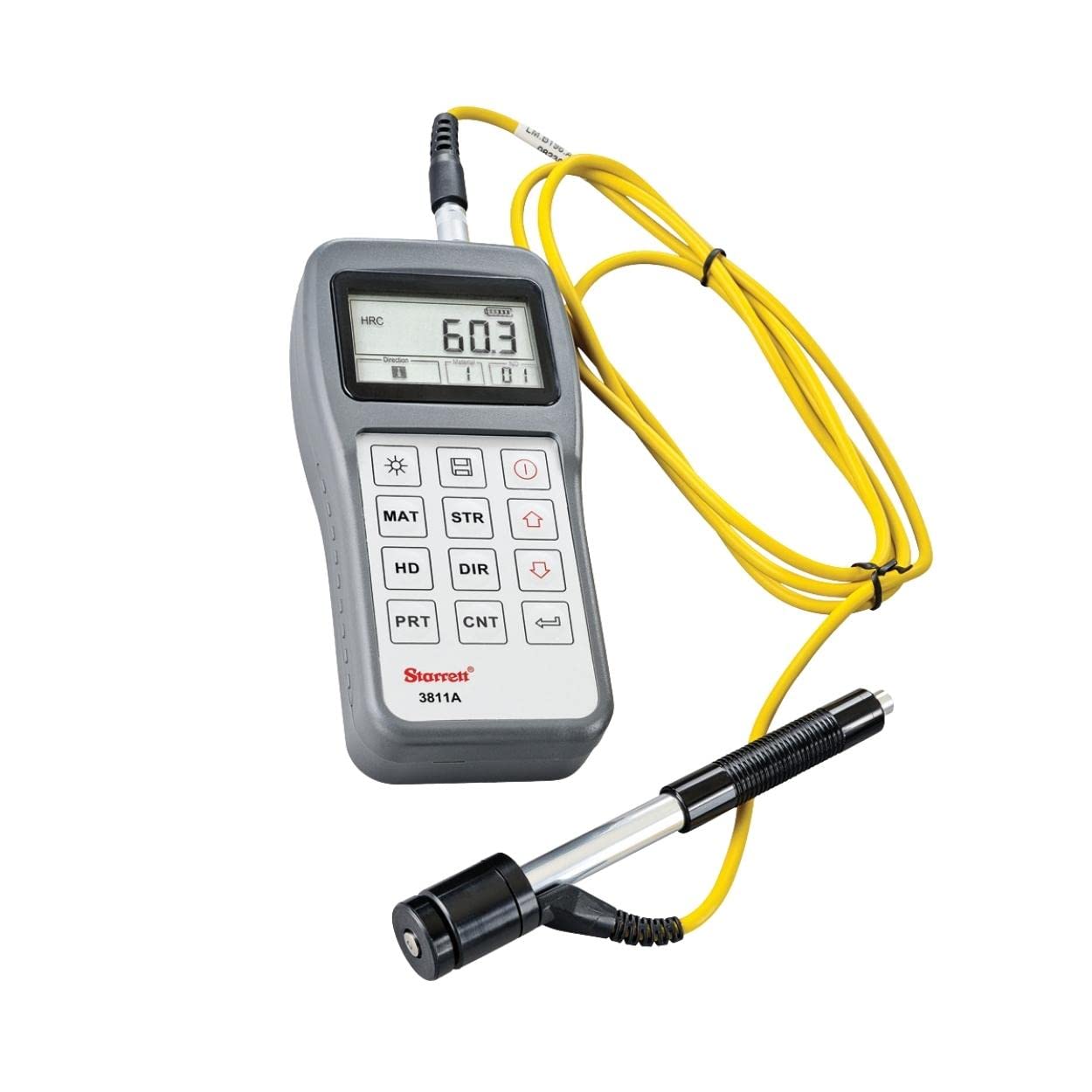
Figure 1: Starrett 3811A Portable Hardness Tester. This image shows the main unit with its digital display and control buttons, connected to the testing probe via a yellow cable.
2. Safety Information
Please read and understand all safety instructions before operating the Starrett 3811A Portable Hardness Tester. Failure to follow these instructions may result in injury or damage to the instrument.
- Always wear appropriate personal protective equipment (PPE) when performing hardness tests.
- Ensure the test piece is stable and securely positioned to prevent movement during testing.
- Do not attempt to test materials beyond the specified hardness range of the instrument.
- Keep the instrument and its components clean and free from debris.
- Avoid exposing the instrument to extreme temperatures, humidity, or corrosive environments.
- Only use accessories and replacement parts approved by Starrett.
- Refer to local safety regulations and guidelines for specific workplace requirements.
3. Package Contents
Upon unpacking, verify that all items listed below are present and in good condition. If any items are missing or damaged, contact your supplier immediately.

Figure 2: Starrett 3811A Portable Hardness Tester and accessories neatly organized within its protective carrying case. The image displays the main unit, testing probe, connection cables, and a calibration block.
- Starrett 3811A Main Unit
- Impact Device (Probe)
- Standard Test Block
- Cleaning Brush
- USB Cable
- Carrying Case
- Operating Manual (this document)
4. Product Features
- High Accuracy: Delivers precise hardness testing with an accuracy of +/- 0.5% and repeatability accuracy of +/- 4L units.
- Versatile Testing: Compatible with multiple hardness scales including Rockwell (HRC, HRB), Brinell (HB), Vickers (HV), and Shore (HS) for diverse applications.
- Fast & Efficient: Designed for rapid testing, making it ideal for various industrial and laboratory environments.
- Ample Memory: Equipped with sufficient storage to handle multiple test results, enhancing efficiency and record-keeping.
- Portable Design: Compact and digital, this hardness tester is suitable for on-site testing of large, hard metal parts.
- USB Output: Facilitates data transfer to a computer for analysis and reporting.
5. Setup
- Battery Installation: Open the battery compartment on the back of the main unit. Insert the required batteries, ensuring correct polarity. Close the compartment securely.
- Connect Impact Device: Connect the cable from the impact device (probe) to the designated port on the main unit. Ensure the connection is firm.
- Power On: Press the power button to turn on the instrument. The display should illuminate.
- Initial Settings: Navigate through the menu using the arrow keys to set the desired hardness scale (e.g., HRC, HB), material type, and impact direction if prompted. Refer to the display for current settings.
6. Operation
6.1 Preparing the Test Piece
- Ensure the surface of the test piece is clean, smooth, and free from scale, oil, or other contaminants.
- The test piece must have sufficient mass and thickness to prevent deformation during the test. Consult the specifications for minimum requirements.
- Position the test piece securely on a stable surface.
6.2 Performing a Hardness Test
- Select the appropriate hardness scale and material type using the instrument's controls.
- Place the impact device firmly and perpendicularly on the prepared surface of the test piece.
- Press the trigger button on the impact device or the corresponding button on the main unit to initiate the test. The impact body will strike the surface and rebound.
- The hardness value will be displayed on the main unit's screen.
- Repeat the test multiple times at different points on the test piece to obtain an average reading and ensure accuracy. Avoid testing too close to previous impact points.
6.3 Data Management
The Starrett 3811A features internal memory to store test results. Use the navigation buttons to review stored data. To transfer data to a computer, connect the instrument via the provided USB cable and follow the instructions for the accompanying software (if applicable, software details not provided in input).
7. Maintenance
- Cleaning: Regularly clean the main unit and impact device with a soft, dry cloth. Do not use abrasive cleaners or solvents.
- Impact Device Care: Use the provided cleaning brush to remove any debris from the impact device after use. Ensure the impact body moves freely.
- Storage: When not in use, store the instrument and its accessories in the protective carrying case in a dry, temperature-controlled environment.
- Battery Replacement: Replace batteries promptly when the low battery indicator appears to ensure accurate readings and prevent data loss.
8. Troubleshooting
| Problem | Possible Cause | Solution |
|---|---|---|
| Instrument does not power on. | Dead or incorrectly installed batteries. | Check battery polarity; replace with fresh batteries. |
| Inconsistent readings. | Unstable test piece; dirty impact device; incorrect material setting. | Ensure test piece is stable; clean impact device; verify material settings. |
| Error message on display. | Testing outside specified range; internal fault. | Refer to the specific error code in the full manual (if available); contact Starrett support if persistent. |
| Data transfer failure. | Loose USB connection; software issue. | Ensure USB cable is securely connected; restart instrument and computer; check software compatibility. |
9. Specifications
| Feature | Detail |
|---|---|
| Model Number | 3811A |
| Accuracy | +/- 0.5% |
| Repeatability Accuracy | +/- 4L units |
| Hardness Scales | Rockwell (HRC, HRB), Brinell (HB), Vickers (HV), Shore (HS) |
| Power Source | Battery Powered |
| Product Dimensions (L x W x H) | 15 x 12 x 4 inches |
| Item Weight | 10 Pounds |
| Connectivity | USB Output |
| Manufacturer | Starrett |
10. Warranty and Support
Starrett products are manufactured to high standards and are backed by a manufacturer's warranty. For specific warranty terms and conditions, please refer to the warranty card included with your product or visit the official Starrett website.
For technical support, service, or inquiries regarding your Starrett 3811A Portable Hardness Tester, please contact Starrett customer service or visit their official website: www.starrett.com.
Related documents3811A


Ask a question about this manual
Ask about setup, troubleshooting, compatibility, parts, safety, or missing instructions. Manuals+ will review the question and use this page’s manual context to help answer it.