
1. Introduction
The KAT KT2 is an advanced 5-piece electronic drum kit designed for players seeking a digital drumming experience with a wide range of features and high-quality sounds. This manual provides essential information for setting up, operating, and maintaining your KT2 drum kit.
The KT2 includes over 450 studio-grade drum, cymbal, and percussion sounds, along with 80 play-along tracks and 45 drum sets (30 preset and 15 user-programmable) to accommodate various musical styles. It also features two additional trigger inputs for expanding your setup with an extra drum pad or cymbal. The USB Sound Module offers versatile connectivity options, including 1/4-inch stereo output jacks, an input jack for external audio devices, and MIDI and USB ports for digital recording or playback.
2. What's in the Box
Your KAT Percussion KT2 5-Piece Advanced Electronic Drum Kit package includes the following components:
- KT2 Sound Module
- Snare Pad
- Tom Pads (3 pieces)
- Kick Pad (Note: Kick pedal is not included with this specific kit variant)
- Hi-Hat Cymbal Pad
- Crash Cymbal Pad
- Ride Cymbal Pad
- Drum Rack/Frame
- Cables and Power Supply
- Drumsticks (2 pieces)

Figure 2.1: Complete KAT Percussion KT2 5-Piece Advanced Electronic Drum Kit setup. Note that the kick pedal shown in this image is not included with the KT2-US kit variant.
3. Setup Instructions
Follow these general steps to assemble and set up your KT2 electronic drum kit. Refer to the detailed assembly diagrams in the included printed manual for specific component placement.
- Unpack Components: Carefully remove all components from the packaging and verify against the "What's in the Box" list.
- Assemble the Drum Rack: Connect the frame components to form the main drum rack structure. Ensure all clamps and fasteners are securely tightened.
- Attach Drum Pads and Cymbals: Mount the drum pads (snare, tom 1, tom 2, tom 3, kick pad) and cymbal pads (hi-hat, crash, ride) to the rack using the provided arms and clamps. Adjust their positions for comfortable playing.
- Connect the Sound Module: Securely attach the KT2 sound module to the drum rack.
- Connect Cables: Use the included multi-cable snake or individual cables to connect each drum pad and cymbal pad to the corresponding input on the sound module. Ensure connections are firm.
- Power Connection: Connect the power adapter to the sound module and then to a suitable power outlet.
- Audio Output: Connect headphones to the headphone jack for private practice, or connect the 1/4-inch stereo output jacks to an amplifier or PA system for external sound.

Figure 3.1: The KAT Percussion KT2 Electronic Drum Kit fully assembled, showing various pads and cymbals.

Figure 3.2: Detailed view of a cymbal pad connection, illustrating proper cable attachment.

Figure 3.3: Detail of a drum rack clamp, showing how components are secured to the frame.
4. Operating Instructions
This section covers the basic operation of your KT2 sound module.
4.1 Powering On/Off
- To power on, press the POWER button on the sound module.
- To power off, press and hold the POWER button until the unit shuts down.
4.2 Selecting Drum Kits
The KT2 features 45 drum sets (30 preset and 15 user-programmable). Use the KIT buttons or the main dial to navigate and select different drum kits.
4.3 Adjusting Volume
Adjust the master volume using the dedicated volume knob on the sound module. Individual pad volumes can often be adjusted within the kit settings.
4.4 Play-Along Tracks
The module includes 80 play-along tracks. Select a track and press PLAY to start. You can adjust the tempo and volume of the track independently.
4.5 Recording and Playback
The KT2 allows you to record your performances. Consult the full manual for detailed instructions on how to initiate recording, save your tracks, and play them back.
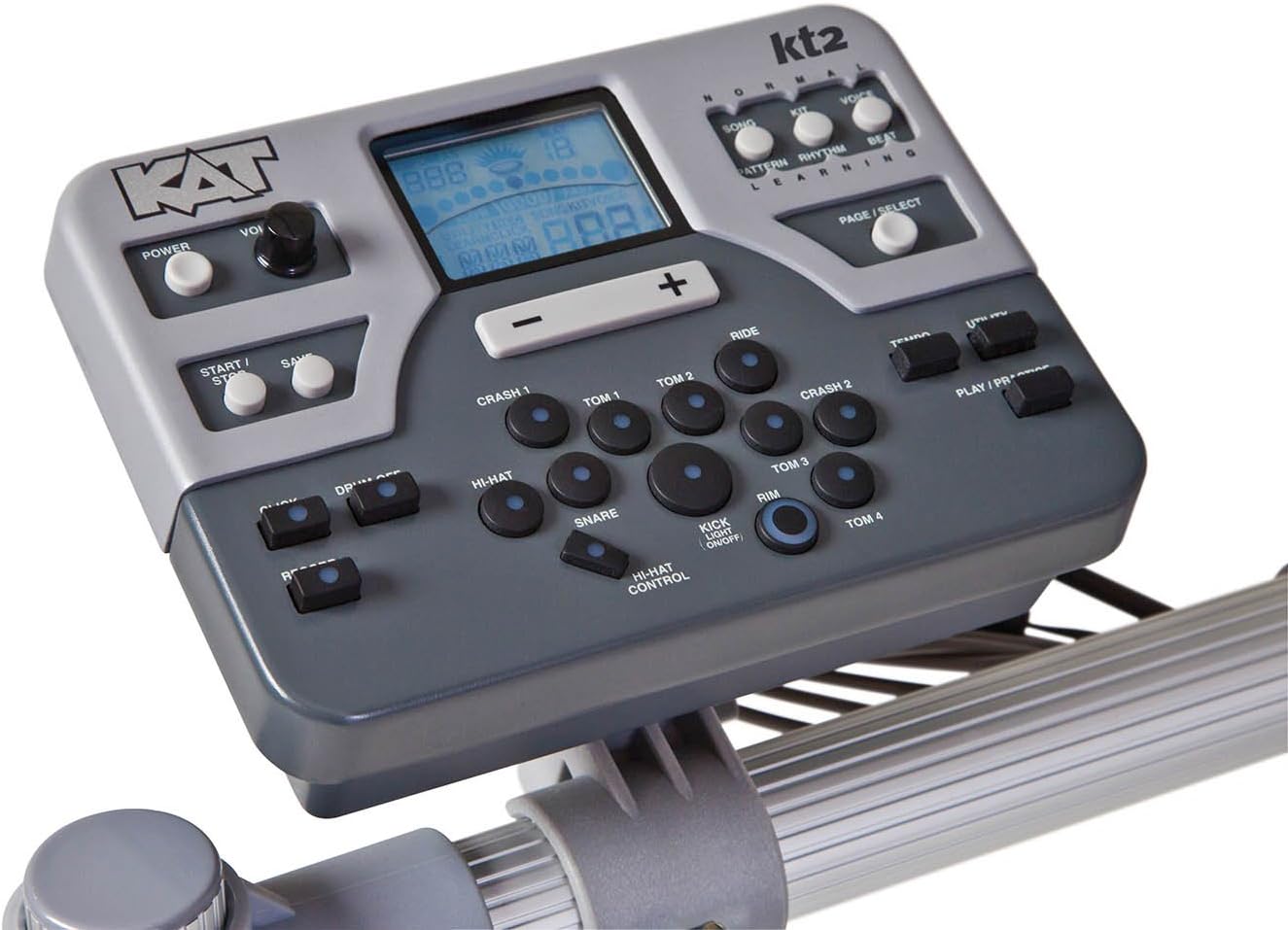
Figure 4.1: The KT2 Sound Module with controls for kit selection, volume, and recording.
5. Connectivity
The KT2 offers various connectivity options for integration with other audio equipment and computers:
- Headphone Jack: For private practice.
- 1/4-inch Stereo Output Jacks: Connect to an amplifier, mixer, or PA system.
- Input Jack: Connect an external audio device like an iPad or MP3 player to play along with your favorite music.
- MIDI Ports: For connecting to MIDI-compatible devices.
- USB Port: For digital recording or playback with a computer.
- Additional Trigger Inputs: Two extra inputs are available for expanding your kit with additional drum pads or cymbals.
6. Maintenance
Proper maintenance ensures the longevity and optimal performance of your electronic drum kit.
- Cleaning: Use a soft, dry cloth to wipe down the pads, module, and frame. Avoid abrasive cleaners or solvents.
- Cable Management: Ensure all cables are neatly routed and not under tension to prevent damage.
- Storage: When not in use for extended periods, store the kit in a dry, temperature-controlled environment away from direct sunlight.
- Pad Care: While durable, avoid excessive force when striking pads. Regularly check for any signs of wear.
7. Troubleshooting
If you encounter issues with your KT2 kit, try the following basic troubleshooting steps:
- No Sound:
- Check all cable connections to the sound module and audio output device (headphones/amplifier).
- Ensure the volume knob on the module and any connected amplifier is turned up.
- Verify the power adapter is securely connected and the unit is powered on.
- Inconsistent Triggering:
- Check the cable connection for the specific pad or cymbal.
- Ensure the pad is securely mounted and not loose.
- Consult the full manual for instructions on adjusting trigger sensitivity settings on the sound module.
- Module Not Responding:
- Power off the module, wait 10 seconds, and power it back on.
- Ensure the power adapter is functioning correctly.
For more advanced troubleshooting or issues not resolved by these steps, please refer to the complete user manual or contact KAT Percussion customer support.
8. Specifications
| Feature | Detail |
|---|---|
| Model Name | KT2-US |
| Drum Set Piece Quantity | 5 (referring to drum pads: snare, 3 toms, kick) |
| Sounds | Over 450 studio-grade drum, cymbal, and percussion sounds |
| Drum Kits | 45 (30 preset, 15 user-programmable) |
| Play-Along Tracks | 80 |
| Connectivity | 1/4-inch Stereo Output, Input Jack (for MP3/iPad), MIDI In/Out, USB Port, 2 Additional Trigger Inputs |
| Body Material | Rubber (pads), Plastic, Metal (frame) |
| Color | White (pads), Grey/Silver (cymbals/frame) |
| Item Weight | 44.3 Pounds |
| Product Dimensions (L x W x H) | 44.75 x 20 x 12.5 inches |
| Manufacturer | Hal Leonard Music Accessories |
| UPC | 736021344600 |
9. Warranty and Support
For information regarding warranty coverage, product registration, or technical support, please refer to the warranty card included with your product or visit the official KAT Percussion website. Keep your purchase receipt as proof of purchase for any warranty claims.