
1. Introduction
Thank you for choosing the Jacques Lemans 1-1708C Sports Madrid Dual Time watch. This timepiece combines classic analog display with modern digital functions, offering precision and versatility. This manual provides detailed instructions for setup, operation, and maintenance to ensure optimal performance and longevity of your watch.
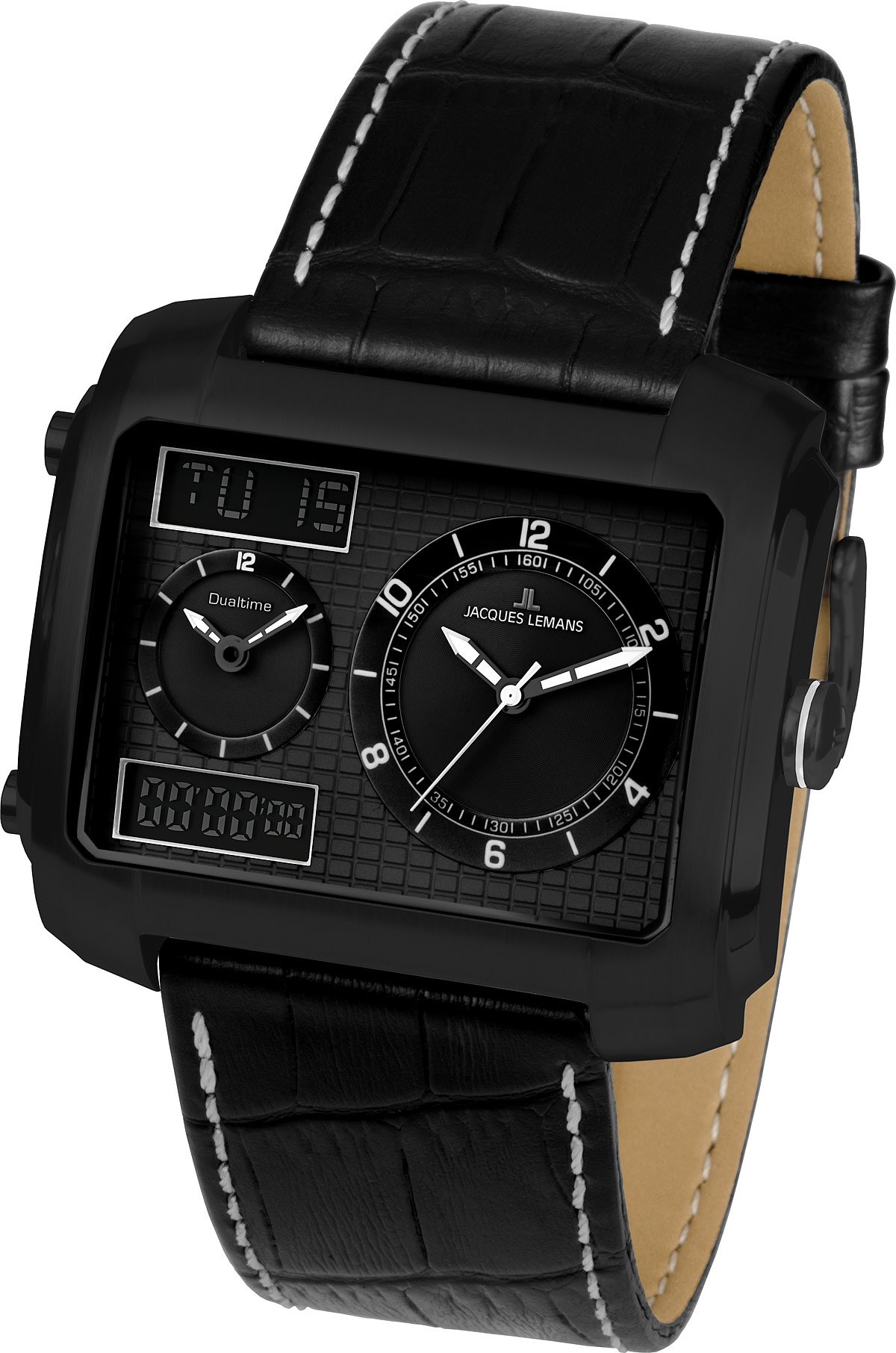
Image: Jacques Lemans 1-1708C Sports Madrid Dual Time Watch. This image displays the watch's square black dial, black leather strap, and the combination of analog and digital displays. The luminous hands are visible, indicating its dual-time functionality.
2. Safety Information
- Water Resistance: This watch is water-resistant up to 50 meters (5 ATM). It is suitable for short periods of recreational swimming but not for diving or snorkeling. Do not operate buttons underwater.
- Temperature: Avoid exposing the watch to extreme temperatures (above 60°C / 140°F or below 0°C / 32°F) or sudden temperature changes.
- Chemicals: Keep the watch away from solvents, detergents, perfumes, and cosmetics, as they may damage the case, strap, or gaskets.
- Impact: Protect the watch from strong impacts and shocks.
- Magnetic Fields: Avoid placing the watch near strong magnetic fields, as this may affect the accuracy of the quartz movement.
3. Setup
3.1 Initial Battery Activation
Your watch comes with a pre-installed LR44 battery. If the watch is not running, gently pull out the crown (the small knob on the side) to activate the battery and stop the movement for shipping. Push it back in to start the watch.
3.2 Setting Analog Time
- Pull the crown out to the first or second click position (refer to your specific model's crown positions for time setting).
- Turn the crown clockwise or counter-clockwise to set the hour and minute hands to the correct time.
- Once set, push the crown back into its normal position.
3.3 Setting Digital Time and Date
The digital display features time, date, and chronometer functions. Specific button operations may vary slightly. Generally, there are pushers on the side of the watch to cycle through modes and adjust settings.
- Mode Button: Press to cycle through digital display modes (Time, Date, Chronometer).
- Adjust Button: Hold to enter setting mode for the current display. Press repeatedly to change values.
- Light Button: Activates the backlight for the digital display.
Refer to the detailed diagrams in the full printed manual for precise button identification and setting procedures.
4. Operating Instructions
4.1 Reading Dual Time
Your watch features both analog and digital time displays. The analog hands typically show the primary time zone, while the digital display can be set to a second time zone or used for other functions.
4.2 Using the Chronometer (Stopwatch)
To use the chronometer function:
- Press the Mode button until the chronometer display appears (usually showing "00:00:00").
- Press the Start/Stop button (often the top right pusher) to begin timing.
- Press the Start/Stop button again to pause or stop the timing.
- Press the Reset button (often the bottom right pusher) to clear the chronometer to zero.
4.3 Luminous Hands
The analog hands are treated with a luminous material. After exposure to light, they will glow in the dark, allowing for time reading in low-light conditions.
5. Maintenance
5.1 Cleaning
- Wipe the watch case and mineral crystal with a soft, dry cloth.
- For the leather strap, avoid excessive moisture. Clean with a damp cloth and mild soap if necessary, then dry thoroughly. Condition periodically with a leather conditioner.
5.2 Water Resistance
The 50-meter water resistance rating means the watch is protected against splashes, rain, and brief immersion in water. It is not designed for prolonged underwater activities. Ensure the crown is fully pushed in before any contact with water. Water resistance is not a permanent condition and may decrease over time due to wear on gaskets.
5.3 Battery Replacement
When the watch stops or the digital display fades, it's time to replace the LR44 battery. Battery replacement should ideally be performed by a qualified watch technician to ensure proper sealing and maintain water resistance.
6. Troubleshooting
| Problem | Possible Cause | Solution |
|---|---|---|
| Analog hands not moving. | Battery depleted or crown pulled out. | Push crown in fully. If still not working, replace battery. |
| Digital display is blank or dim. | Battery depleted. | Replace battery. |
| Watch gains or loses time. | Exposure to strong magnetic fields or extreme temperatures. | Keep away from magnetic sources. If problem persists, consult a technician. |
| Water inside the watch. | Crown not fully pushed in, or water resistance seals compromised. | Immediately take to a watch technician for inspection and repair to prevent further damage. |
7. Specifications
| Feature | Detail |
|---|---|
| Model Name | 1-1708C |
| Model Number | Sports Madrid Dual Time |
| Movement Type | Quartz |
| Display Type | Analog-Digital |
| Case Material | Stainless Steel |
| Dial Window Material | Mineral |
| Case Shape | Square |
| Case Diameter | 46 Millimeters |
| Case Thickness | 15 Millimeters |
| Band Material | Leather |
| Band Width | 28 Millimeters |
| Clasp Type | Buckle (Pin Buckle) |
| Water Resistance Depth | 50 Meters (5 ATM) |
| Special Features | Luminous Hands, Chronometer |
| Battery Type | 1 x LR44 (included) |
| Item Weight | 92 Grams |
| Product Dimensions | 11.2 x 11.2 x 7.5 cm (packaging) |
8. Warranty & Support
Jacques Lemans watches typically come with a manufacturer's warranty covering defects in materials and workmanship. Please refer to the warranty card included with your purchase for specific terms, conditions, and duration of coverage.
For technical support, service, or warranty claims, please contact your authorized Jacques Lemans dealer or visit the official Jacques Lemans website for contact information and service center locations.
Online Resources: www.jacques-lemans.com


