1. Product Overview
The Power Acoustik PDR-780 is a single DIN digital media receiver featuring a motorized flip-up 7-inch LCD touchscreen. This unit is designed to provide comprehensive multimedia entertainment and control in your vehicle. It supports various audio, video, and picture file formats from SD cards and USB flash drives, and includes an integrated AM/FM tuner.
Key Features:
- Motorized telescoping and angle adjustment for the 7-inch LCD touchscreen.
- Detachable theft deterrent front panel for security.
- Playback from up to 32GB SD/MMC card or USB drive.
- Supports 720p HD video playback of MP4, DIVX, AVI, and more.
- Audio playback of MP3, AAC, AC3, and WMA formats.
- Digital signal processing with a 2-band equalizer, 7 factory presets, and custom preset options.
- Programmable FM/AM receiver with 18 FM and 12 AM station memory.
- Low-level RCA audio outputs for connecting external amplifiers.
- 800x480 HD Resolution display.
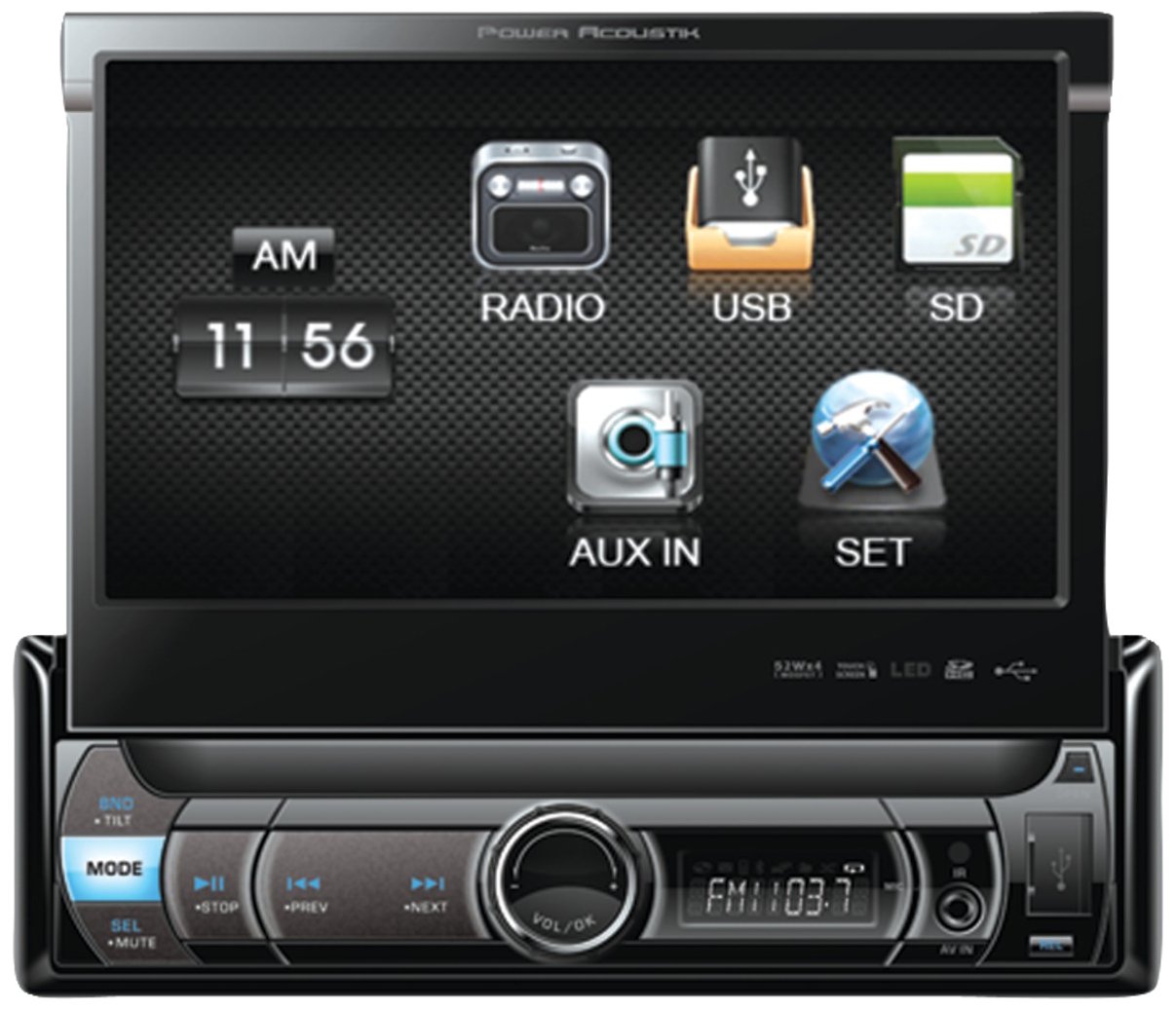
Figure 1: Front view of the Power Acoustik PDR-780 multimedia receiver with its 7-inch motorized flip-up LCD touchscreen extended.
2. Setup and Installation
Proper installation is crucial for optimal performance and safety. It is recommended that installation be performed by a qualified professional. Always disconnect the vehicle's battery before beginning any electrical work.
2.1 Mounting the Unit
- Carefully remove the existing car stereo from the dashboard.
- Insert the PDR-780 into the single DIN opening. Ensure it fits securely.
- Secure the unit using the provided mounting hardware (screws, brackets) to prevent movement.
2.2 Wiring Connections
Refer to your vehicle's wiring diagram and the PDR-780's wiring harness for specific connections. Common connections include:
- Power (Yellow): Constant 12V supply.
- Accessory (Red): Switched 12V supply (ignition).
- Ground (Black): Connect to a clean chassis ground point.
- Speaker Outputs (Colored pairs): Connect to vehicle speakers (e.g., White/White-Black for front left, Gray/Gray-Black for front right, etc.).
- Antenna (Blue): Power antenna or amplifier remote turn-on.
- RCA Outputs: For connecting external amplifiers (Front, Rear, Subwoofer).
- Parking Brake (Light Green): Connect to the parking brake switch for video playback safety.
Important: Incorrect wiring can damage the unit or your vehicle's electrical system. Double-check all connections before restoring power.
3. Operating Instructions
3.1 Power On/Off and Screen Operation
- Power On: Press the POWER button or turn the vehicle's ignition to ACC or ON. The screen will automatically extend.
- Power Off: Press and hold the POWER button. The screen will retract before the unit powers down.
- Screen Angle Adjustment: Use the ANGLE UP/DOWN buttons on the front panel or touchscreen controls to adjust the viewing angle of the LCD.
- Touchscreen: Navigate menus and control functions by touching the icons and options displayed on the 7-inch LCD.
3.2 Media Playback (USB/SD)
- Insert a USB flash drive into the USB port or an SD card into the SD card slot.
- The unit will automatically detect the media and display the media browser. If not, select the "USB" or "SD" source from the main menu.
- Browse folders and select audio, video, or picture files for playback.
- Use the on-screen controls for Play/Pause, Skip, Fast Forward/Rewind.
3.3 Radio Operation (AM/FM)
- Select the "Radio" source from the main menu.
- Band Selection: Tap the "BAND" button to switch between FM1, FM2, FM3, and AM bands.
- Auto Seek: Press and hold the "SEEK" buttons to automatically scan for the next strong station.
- Manual Tune: Briefly press the "SEEK" buttons to fine-tune the frequency.
- Preset Stations: To save a station, tune to the desired frequency, then press and hold one of the preset number buttons (1-6) on the touchscreen until you hear a beep. To recall a preset, simply tap the corresponding number button.
3.4 Audio Settings (Equalizer)
- Access the "Audio" or "Sound" settings from the main menu.
- Select "Equalizer" to adjust audio frequencies.
- Choose from 7 factory presets (e.g., Pop, Rock, Classic) or select "Custom" to manually adjust the 2-band equalizer.
- Adjust bass and treble levels to your preference.
4. Maintenance
4.1 Cleaning the Unit
- Screen: Use a soft, lint-free cloth (e.g., microfiber) to gently wipe the LCD touchscreen. For stubborn smudges, slightly dampen the cloth with water or a screen-safe cleaning solution. Do not spray liquid directly onto the screen.
- Front Panel: Wipe the detachable front panel with a dry, soft cloth. Avoid abrasive cleaners or solvents.
- Ports: Keep USB and SD card slots free of dust and debris. Use compressed air if necessary.
4.2 General Care
- Avoid exposing the unit to extreme temperatures, direct sunlight for prolonged periods, or high humidity.
- Ensure proper ventilation around the unit to prevent overheating.
- Always retract the screen and detach the front panel when leaving the vehicle unattended for security.
5. Troubleshooting
If you encounter issues with your PDR-780, refer to the following common problems and solutions before contacting support.
| Problem | Possible Cause | Solution |
|---|---|---|
| No power to the unit. | Incorrect wiring; Blown fuse; Vehicle battery disconnected. | Check power and ground connections. Inspect the fuse on the unit's wiring harness and in the vehicle's fuse box. Ensure the vehicle battery is connected. |
| No sound from speakers. | Speaker wires disconnected; Volume too low; Mute function active; Incorrect audio source. | Verify speaker connections. Increase volume. Check if the unit is muted. Select the correct audio source. |
| Screen does not extend or retract. | Motor obstruction; Power issue; Unit malfunction. | Ensure no objects are blocking the screen's path. Check power supply. If the issue persists, contact support. |
| USB/SD media not playing. | Unsupported file format; Corrupted media; Incorrectly inserted media. | Ensure files are in supported formats (MP3, WAV, MP4, DivX, AVI). Try a different USB/SD card. Reinsert the media correctly. |
| Poor radio reception. | Antenna not connected; Damaged antenna; Weak signal area. | Check antenna connection. Inspect antenna for damage. Try tuning to a different station or moving to an area with better signal. |
6. Specifications
| Feature | Detail |
|---|---|
| Brand | Power Acoustik |
| Model | PDR-780 |
| Product Dimensions | 29.21 x 12.07 x 22.86 cm |
| Item Weight | 794 g |
| Tuner Technology | AM, FM |
| Compatible Devices | Speaker |
| Special Features | Equalizer |
| Standing Screen Display Size | 7 inches |
| Audio Output Type | Speakers |
| Audio Wattage | 52 Watts x 4 (MOSFET Powered Speaker Level Outputs) |
| Connector Type | USB, RCA |
| Media Format Support | AVI, MP3 Audio, WAV, WMA, MP4, DivX, JPG |
| Display Resolution | 800x480 HD |
| Max Storage Capacity | 32GB (SD card or USB drive) |
7. Warranty and Support
7.1 Product Warranty
This Power Acoustik PDR-780 unit comes with a 1 Year Warranty from the date of purchase. This warranty covers manufacturing defects and faulty workmanship under normal use. It does not cover damage caused by improper installation, accident, misuse, abuse, neglect, unauthorized modification, or normal wear and tear. Please retain your proof of purchase for warranty claims.
7.2 Customer Support
For technical assistance, troubleshooting beyond this manual, or warranty service, please contact Power Acoustik customer support. Refer to the official Power Acoustik website or your purchase documentation for the most current contact information (phone numbers, email, or support portal).
Note: Do not attempt to repair the unit yourself, as this may void your warranty.


