
1. Overview
The Bovee Tune2Air WMA1000 is a wireless music interface adapter designed to bring Bluetooth audio streaming to vehicles equipped with a 30-pin iPod connector. This device allows you to stream music wirelessly from your smartphone or other Bluetooth-enabled devices to your car's audio system, utilizing existing iPod integration.
It supports Airplay and A2DP Bluetooth, enabling seamless audio playback. Depending on your car's display capabilities, the adapter can also read and display your entire iPod library from your iPhone, iPad, or iPod touch directly on the car's screen.

Image: Bovee Tune2Air WMA1000 adapter integrated into a car's media system, showing music display and steering wheel controls.
2. Setup and Installation
The Bovee Tune2Air WMA1000 is designed for plug-and-play installation, requiring no complex wiring. Simply connect it to your car's existing 30-pin iPod installation cable.
- Locate your car's 30-pin iPod connector, typically found in the glove compartment, center console, or armrest.
- Plug the Bovee Tune2Air WMA1000 adapter directly into the 30-pin connector.
- Ensure your car's stereo is set to the correct input source (e.g., AUX, iPod, Media Interface, or MDI) to recognize the adapter. Refer to your car's manual for specific instructions on selecting the input source.
- On your mobile device, enable Bluetooth and search for available devices. Select 'Tune2Air' or 'Bovee' from the list to pair. The pairing code is typically '0000' if prompted.
- Once paired, the adapter's indicator light will show a steady blue light, indicating a successful connection.

Image: The Bovee Tune2Air WMA1000 adapter connected to a car's 30-pin iPod interface.

Image: Detailed view of the Bovee Tune2Air WMA1000 adapter.
Installation Video
Video: Demonstrates the installation process of a Bluetooth 5.0 aptX-HD Car Adapter for Audi, which is similar to the Bovee Tune2Air WMA1000.
3. Operating Instructions
Once the Bovee Tune2Air WMA1000 is successfully installed and paired with your device, you can begin streaming music and control playback through your car's audio system.
- Automatic Connection: The adapter is designed to automatically reconnect to your paired device when you start your car, provided Bluetooth is enabled on your device.
- Music Playback: Play music from any audio app on your paired device (e.g., Spotify, Apple Music, Pandora). The audio will be transmitted wirelessly to your car's speakers.
- Display and Controls: The adapter allows your car's display to show your iPod library (from iPhone, iPad, or iPod touch). You can typically use your car's steering wheel controls or media interface controls to skip tracks, adjust volume, and browse your music library.
- Phone Calls: While the Bovee Tune2Air WMA1000 is primarily for music streaming, it generally works in conjunction with your car's existing phone system. If a call comes in, music streaming will pause, and the call will route through your car's hands-free system. Music playback resumes once the call ends.
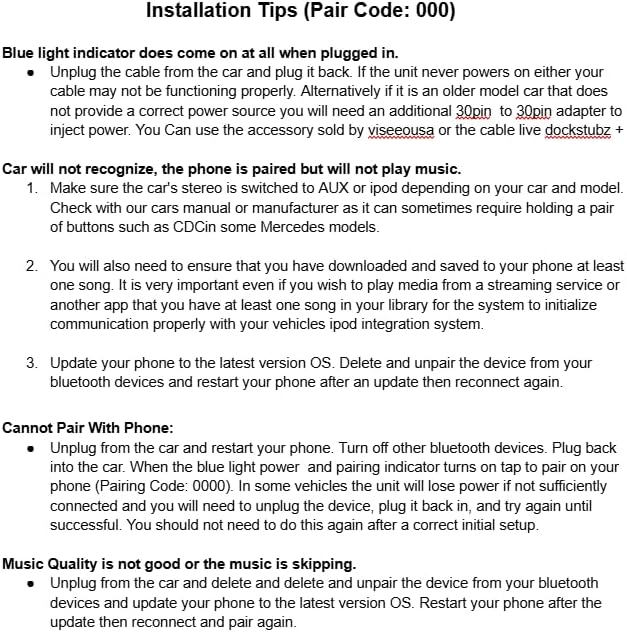
Image: Car's media display showing music information, indicating successful integration with the Bovee adapter.
4. Compatibility
The Bovee Tune2Air WMA1000 is compatible with a range of vehicles and devices, specifically those with a 30-pin iPod connector as part of their original or aftermarket iPod integration system.
- Vehicle Compatibility:
- Audi AMI (Audi Music Interface) systems, including Audi 3G AMI (e.g., part 4F0051510AG).
- Mercedes Media Interface (typically 2011 and earlier models).
- Volkswagen MDI (Media Device Interface).
- Mini-Cooper/BMW vehicles with iPod integration.
- Other vehicles featuring an iPod integration system with a 30-pin connector.
- Important Notes:
- A 30-pin car interface cable is required and is not included with the adapter.
- Not compatible with USB-only iPod cables.
- Audi pre-2009 2G AMI/MMI systems may require a separately purchased 30-pin external power injector for proper function.
- To confirm compatibility, try playing music from an iPod or iPhone directly through your car's existing iPod integration system first.
- Works with the newest car models and latest phone versions.
5. Troubleshooting
If you encounter issues with your Bovee Tune2Air WMA1000 adapter, refer to the following troubleshooting tips:

Image: Installation and Troubleshooting Guidelines for the Bovee Tune2Air WMA1000.
Common Issues and Solutions:
- Cannot Power On:
- Ensure the adapter and speaker base (if applicable) are powered on.
- Unplug the adapter from the car and plug it back in. If the unit never powers on, the cable may not be functioning properly.
- Older car models might require an additional 30-pin to 30-pin adapter to inject power.
- Car Will Not Recognize, Phone is Paired but Will Not Play Music:
- Make sure the car's stereo is switched to AUX or iPod mode. Some Mercedes models may require holding a pair of buttons.
- Ensure you have at least one song downloaded and saved to your phone. This helps the iPod integration system communicate properly.
- Update your phone to the latest OS. Delete and unpair the device from your Bluetooth settings, restart your phone, and then reconnect.
- Cannot Pair With Phone:
- Unplug the adapter from the car and restart your phone. Turn off other Bluetooth devices.
- Plug the adapter back into the car. When the blue light power and pairing indicator turns on, tap to pair on your phone (Pairing Code: 0000). If the unit loses power or is not sufficiently connected, unplug, plug back in, and try again. This should not be needed after initial setup.
- Music Quality is Not Good or Music is Skipping:
- Unplug the adapter from the car and delete/unpair the device from your Bluetooth settings.
- Update your phone to the latest OS. Restart your phone, then reconnect and pair again.
- No Audio Output Even When Both Phone and Speaker Volumes are Maximum:
- Ensure the speaker dock input source is selected to the iPod channel.
- Alternatively, connect an AUX cable from the adapter to the speaker dock's AUX channel, then switch the speaker's input to AUX.
- Volume is Still Too Low Even at Max Display Volume:
- Adjust the volume key on the dock itself to set a proper volume level.
Troubleshooting Video
Video: Provides a detailed troubleshooting guide for common issues with 30-pin Bluetooth receivers, including power, connection, and sound problems.
6. Maintenance
To ensure the longevity and optimal performance of your Bovee Tune2Air WMA1000 adapter, follow these simple maintenance guidelines:
- Cleaning: Use a soft, dry cloth to gently wipe the adapter. Avoid using liquid cleaners or abrasive materials, as these can damage the device.
- Storage: When not in use for extended periods, store the adapter in a cool, dry place away from direct sunlight and extreme temperatures.
- Handling: Handle the adapter with care. Avoid dropping it or subjecting it to strong impacts, which could damage internal components.
- Connection Ports: Keep the 30-pin connector free from dust and debris. Periodically inspect the connector for any signs of damage.
7. Specifications
| Feature | Specification |
|---|---|
| Product Dimensions | 1.5 x 1.5 x 0.3 inches |
| Item Weight | 0.8 ounces |
| Connectivity Technology | Bluetooth |
| Power Source | Corded Electric (via 30-pin connector) |
| Material | Plastic |
| Special Feature | Automatic Connected |
| Manufacturer | Bovee |
8. Warranty and Support
For warranty information or technical support regarding your Bovee Tune2Air WMA1000 Wireless Music Interface Adapter, please contact the manufacturer directly. Keep your purchase receipt as proof of purchase for any warranty claims.
Safety Information: This device may interfere with other wireless devices. Do not dispose of the battery (if applicable) in regular trash; follow local regulations for battery disposal.